

August 2026
Database Optimizer 2.0, Savings Report GA, and GCP Reservations
The Database Optimizer is relaunched as version 2.0, reorganized around the database instance so caching, connection pooling, and the Performance Advisor sit in one place instead of three. The Savings Report is generally available and now covers clusters that run only Workload Autoscaler. GCP reservations can be used to guarantee Compute Engine capacity, with the autoscaler provisioning into them on GKE.
Also this month: Identity and access activity in the Event Log, a Pending Pod alert under a new Node Autoscaler notification category, a rebuilt Live Migration dashboard, custom CA certificates for nodes behind an intercepting proxy, and an Evictor setting that lets it bin-pack past protection labels.
To take full advantage of all features in this release, update your Cast AI umbrella Helm chart to the latest version. You can upgrade by running:
helm repo update castai-helm
helm upgrade -n castai-agent castai-agent castai-helm/castai --reset-then-reuse-values
If you manage Cast AI through Terraform, update the provider to the latest version.
Major Features and Improvements
Savings Report
The Savings Report is generally available. It answers one question: how much has Cast AI saved you, and how. It compares what you are paying today with a modeled estimate of what you would pay without Cast AI.
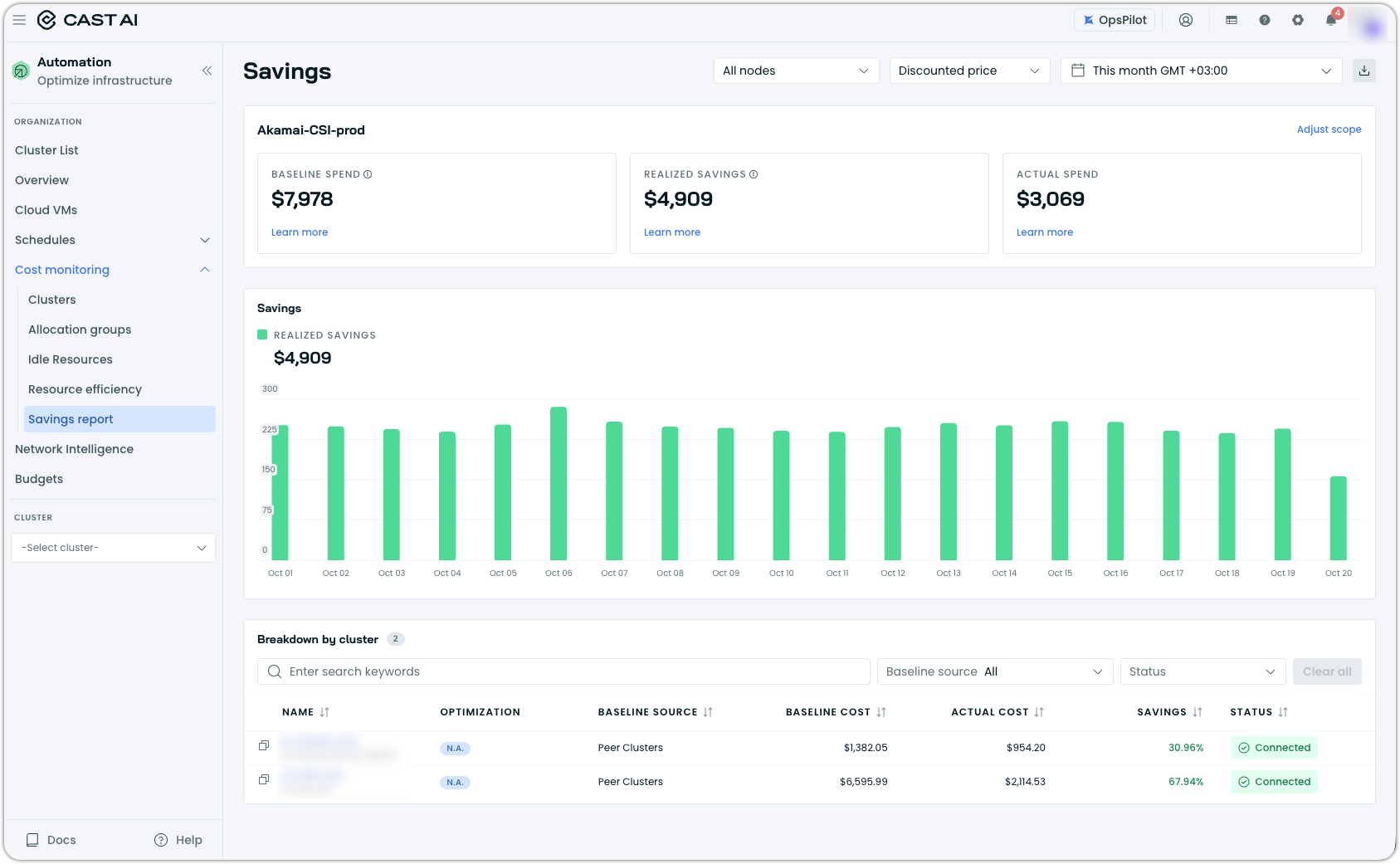
The report now also works for clusters that run only Workload Autoscaler. Previously, a cluster without Node Autoscaler had no baseline to compare against, so the report showed an empty state even though Workload Autoscaler was producing real savings.
See the Savings Report documentation.
GCP Reservations
You can guarantee Compute Engine VM availability using GCP On-Demand reservations. Both consumption types are supported, automatic and targeted, along with all three project sharing types: single-project, shared, and organization.
Reservations are synced from your project and tracked like any other commitment, so utilization appears alongside your other coverage, and Node Autoscaler provisions them when scaling GKE clusters.
See the GCP reservations documentation.
Database Optimization
Database Optimizer 2.0
The Database Optimizer is now in production as version 2.0. New Database Optimizer customers start on it, and existing deployments are being migrated individually by Cast.
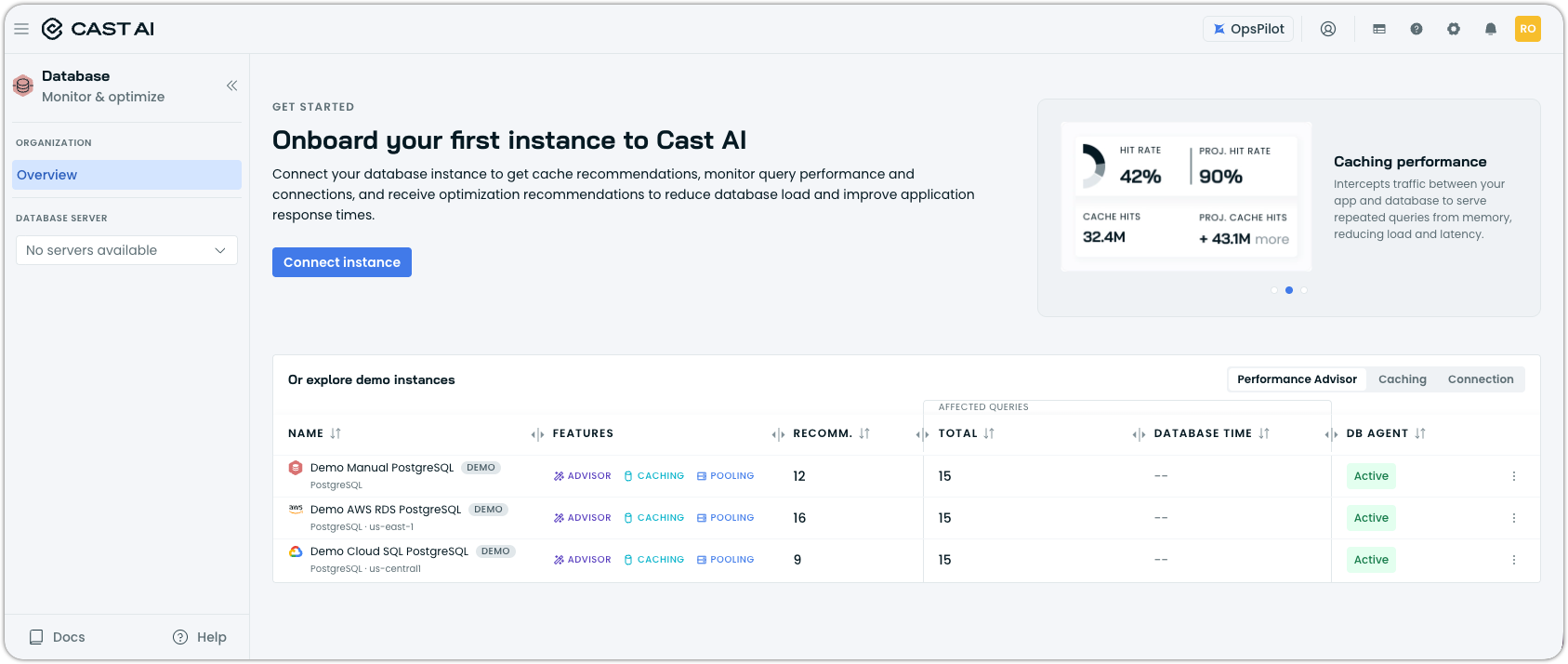
Until now, the product was organized around the caching proxy, with each capability in its own view. Answering a simple question about a single database meant stitching together separate screens that did not refer to one another. Version 2.0 reorganizes everything around the database instance. Caching, connection pooling, and the Performance Advisor appear together for each instance, whichever of them you have deployed.
See the Database Optimizer documentation or check out the new dedicated product website for DBO.
Workload Optimization
Choose Whether a Generated Scaling Policy Is Active
When OpsPilot generates scaling policies for Workload Autoscaler, you choose whether optimization is enabled during their creation, rather than having the policies applied and enabled in a single step. This lets you generate policies against a production cluster and review the recommendations they would produce before anything is acted on.
Annotations Preserved on Ownership Takeover
When the Workload Autoscaler takes ownership of a resource type it has just started supporting, such as an HPA object, annotations on that resource are now preserved by default. Stripping is now opt-in rather than opt-out.
Horizontal Scaling with Converted HPA Targets
When the HPA converter replaces a percentage target with an average value derived from the original requests, a workload that uses far less than it requested could end up pinned at its minimum replica count: the recommendation drops low enough that per-replica usage would never reach the average value that triggers a scale-out. Recommendations are now adjusted against that average value, so the workload keeps room to scale horizontally while still coming down from its original requests.
Constraints for Custom Workloads and Injected Containers
Percentage-based minimum and maximum resource constraints now work for custom workloads and injected containers, using the original requests from the controller manifest as the reference point, the same basis used for every other workload type.
Other Workload Optimization Improvements
Several smaller changes across Workload Autoscaler:
- The HPA converter can be configured through Terraform.
- Searching the fields in an assignment rule matches on a substring rather than requiring the whole value.
- The workload ID can be copied from the workload page.
- Installing Workload Autoscaler exporter chart no longer intermittently fails when its custom resource definition is not yet established.
Node Autoscaling
Evictor Configuration
Three changes to how Evictor is configured:
The advanced configuration accepts a forceDisposable setting, which causes Evictor to ignore the safe-to-evict and removal-disabled labels on workloads and bin-pack as tightly as possible. This mirrors what aggressive mode does for the Rebalancer and is useful on clusters that are not running Node Autoscaler. It is meant to be switched on temporarily rather than left on:
evictionConfig:
  - podSelector: {}
    settings:
      forceDisposable:
        enabled: true
Configuration changes made via the API now propagate to the running Evictor in the cluster without restarting it.
The Evictor configuration page in the console matches the Evictor policy API. The maximum target node count moved out of cluster settings and into the Evictor policy, and three settings that existed only in the API are now editable in the console:
-
back-off interval after a failed pod eviction
-
Karpenter node cleanup
-
soft tainting
Node Configuration Respected During Scaling and Drain
Node Autoscaler accounts for more of what your node configuration says:
- Hard eviction thresholds are subtracted when calculating a node's allocatable resources, along with the system and Kubernetes reservations already accounted for. Ignoring them made allocatable capacity look larger than it was.
- The empty and evicted worker node policies use the node configuration's drain timeout instead of a fixed 2 minutes, which matters when a drain has to wait on an external hook.
- A node is treated as ready only once the not-ready taint has been removed, not as soon as it reports
Ready. Kubernetes removes that taint during a short reconciliation loop, leaving a window in which the two disagree and the provisioner and Node Autoscaler could reach different conclusions about the same node. - Node-local storage provisioners are detected properly, so provisioning no longer fails on clusters that use them.
Rebalancing Failures and Live Migration
When a rebalance fails, the specific error is shown in the rebalancing view, with the details left in the event log.
Rebalancing also handles live migration failures more sensibly. When a migration fails after the workload has already been evicted, the drain is no longer blocked, and the node is not tainted, since there is nothing left to protect. Failures reported as a precondition or a cancellation are treated the same way because, in practice, the pod is gone or on its way out.
Release Notes in Chart Releases
Node Autoscaler team’s chart releases now ship with release notes describing what changed in that version, matching what Karpenter Enterprise Suite and Container Live Migration charts do.
This includes the castai-agent, castai-evictor, and castai-pod-pinner chart releases, all of which are reported on GitHub.
Cluster Onboarding and Node Configuration
Custom CA Certificate Support
Clusters whose nodes sit behind an SSL-intercepting proxy can supply a custom CA certificate to Cast AI components, rather than needing the proxy's certificate added to every node's trust store. This is documented at both the pod level (in the communication requirements) and the node level (in the AKS Terraform provider guide).
Custom Drain Hooks
The castai-cluster-controller component supports two opt-in hooks during a node drain: sending a termination signal to DaemonSet pods, and waiting for an external marker to appear on the node before the drain is considered complete. Both are for workloads that need to finish their own shutdown work before the node goes away, offering similar support to AWS's native EC2 Auto Scaling lifecycle hooks. The drain timeout you set on the node configuration is respected while the hooks run.
JSON Console Logging
The castai-cluster-controller and the castai-agent both accept a LOG_FORMAT environment variable, set to json or text. Setting it to json emits JSON-formatted console output, which is easier for log aggregation systems to parse and ingest. The default is text, so existing output is unchanged, and log shipping to Cast AI is unaffected either way, just more flexible.
castctl Improvements
Several additions to the CLI:
castctl cluster hibernateandcastctl cluster resumehibernate and resume a cluster from the command line. Both take a dry-run mode that checks the prerequisites for the operation and reports what would block it, without changing anything.- EKS clusters using ConfigMap authentication mode can be onboarded. Where access entries cannot be used, the Cast AI node role is added to the
aws-authConfigMap instead, preserving its existing format, and removed again on offboarding without touching other roles. - When a command fails unexpectedly, the log file and any cluster snapshot collected during rollback are bundled into a single zip, so there is one file to send rather than several.
- OMNI clusters can be onboarded through the CLI.
Azure Provider 5.x Compatibility
The Terraform provider examples and the Cast AI AKS cluster module work with version 5.x of the Azure provider, which introduced breaking changes.
Commitment Import Through Terraform
Commitments of any type can be imported via a single generic Terraform resource for organizations that cannot use Cloud Connect due to security restrictions. It replaces the per-type import resources and covers the commitment types that never had one. Available from provider version 8.60.0, documented as the commitment resource.
Kubernetes Permissions in the Permission Center
The permission center covers the Kubernetes permissions Cast AI needs, not only cloud permissions. Features such as Workload Autoscaler map to no cloud permissions at all while requiring a set of Kubernetes ones, so the center was incomplete for exactly the cases where a security or governance team asks for a full list. It is now a single source of truth for everything you grant Cast AI.
Karpenter Enterprise Suite
Node Actions on Karpenter Clusters
Deleting a node, draining a node, and simulating a Spot interruption work on Karpenter clusters, from the console and through the API.
Node Overlays in the Console
Node overlays have a console view, listed the same way as node pools and node classes, with the fields that matter when you are debugging what a price adjustment did. This follows API support added some time ago.
Rebalancing Visibility
Rebalancing tells you more about what it is doing and why:
- A plan that cannot proceed because no nodes match the selection, for instance, is reported as skipped with a reason rather than failing silently.
- Node pool disruption budget information is exposed in the plan status, so a plan that looks stalled can be recognized as waiting on budget rather than stuck. With a default budget of 10% on a small node pool, deletions occur one at a time, and there was previously no way to see that.
- Events are emitted when rebalancing is blocked by a node disruption budget or by node pool constraints, and when a continuous rebalancing cycle runs and finds no valid plan.
- A plan that has not started within an hour expires and can no longer be executed. Cluster state moves on, and there is no good reason to run a plan built against an outdated picture of the cluster.
Continuous Rebalancing Controls
More control over how aggressively continuous rebalancing acts:
- Aggressive mode applies to the empty nodes mode, which previously followed a separate path and did not inherit it. The settings that make sense there, such as ignoring removal-disabled nodes, are now available.
- Two aggressive mode settings are exposed in the console, in the rebalance wizard, the consolidation settings, and scheduled rebalancing: ignoring nodes marked
removal-disabledordo-not-disrupt, and ignoring the consolidatable marker. Both override node-level protection, so they are flagged accordingly. - The minimum savings threshold that gates plan execution is evaluated against the savings the plan itself delivers, rather than the savings as a percentage of the whole cluster. This matches how the threshold behaves elsewhere in Cast AI.
- Empty nodes are cleaned up more promptly.
Commitments on Karpenter Clusters
Following previous months' commitments support:
- Node pools can be excluded from commitment coverage with an annotation, so you decide which pools Cast AI may clone to cover a commitment instead of it acting on every eligible pool. Pools are included by default.
- Creating a node pool to cover a commitment is recorded in the Event Log, so the pools appearing in your cluster have a visible cause.
- A budget with sufficient commitment is no longer reported as insufficient.
castai-kentroller Status in Console
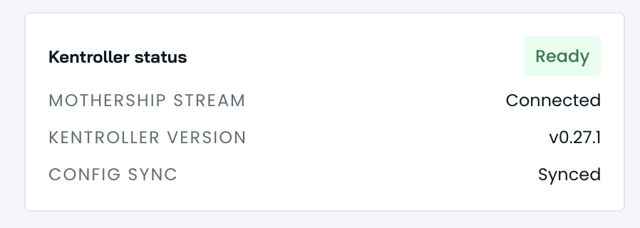
castai-kentroller Status in ConsoleThe controller status view shows the detail exposed by the status API added in July for easier at-a-glance understanding.
Persistent Volume Optimization
Persistent Volume Optimization is in early access. The console view is enabled on request, so contact your account manager if you would like it turned on. The Storage Autoscaling documentation is public and covers what it does, how to install it, the configuration options, and troubleshooting.
Action Markers on Volume Charts
The size, IOPS, and throughput charts in the volume detail view mark the points at which Cast AI resized the volume, so changes in the metrics can be aligned with the action that caused them instead of cross-referencing the action list by timestamp.
OMNI
Gateway Throughput and Redundancy
Traffic between a cluster and its edge locations is carried by multiple gateway replicas simultaneously, with equal-cost multipath routing spreading connections across them, rather than by a single active gateway and a passive standby. Each replica is individually addressable and exposed by its own service, and tunnel connectivity is checked per replica.
Edge Node Reliability
Several changes make edge nodes join and stay healthy more reliably:
- An add-on that fails to install no longer blocks the edge node from joining. Only the system add-ons block completion, so a problem with an optional component such as the GPU operator can be investigated on a node that is already up.
- Fabric pods run at system-node-critical priority, so they are not left pending indefinitely when a node is resource-constrained.
- Pods offloaded to an edge location can reach the Kubernetes API server on GKE clusters using Dataplane V2.
Container Live Migration
Rebuilt Migration Dashboard
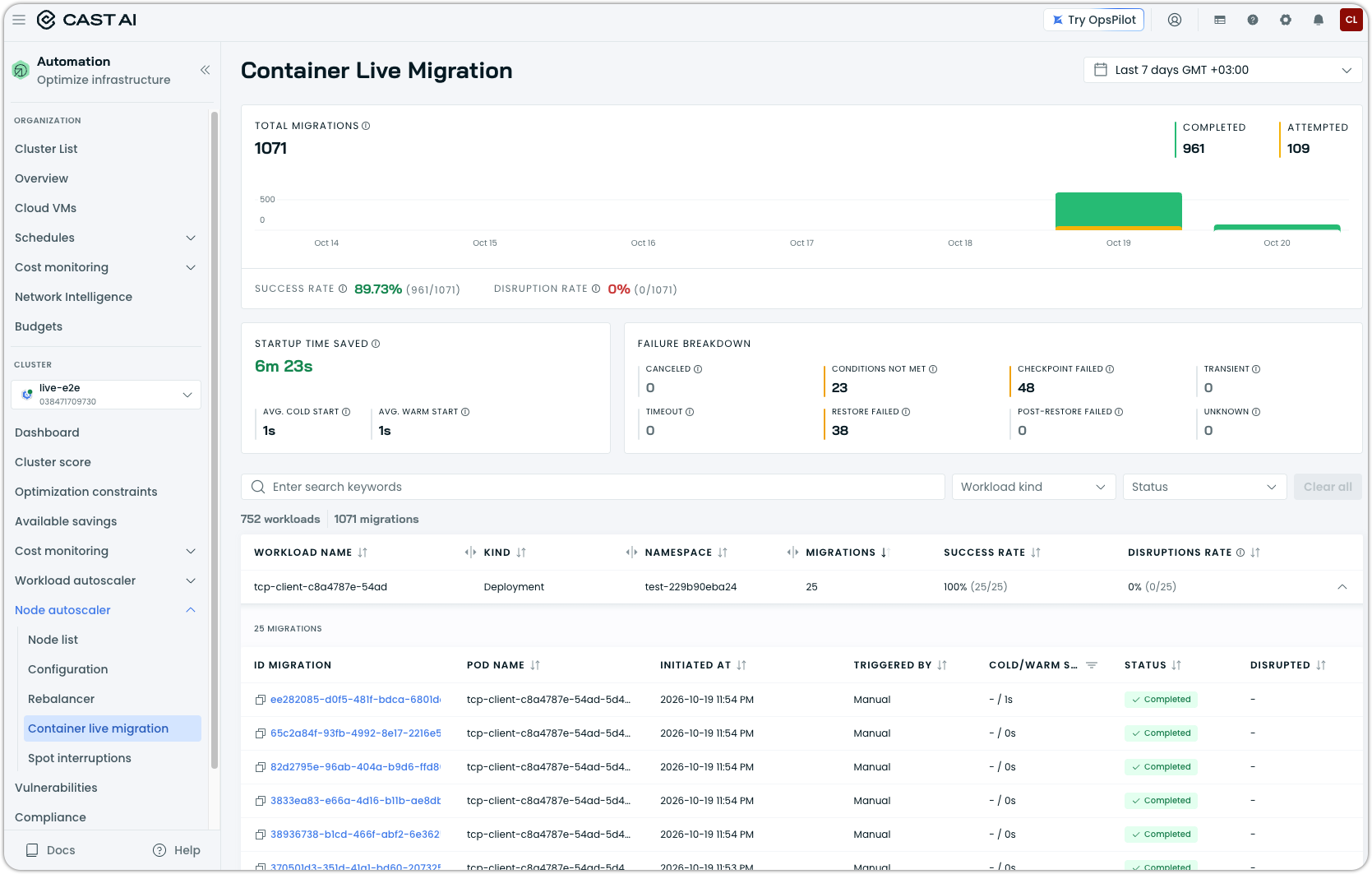
The Container Live Migration dashboard has been rebuilt around a summary section, with migrations grouped by workload owner rather than listed flat. A migration triggered by rebalancing links back to the plan that caused it, so you can get from a migration to its reason in one step. Workloads that cannot be migrated are listed with the full reason rather than a truncated one, and the migration detail view has been reworked to align with the dashboard.
Container Runtime Requirement
The live migration daemon no longer ships its own container runtime and uses the one already installed on the node. Bundling a runtime meant the version on the node and the version in the daemon could disagree, and a mismatch is a bad thing to discover mid-migration.
Traffic Control
The traffic control path used during migration handles more network cases involving a moving pod. Connections originating outside the cluster are closed as part of the migration rather than left pointing to the old pod, and migrations in which the pod IP changes are supported through the Service ClusterIP. Be mindful that the global connection limiter is enabled by default in the Helm chart.
For more information, see Traffic Control documentation.
Migration Error Classification
Migration failures that previously returned unclassified are now categorized, so a failure reports the type of problem it was rather than an unknown error. This applies to clusters running the castai-live Helm chart v0.120.0 or later.
Reporting
Internet and Cloud API Traffic
No action needed. Network traffic and cost reports may show additional traffic and cost from August 18 onward. Nothing changed in your cluster, and nothing was under-reported before; a category of traffic that was previously not tracked is now included.
Network reports now distinguish paid internet egress from free cloud API traffic within the same region, instead of treating them as one. This applies to clusters running Kvisor v1.55.10 or later, which is where the distinction can be made. Clusters on earlier versions report exactly as they did before.
Node Template Efficiency Charts
Resource efficiency report includes efficiency and cost charts for node templates, so comparisons between templates are visible without exporting data.
Reliability Metrics Setup
Enabling reliability metrics is more reliable on clusters that already run a ClickHouse operator. Setup now detects when a ClickHouse operator already exists in the cluster and asks how to proceed: install its own operator, use the existing one, or decide automatically. Default memory requests for ClickHouse have also been adjusted.
Notifications and Alerts
Node Autoscaler Notification Category and Pending Pod Alert
Scheduling alerts have their own Node Autoscaler notification category, joining the Workload Autoscaler category added in July. The first alert in it is Pending Pod Detected, which fires when a pod has been stuck unscheduled and resolves itself once the pod is scheduled, so a capacity or scheduling constraint reaches you without someone having to notice it in the console.
Project Name in Webhook Templates
Webhook notification templates can include the cloud project name, for routing and tagging alerts by project. If your clusters are named consistently across projects, an alert naming only the cluster does not tell you which project it came from.
Organization Management
Identity and Access in the Event Log
Identity and access activity is recorded in the Event Log, covering the questions a security review asks and that previously had no answer:
- API keys: creation, revocation, and failed verification attempts, correlated by a key prefix rather than the key itself.
- Personal access tokens: creation, deletion, failed authorization, and changes to their permission groups, with the old and new values.
- Service accounts and their keys: full lifecycle, with the related events from a single deletion tied together.
- Users: logins, additions to and removals from an organization, profile changes, and how each user was added.
- SCIM provisioning: activation and deactivation, and group changes driven by your identity provider.
- Organization settings: which security policy fields changed, with their old and new values.
Event Log Filtering
Filtering has been reworked from the first months of use. Cluster filtering moved into the quick filters with the rest; filter values have checkboxes, and the filter panel can be collapsed while keeping the filters you have already selected visible. The resource column shows the resource name with its type beneath it rather than the type alone. Event Log statistics can also be queried via the new Cast AI MCP server (currently in private preview), which is expected to be GA by next month.
Schedule Manager Role
A Schedule Manager role grants management of rebalancing and hibernation schedules across an organization, but nothing else. Schedules are organization-scoped resources. The role can be assigned to a service account at the organization scope, a user, or a user group through both the console and the API.
For more information, see RBAC documentation.
Enterprise Service Accounts
Every service account in the organization is now visible in one place. Enterprise organizations have a service accounts page in the console, following the release of enterprise service accounts in July.
Workload Autoscaler Credit Consumption in Platform Usage
Organizations billed through the Azure Marketplace can track their Workload Autoscaler credit consumption on the Platform Usage page and see whether they are on track during the month, rather than finding out at the end of the month. Support for the other marketplaces follows.
Terraform and Helm Chart Updates
We have released an updated version of our Terraform provider. The latest changes are detailed in the changelog on GitHub, and the updated provider and modules are ready for use in your infrastructure-as-code projects via Terraform's registry.
We have also released a new version of the Cast Helm chart. We ship updates multiple times a month, so staying current matters if you want the latest fixes and features as they land.
To upgrade in-place on a cluster:
helm repo update castai-helm
helm upgrade -n castai-agent castai-agent castai-helm/castai-agent --reset-then-reuse-values
If you are managing the agent through GitOps, bump the chart version in your manifest (Helm chart, ArgoCD Application, etc.) and let your reconciler roll out the upgrade. You can also use the Component Control dashboard in the Cast AI console to upgrade the agent directly.