

June 2026
Persistent Volume Optimization, Automatic Node Configuration, and a Rebuilt Event Log
June brings Persistent Volume Optimization (Early Access), a new storage autoscaler that upsizes your persistent volumes as demand grows. Cluster onboarding now automatically recreates your existing node groups as node configurations and templates, so connecting a cluster no longer requires rebuilding that setup by hand. The audit log has also been rebuilt as an organization-level Event Log, scoped by RBAC, with full-text search and a severity histogram. Elsewhere this month: workload-level instance constraints for the node autoscaler, a Network Intelligence UI overhaul, and CEL-based targeting for Pod Mutations.
To take full advantage of all features in this release, update your Cast AI umbrella Helm chart to version 0.43.0 or later. You can upgrade by running:
helm repo update castai-helm
helm upgrade -n castai-agent castai-agent castai-helm/castai --reset-then-reuse-values
If you manage Cast AI through Terraform, update the provider to v8.41.0 or later. OMNI users should update the omni-agent chart to 1.15.0 or later.
Major Features and Improvements
Persistent Volume Optimization (Early Access)
Persistent Volume Optimization brings autoscaling to your storage by upsizing persistent volumes to match what your workloads need. A new Persistent Volumes view shows average utilization, per-volume details, and resize events, so you can see what's being optimized and act on it.
The feature is in Early Access for AWS and GCP. It's currently behind a feature flag, so reach out to enable it for your organization.
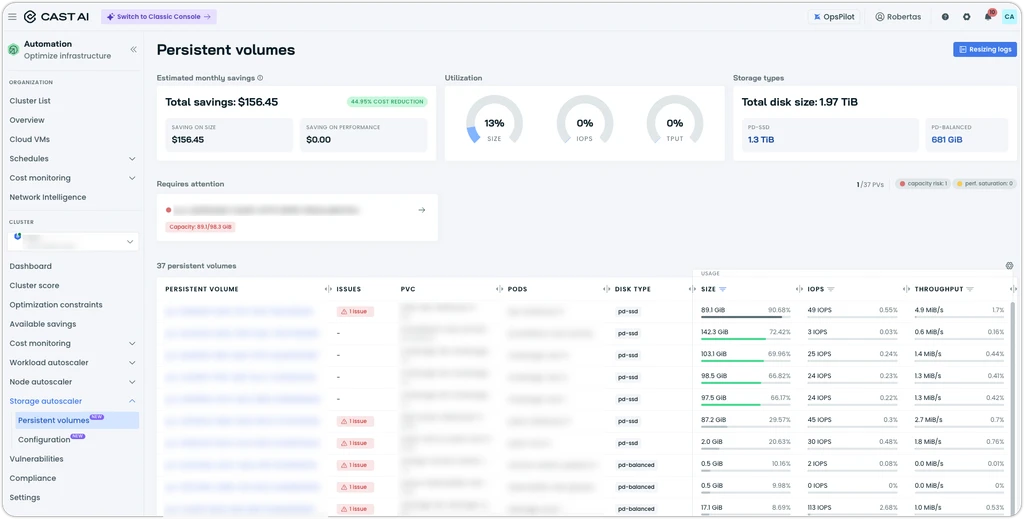
Persistent volumes page within Storage autoscaler
OpsPilot Is Now Generally Available
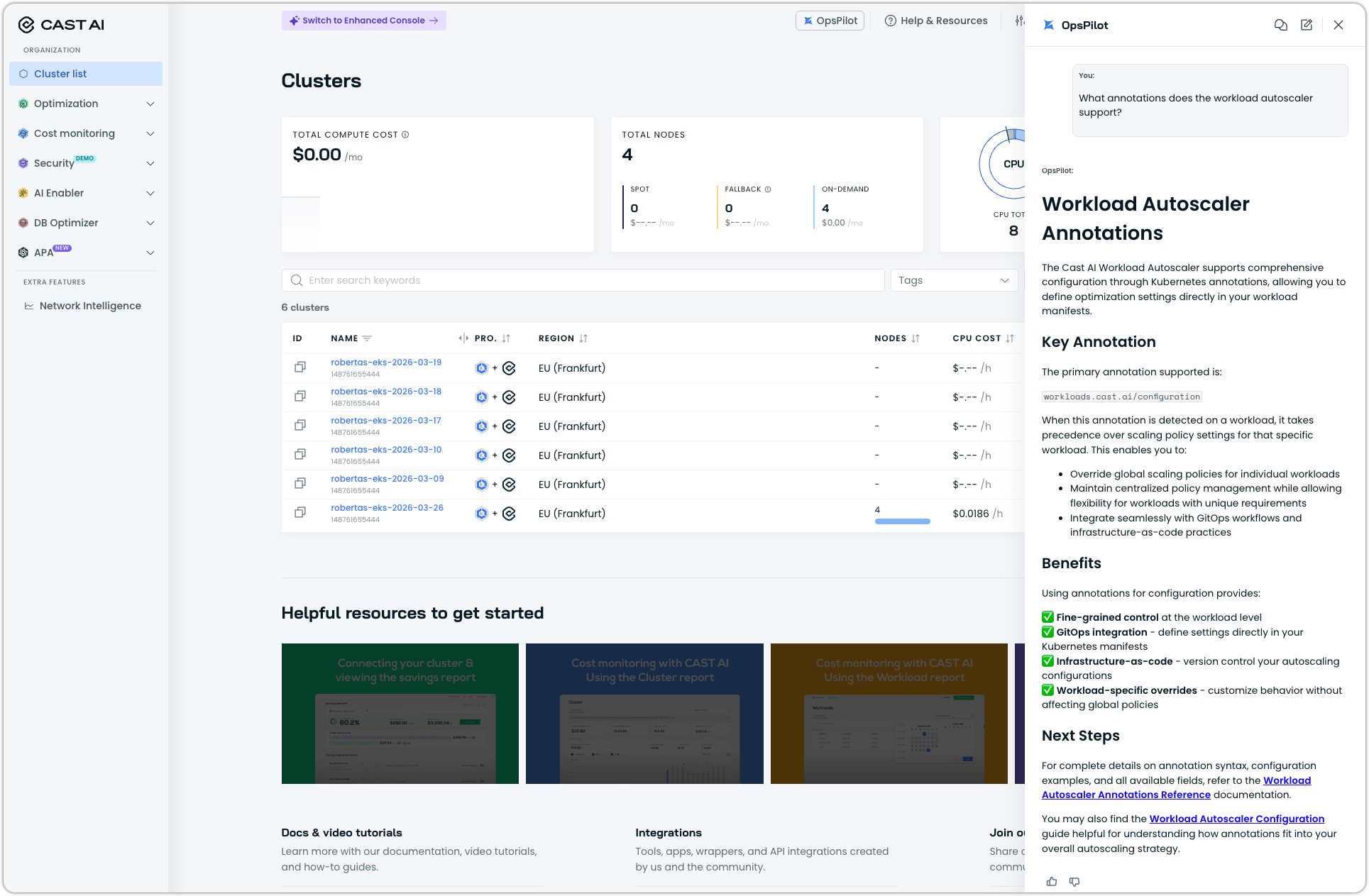
OpsPilot, the AI assistant of Cast AI, is now generally available to all customers. It's no longer behind a feature flag, so any customer can turn it on and start using it.
See OpsPilot documentation to familiarize yourself with its capabilities, or simply give it a spin in the Console UI:
Automatic Node Configuration from Existing Node Groups (EKS)
When you connect a cluster, Cast AI now recreates your existing node groups and pools as both node configurations and node templates, rather than leaving you to rebuild that setup by hand. During discovery, it maps each native pool or group to a node configuration and imports the settings that matter for a faithful copy: disk type, size, IOPS, and ephemeral settings; security groups; the AMI in use; instance tags; and init scripts. It also detects your CNI configuration — including prefix delegation, a trunk ENI, and EKS custom networking — and automatically selects the appropriate max-pods formula.
It then reads the labels and taints on each pool or group and copies them into a matching node template, linking that template to the node configuration it was built from — so both halves of the setup come across together and are wired up from the start.
Event Log
The event log has been rebuilt as an organization-level view, replacing the previous Audit Log. Scoped by RBAC so each user sees only the events they're permitted to see. Filtering by cluster is still available, but it's now optional rather than the required first step. What's new:
- Severity histogram showing event volume across the selected time window, broken down by severity
- Quick Filters are built around the three levels that describe every event: domain, resource, and action
- Full-text search across every field of an event: resource ID, domain, resource, action, actor, and summary
- Actor details as first-class fields — actor type, email, and display name.
- Detail drawer — click any row to open a drawer with the event's structured details, and use the JSON toggle at the top right for the full raw event object
- Copyable deep links — the drawer includes a copy-link button so you can share a direct link to any event
- Workload Autoscaler events included, which also have their own dedicated event log
Workload Optimization
Percentage-Based Workload Constraints
Min and max resource constraints can now be expressed as a percentage of a workload's original requests, per container, instead of only as flat values. If you set a maximum of 200%, the Workload Autoscaler won't recommend more than twice the workload's original request, so the guardrails scale with the workload at all times.
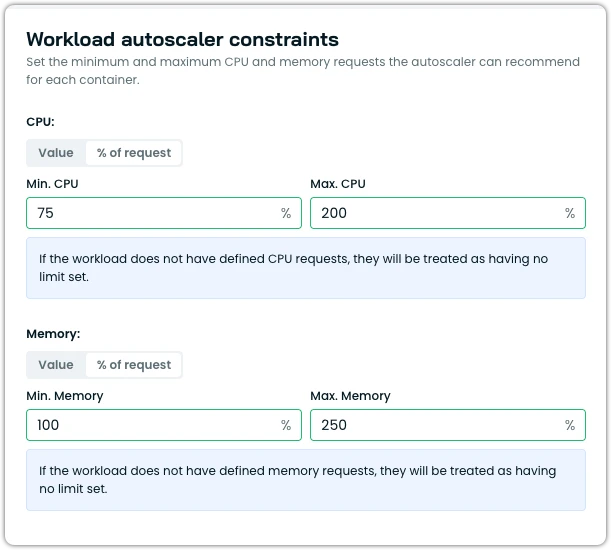
Percentage-based constraints in a scaling policy
In-Place Resizing for CronJobs and Rollbacks
In-place pod resizing now covers more of the lifecycle. CronJob workloads pick up immediate and deferred recommendations through in-place resize, and when you disable optimization on a workload, the Workload Autoscaler uses in-place resize to roll back to the previous values where it can, avoiding an unnecessary pod restart.
OOM Events Grouped by Container
Out-of-memory (OOM) kill events on the workload page are now grouped by container, so in a multi-container workload you can see which container is actually being OOM-killed instead of a single combined count.
Two-Phase (Startup) CPU Recommendations in Scaling Policies
Two-phase CPU recommendations, which apply a separate recommendation during a workload's startup phase, can now be enabled directly in a scaling policy. Available via Console, API, and annotations at launch. This is supposed to supercede the pre-existing functionality of merely ignoring startup metrics for workloads.
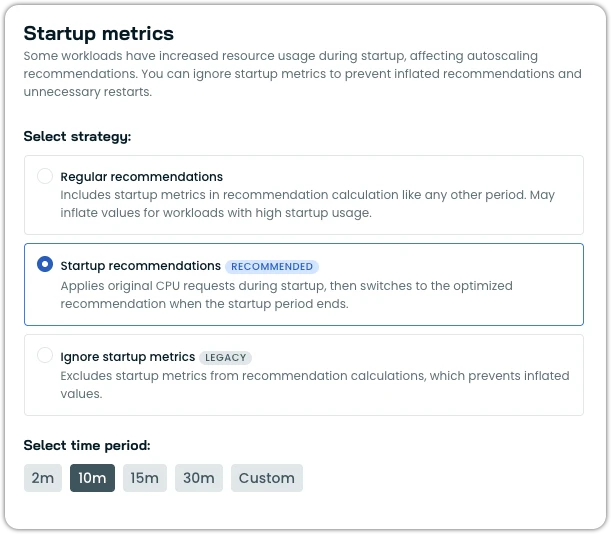
Updated startup metrics options in a scaling policy
See startup recommendations documentation.
Batch Actions on the Policies Table
The scaling policies table now supports batch operations. Select multiple policies to delete them or set the optimization type in one step.
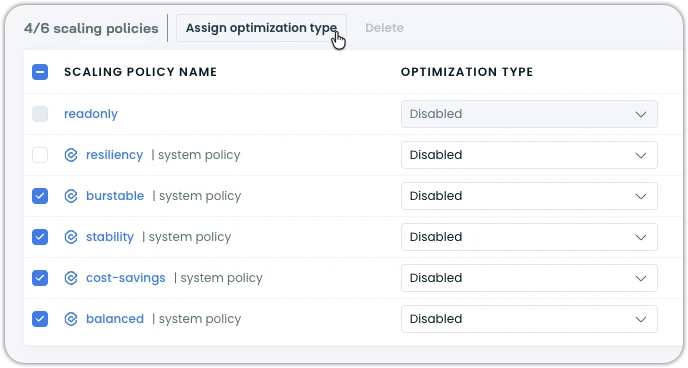
Change optimization type across multiple policies in one go
Export the Impact Page to CSV
The impact page under Workload Autoscaler can now be exported to CSV, so the impact table can be shared and analyzed outside the console.
Node Autoscaling
Workload-Level Instance Constraints
The node autoscaler now supports node selectors and node affinities that require or prefer particular instance characteristics and honors them at the workload level. Previously, steering a workload onto a specific kind of instance — a particular CPU manufacturer, a memory floor, an exact instance family — meant creating a dedicated node template just for that workload, which meant more templates to maintain, smaller node pools, and less efficient bin-packing. Now you can put the constraint on the workload itself with a nodeSelector or nodeAffinity, and Cast AI places the workload on a node that matches, using a cloud-agnostic set of scheduling labels:
scheduling.cast.ai/cpu-manufacturer— e.g. amd, intelscheduling.cast.ai/instance-category— e.g. c, mscheduling.cast.ai/instance-family— e.g. c6a, m5scheduling.cast.ai/instance-generation— e.g. 5, 6- And more.
A standard nodeSelector gives exact-match behavior. For the vCPU and memory labels, use nodeAffinity with matchExpressions and the Gt/Lt operators when you want "at least" or "at most" thresholds rather than an exact value.
See the updated pod placement documentation.
Aggressive Mode Parameter Deprecation
An aggressive-mode parameter on scheduled rebalancing has been marked deprecated, after discovering that setting aggressive_mode to true on the scheduledRebalancingAPI resulted in a conflict and override of aggressive_mode_configuration.
See Terraform documentation for more details.
Prioritize Spreading Soft Topology Constraints
When a workload uses soft topology spread constraints, the node autoscaler now prioritizes honoring the spread over choosing the cheapest placement, so soft spreading is respected rather than quietly traded away for cost.
Terraform: Drain Failure Configs on Rebalancing Schedules
Drain failure configuration on rebalancing schedules can now be managed through the Cast AI Terraform provider, so this behavior no longer has to be set manually outside your infrastructure-as-code.
See GitHub PR #727 for changes.
Cluster Onboarding
Console Onboarding Now Uses castctl
castctlThe console's onboarding, reconnect, and feature enablement flows now leverage castctl instead of the legacy bash onboarding scripts. castctl is a much more sophisticated way of onboarding and interacting with Cast components and features, which handles a lot of steps automatically for you.
castctl Improvements
castctl Improvementscastctl picks up broader coverage and a smoother experience:
- Onboards Cast AI Anywhere clusters (bare-metal, on-prem, unsupported CSPs), not just EKS, GKE, and AKS.
- Validates Kubernetes permissions against the features you actually selected.
- Detects a leftover agent from an earlier, legacy installation during preflight and suggests re-onboarding with the umbrella chart.
- Handles the case where a standalone agent is already installed during connect.
- Upgrades standalone Helm releases with castware upgrade.
- Detects non-interactive terminals and skips prompts accordingly.
Hibernate Reliability
When you resume a hibernated cluster, Cast AI brings back a single node first — the resume node — and uses it to wake the rest of the cluster. This month hardens that path against several transient conditions that could previously leave a resume stuck partway, so hibernated clusters come back reliably even when the first node or its components take an unusual route to readiness:
- Resume no longer aborts when the resume node joins as not-ready. Because Cast AI already waits for a healthy agent and cluster controller on the node, the node joining the cluster is enough to continue.
- On EKS, a missing security group ID no longer fails the resume.
- Cast AI now checks that critical components — such as your CNI — carry the toleration they need to schedule onto the resume node, so a missing toleration can't stall the wake-up.
- Resume tolerates castware already running before the resume node is registered as joined, so transient timing issues in the resume flow no longer fail the operation.
Karpenter Enterprise Suite
Per-Mode Cycle Intervals for Continuous Rebalancing
Interval cycles for each mode in the Continuous Rebalancing configuration can now be set independently, allowing for more granular control. The values can be configured through the UI or via Helm values.
NodePool Limit Support
Rebalancer now supports NodePool limits, ensuring over-provisioning is avoided during rebalancing.
Price Adjustment Support
Price adjustments are now available in Reporting and Rebalancer, allowing you to manually override resource prices in the cluster to account for various business scenarios — for example, if you run third-party software licensed per vCPU, making the actual node cost higher than the base instance price.
Rebalancer Enhanced with Intelligence About Capacity Availability
When generating rebalancing plans, Rebalancer now takes into account signals about instance availability — both locally in the cluster and region-wide, based on signals the Cast AI platform collects. This ensures that Rebalancer does not plan to add nodes that are known to be temporarily unavailable.
Spot to On-Demand Split Ratio
Rebalancer now supports the Karpenter-native way of defining a Spot to On-Demand split ratio using multiple node pools and topology spread constraints.
Node Class Status
Node classes now report a status the same way node pools do, surfacing conditions such as whether AMIs have resolved from your selector terms and whether capacity reservations have been discovered. Node classes are reported as ready or not ready accordingly.
Filterable Status for Disrupted Nodes
Nodes that Karpenter has marked (tainted) for disruption now appear with a distinct, filterable status in the node list, clearing up the mismatch where the node pool count didn't match the node list.
From now on, if a node is tainted with karpenter.sh/disrupted=:NoSchedule, it will be marked as unschedulable in the Console.
Weight Column on the Node Pools Table
The node pools table now includes a Weight column, surfacing each node pool's configured weight.
Ignore Zero-Value Disruption Budgets in Aggressive Mode
Aggressive-mode rebalancing gains an option to ignore node pool disruption budgets set to zero, so those budgets don't block aggressive rebalancing.
Pod Mutations
CEL Expressions and Toleration Filtering for Targeting
Pod Mutations now support CEL (Common Expression Language) expressions as a general-purpose way to target which pods a mutation applies to, and pods can be filtered by their tolerations. Together, these give you far more precise control over the pods a mutation affects.
Distribution Groups Without a Default Configuration
You can now use Distribution Groups on their own, without being forced to set a default configuration first. If you only want to apply a mutation to a percentage of pods through a Distribution Group, that's now sufficient.
Mutation Behavior Options
Two behavior refinements: you can now disable the preStop hook that the pod mutator injects, and the mutator strips any preexisting Spot configuration before applying its own, so mutations start from a clean baseline.
Continuous Enforcement UI Fixes
Post-release fixes to the continuous enforcement experience introduced last month: a "When to apply changes" column on the Pod Mutations table, and the Deferred/Immediately controls are now fully clickable across their whole area.
OMNI
Terraform Support for Edge Configurations
Edge Configurations can now be managed through the Cast AI Terraform provider and modules, bringing the provisioning-time node settings introduced last month under infrastructure-as-code.
Multiple Pod CIDRs
Edge networking now supports multiple Pod CIDRs, configurable both directly and through the OMNI Terraform cluster module, for clusters that need more address space than a single range provides.
Custom CIDR Routing Refinements
The custom CIDR routing that lets edge nodes reach internal networks through the main cluster gateway has been refined for reliability.
OCI Storage Support on Edges
Oracle Cloud edge locations now support Oracle Cloud Infrastructure (OCI) storage. When you onboard an OCI-backed location, nodes are automatically authenticated to OCI using instance principals and granted the permissions the storage driver needs, and the OCI resources required for dynamic File Storage Service provisioning are created for you — so a standard persistent volume claim against an OCI storage class just works.
Crossplane Support and Delete Protection
OMNI can now be managed through Crossplane, and edge locations support delete protection so that a stray delete can't remove an edge you meant to keep.
Container Live Migration
Respect Existing VPC CNI Settings
On EKS, Container Live Migration now imports and respects your existing AWS VPC CNI settings rather than overriding them, and the umbrella chart installation no longer changes VPC CNI configuration by default.
Regional Disks and Single-Replica Migrations
Live migration now supports workloads on regional disks. A new option lets the controller force-delete the original pod before restoring the migrated one, so that single-replica workloads never briefly run two copies during a migration.
Reporting
Storage Cost Monitoring for Azure Managed Disks
Cast AI now reports storage costs for Azure Managed Disks used as Kubernetes persistent volumes in AKS clusters. Both the in-tree kubernetes.io/azure-disk provisioner and the CSI disk.csi.azure.com provisioner are covered, so existing AKS persistent volume setups are picked up without any changes.
Standard HDD (S-series), Standard SSD (E-series), and Premium SSD (P-series) locally redundant managed disks are all supported. Azure Managed Disks use a tiered pricing model in which each disk is billed at the next tier that matches its provisioned size — for example, a 50 GiB Standard_LRS disk is billed at the S6 (64 GiB) tier. Cast AI resolves the correct tier for you, so the reported cost matches what Azure actually bills.
A few things to be aware of:
- Only Azure Managed Disks are supported; Azure Files (
file.csi.azure.com) is not covered yet. - Only provisioned capacity is reported. Premium SSD pricing is exact because IOPS and throughput are bundled into the tier, but Standard HDD and Standard SSD carry per-transaction (per-10K) charges that aren't included in the cost calculation.
- Only persistent volumes are covered; ephemeral storage on AKS isn't reported yet.
For full details, see the Azure AKS Managed Disks documentation.
GPU and TPU Cost Columns in Reports
Cost reporting tables now include dedicated GPU and TPU cost columns, so accelerator spend is visible in its own right instead of being folded into overall node cost.
Network Intelligence
Network Intelligence has had a major UI overhaul that makes it easier to explore traffic, filter data, and understand service health at any experience level:
- New users land on a guided start view tailored to their role, while power users can jump straight into an advanced mode.
- The CEL expression filter is significantly improved, with keyboard navigation, autocomplete suggestions, and visual separators between filter elements.
- The graph view is no longer one-size-fits-all: switch between the classic flow graph, a new cross-AZ graph that shows which workloads and services span availability zones, and — where reliability metrics are available — a reliability overlay that surfaces service degradation directly on the graph.
- Pin a node to cut visual noise and explore its connections in isolation while keeping your current filter.
This experience is rolling out gradually; you may need to request enablement for your organization.
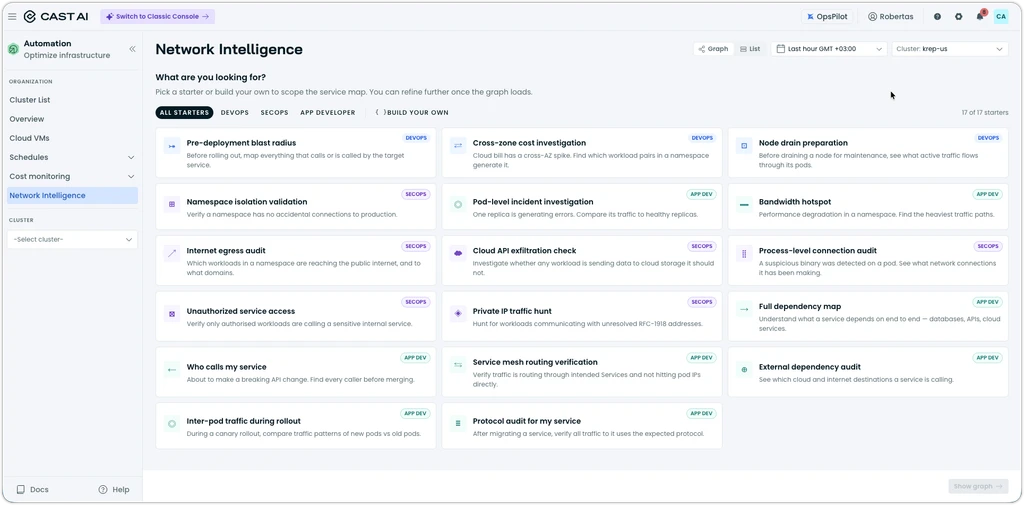
Network Intelligence dashboard
Customizable Overview Dashboard
The organization Overview dashboard is now a draggable grid, so you can arrange its cards to match how your team reads the dashboard. A cost chart has also been added to the per-user Overview view.
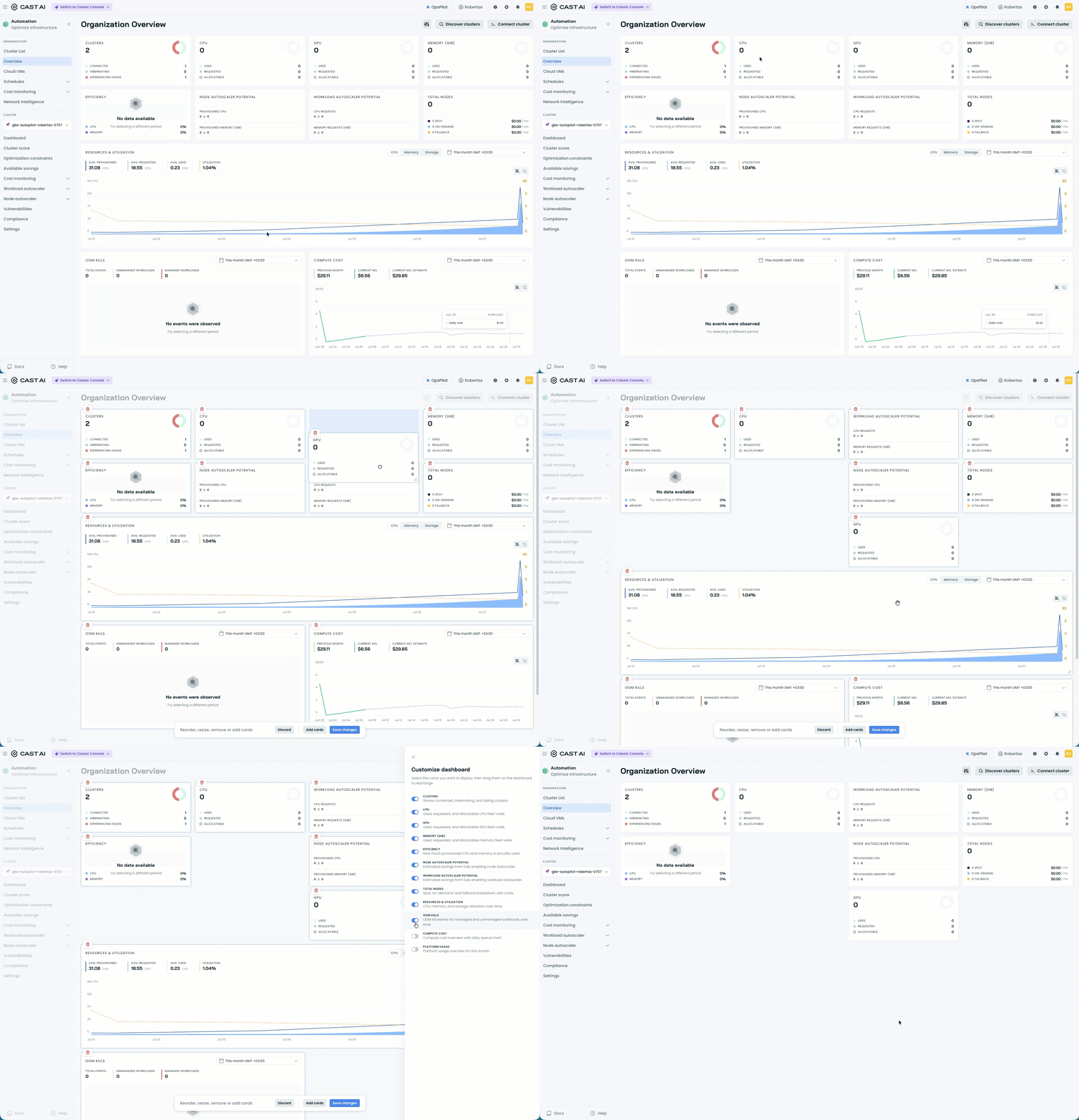
Customizable cards in the Overview dashboard
OpsPilot
The OpsPilot assistant picked up several improvements this month:
- Interactive follow-up questions are offered as clickable suggestions after a response.
- Cleaner markdown rendering of responses and more concise answers.
- Your questions are preserved locally, so an interrupted session isn't lost, and failed requests retry automatically.
- Report a bug directly from OpsPilot and have an automated agent investigate it.
- A new troubleshooting agent that can dig into cluster issues on your behalf.
Organization Management
Enterprise Platform Usage Reporting
Enterprise parent organizations now get a per-product breakdown of platform usage, with Node Autoscaling and Workload Autoscaler usage reported separately, so you can see which product is driving consumption. Usage is broken down per child organization, and the view also surfaces credit consumption and where your subscription is active. This changes only how usage is displayed; it doesn't affect invoicing.
Notifications
Slack notifications now handle private channels, with in-product guidance about the extra step they require, and the organization name shown in Slack notifications updates automatically when you rename your organization.
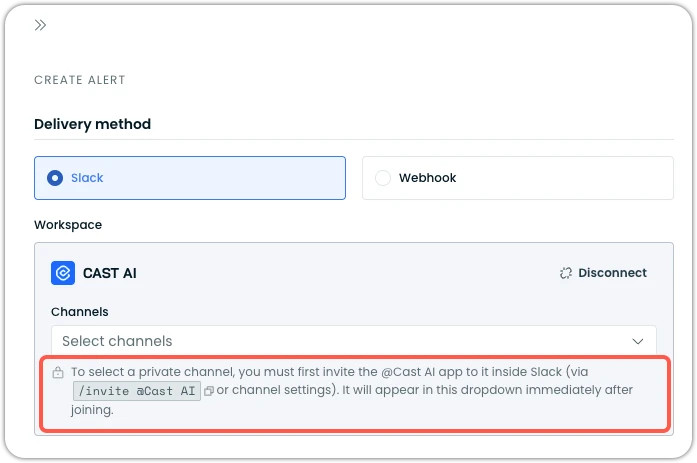
Slack notification configuration in console
Deprecations
Classic Console Retiring on July 27
The Classic Console will be retired on July 27, 2026. Cast AI is consolidating on the Enhanced Console, which, at this point, has no meaningful functional difference from Classic, and the vast majority of users have already moved to it. An in-app banner will appear before the deadline, and anyone still on the Classic Console will be automatically migrated on July 27.
Terraform and Agent Updates
We've released an updated version of our Terraform provider. The latest changes are detailed in the changelog on GitHub, and the updated provider and modules are ready for use in your infrastructure-as-code projects via Terraform's registry.
We have also released a new version of the Cast AI agent. We ship agent updates multiple times a month, so staying current matters if you want the latest fixes and features as they land.
To upgrade in-place on a cluster:
helm repo update castai-helm
helm upgrade -n castai-agent castai-agent castai-helm/castai --reset-then-reuse-values
If you're managing the agent through GitOps, bump the castai-agent chart version in your manifest (Helm chart, ArgoCD Application, etc.) and let your reconciler roll out the upgrade. You can also use the Component Control dashboard in the Cast AI console to upgrade the agent directly.