
May 2026
Karpenter Enterprise Suite goes GA, and OpsPilot generates your scaling policies
In May, Database Optimizer merges Index Advisor into Performance Advisor, and adds MySQL support to connection pooling. Workload Autoscaler gains a guided policy-generation flow powered by OpsPilot, so connecting a new cluster no longer means starting from a blank slate of policies.
Major Features and Improvements
Karpenter Enterprise Suite is Generally Available
The Karpenter Enterprise Suite is now generally available, graduating from the Early Access program that began in December of last year. The suite adds an optimization, visibility, and rebalancing layer on top of open-source Karpenter — it does not replace Karpenter, and your existing NodePools and EC2NodeClasses stay the source of truth.
Three things the suite gives you that open-source Karpenter doesn't:
- Continuous Rebalancing. Instead of waiting for Karpenter's one-shot consolidation to kick in, the Continuous Rebalancer monitors the cluster on a recurring cycle and consolidates underutilized nodes — coordinated with Workload Autoscaler recommendations and
- Container Live Migration so that rebalancing accounts for actual usage and moves workloads without restarts where possible. Per-pod and per-node eviction policies, configurable modes, and node exclusions give you tighter control than Karpenter's native consolidation exposes.
- Spot interruption prediction. Cast AI flags at-risk nodes ahead of an interruption well beyond the standard two-minute AWS warning, so the platform has time to migrate workloads cleanly inside your existing Karpenter setup.
- Workload rightsizing fed back into Karpenter. Workload Autoscaler continuously adjusts CPU and memory requests to match real usage. Because Karpenter provisions on requests, accurate requests mean fewer oversized nodes and better bin-packing without changing how Karpenter itself behaves.
For a full overview, see the Karpenter Enterprise Suite docs. For the launch announcement: Karpenter Enterprise Suite GA blog post.
Guided Policy Generation with OpsPilot
When you connect a new cluster, getting from using the defaults to building custom-tailored policies for your workloads by hand used to require effort on your team. OpsPilot now does that work for you.
You describe your environment and reliability targets. OpsPilot analyzes the workloads in your cluster, then produces a complete set of Workload Autoscaler policies and assignment rules tailored to what it sees. You review what OpsPilot proposes, then apply with one click.
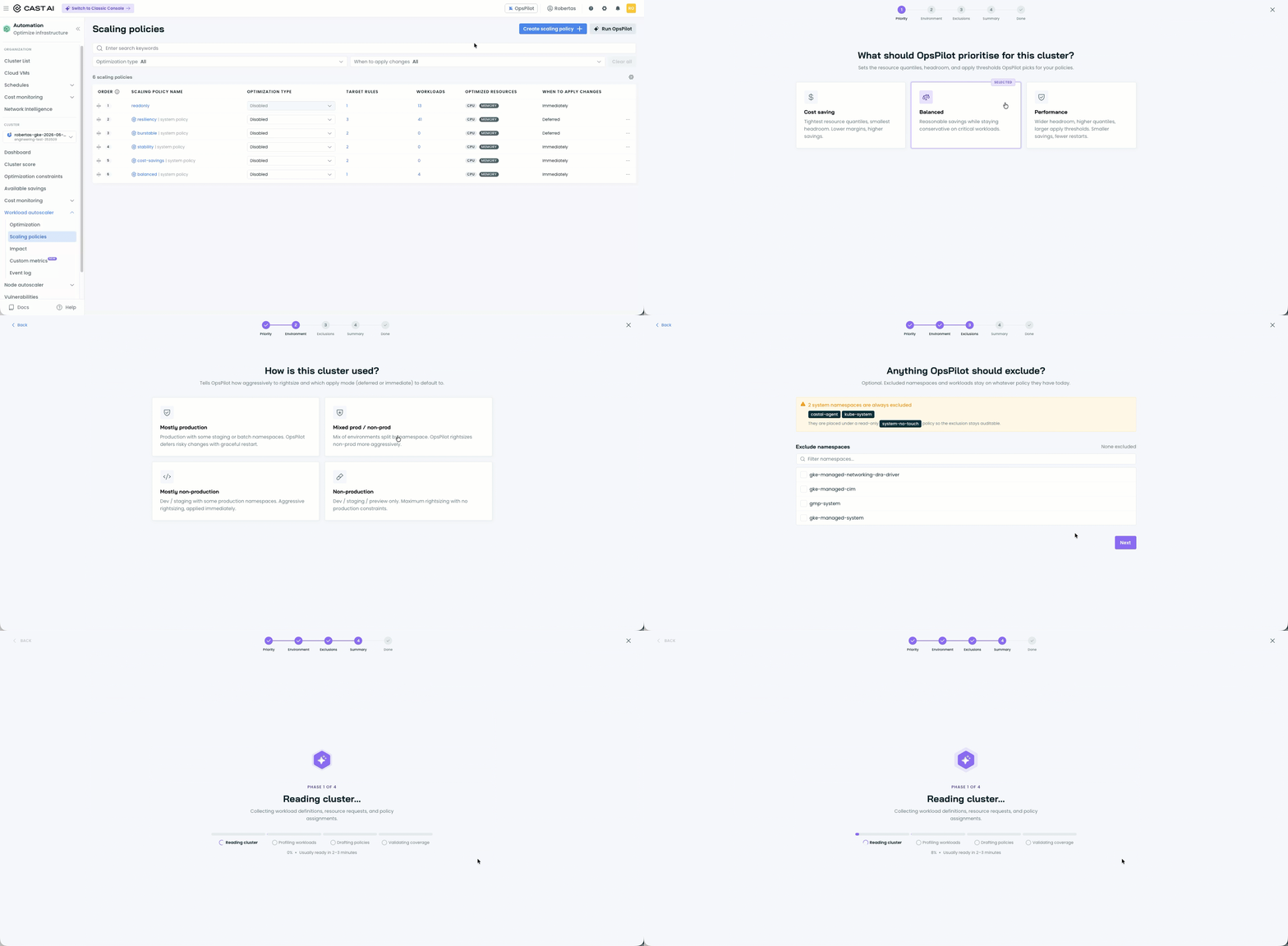
For the release announcement with more details, see our blog post.
Workload Optimization
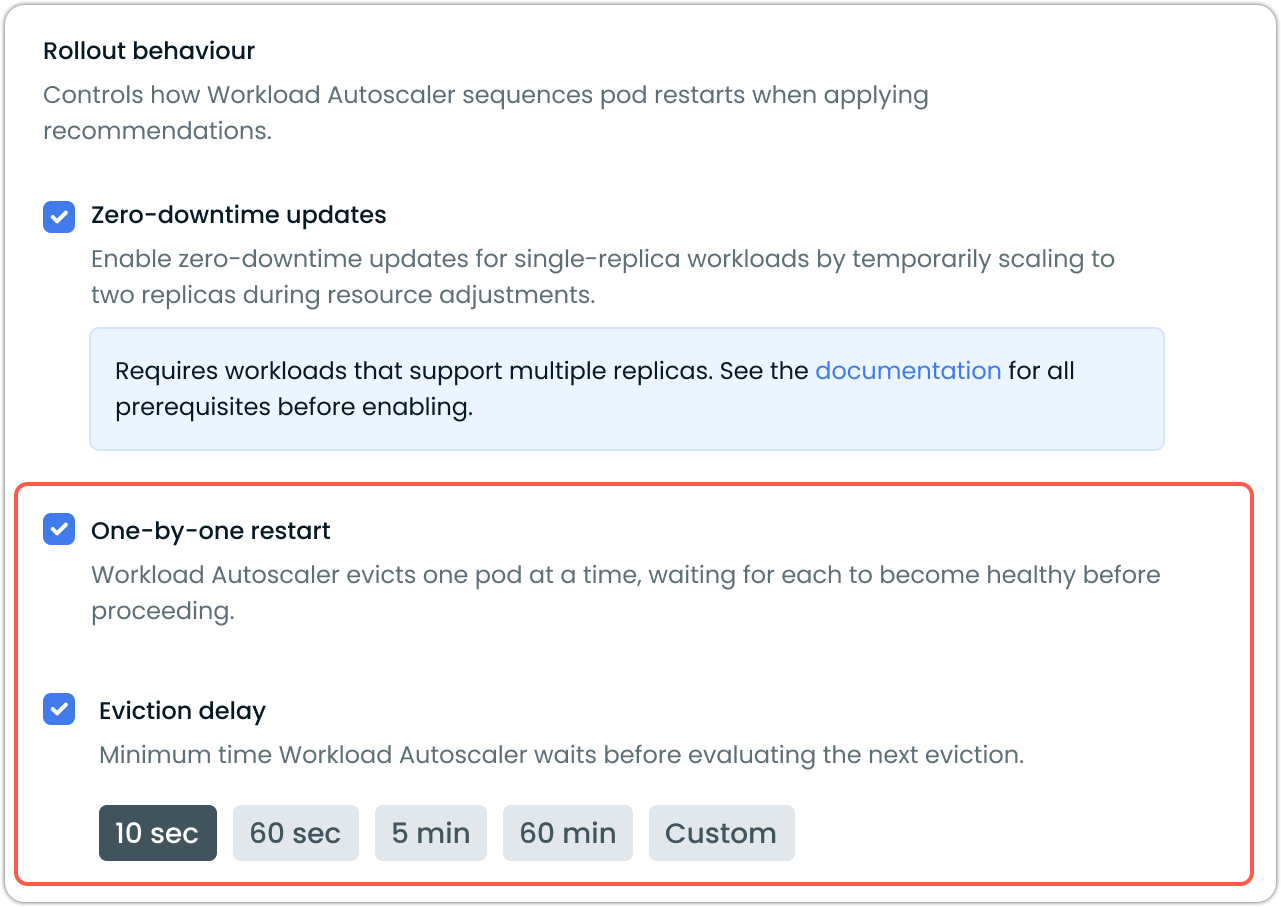
Pod-by-Pod Rollout Pacing in Scaling Policies
When the Workload Autoscaler applies a recommendation, it evicts pods to pick up the new resource values. For sensitive production workloads, customers want to slow that down so it doesn't ripple through the entire deployment too fast.
That control, the delay between successive pod evictions during a rollout, now lives directly on the scaling policy. You set it once on the policy, and every workload assigned to it inherits the pacing.
See Workload Autoscaler documentation for details and instructions on how to set it up for your workloads.
Recommendation Manifest Tab
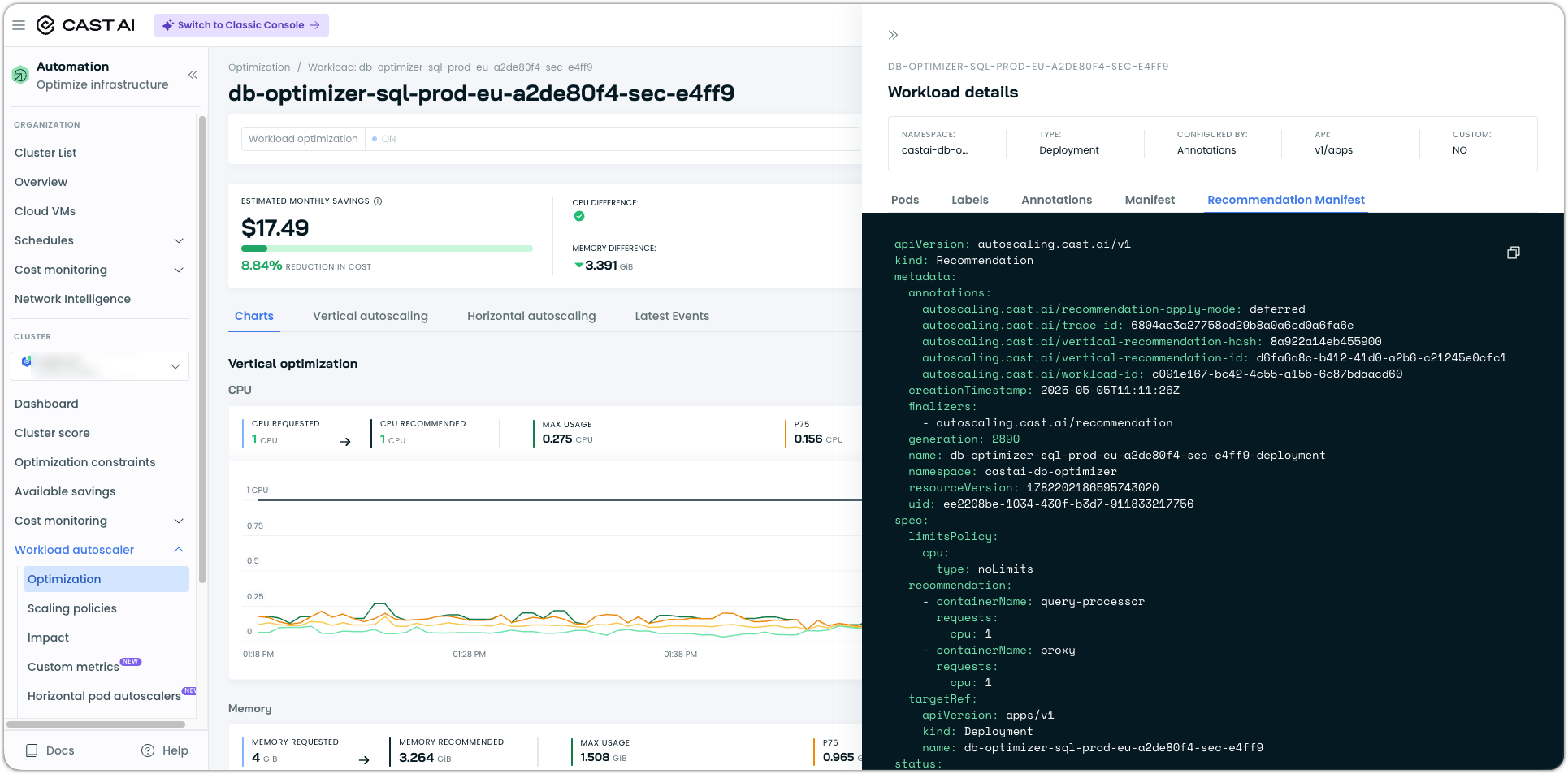
The workload page now includes a Recommendation Manifest tab that shows the full YAML the Workload Autoscaler proposes, alongside the existing workload manifest. You can see exactly what would change before applying anything, without leaving the console.
OOM Kills on the Workload Page
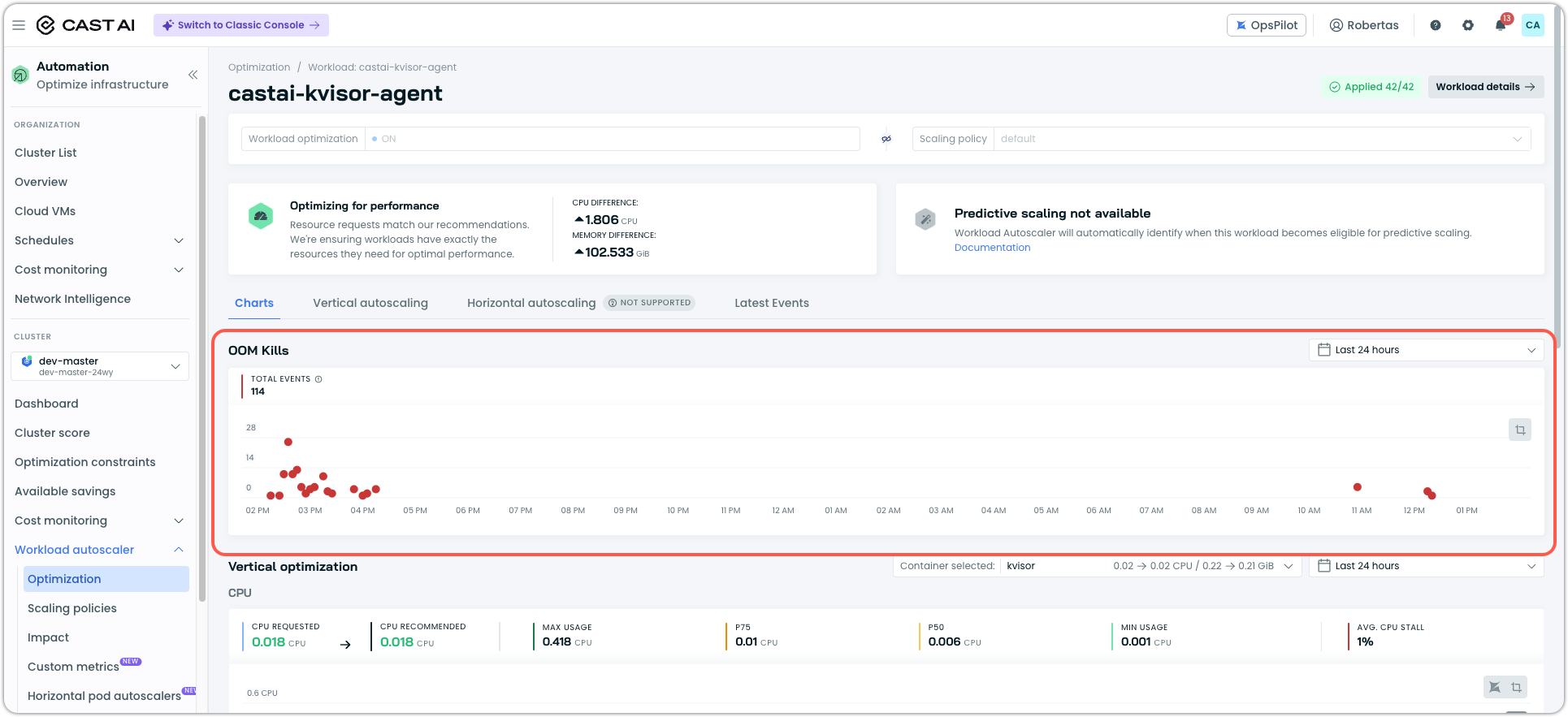
OOM kills are now first-class signals in the console. Each workload page includes an OOM kills chart so you can correlate memory pressure with the recommendations and rollouts the Workload Autoscaler has made over the same window. OOM events are now exposed for read-only clusters as well.
*In order to see OOMkills on the workload page, the workload needs to have such events in its event history for the selected time period.
JVM Out-of-Memory Handling
Java workloads no longer degrade silently when they hit memory limits. Workload Autoscaler now injects ExitOnOutOfMemoryError into JVM workloads, so they exit cleanly on OOM, and Kubernetes restarts them, meaning Workload Autoscaler's existing OOM recovery logic applies to JVM workloads just as it does to everything else.
Database Optimization
Performance Advisor
Following last month's MVP work and launch, Performance Advisor has now graduated to the unified Database Optimizer surface for which it was designed. Index recommendations, query recommendations, and DB agent status all live in one view, rather than the three loosely-connected surfaces customers saw before.
A few things land alongside the graduation. Cache-group views now show every cache group regardless of whether the DB agent is installed, with the agent's install state shown directly so you can tell at a glance which databases are ready to be optimized. New endpoints expose all existing indexes for a given table, along with a summary of database analysis metrics, making it easier to plan and review changes without leaving the console.
See Database Optimizer documentation for details.
MySQL Connection Pooling
Connection pooling is now available for MySQL with feature parity to the existing PostgreSQL implementation. Just as before, Database Optimizer automatically identifies databases eligible for pooling and walks you through enabling it.
See our tutorial on MySQL connection pooling.
DB Agent Improvements
The DB Agent has picked up several improvements driven by customer feedback.
- RDS IAM authentication. The agent itself can now authenticate to RDS instances using IAM, removing the need for static credentials. Requires
castai-db-agentversion ≥0.18.0. - Recoverable startup. The agent's index collector and the broader collector pool now recover from transient startup failures, rather than exiting permanently and leaving you without telemetry until the next pod restart.
- No more whitespace traps. Whitespace in excluded-schema and excluded-database lists is now trimmed automatically, eliminating a recurring source of misconfiguration.
- Server-version telemetry. The agent exports database server version metrics so you can track version distribution alongside the rest of your DB Agent telemetry.
- AWS ECS deployment. The DB Agent is now available as a Terraform module, along with an ECS task definition, for customers running workloads on AWS ECS.
- MySQL in the install script. The install script sets up MySQL and PostgreSQL databases.
Node Autoscaling
Azure Spot Interruption Model on AKS Node Templates
The Azure Spot interruption model is now configurable directly on AKS node templates in the console, bringing AKS in line with the existing AWS Spot reliability controls.
Drain Failure Audit Events Name the Blocking Pod
When a drain fails during a rebalancing operation, the audit event now names the specific pods that prevented the drain from completing, rather than just reporting "context deadline exceeded". Identifying the offending workload no longer requires correlating logs across multiple components.
Node Template Visibility
Node template tables now show additional details inline, and the Node List has a new "Managed By" column that distinguishes nodes managed by Cast AI from those managed by the CSP.
Clicking the node count on a Karpenter node pool now takes you to the filtered node list that only shows those nodes. *Only for Karpenter Enterprise Suite users.
Spot Interruption Dashboard
Following the first round of post-release feedback, the spot interruption dashboard now supports per-template feature state, 5-minute-granularity graphs, and graph-series filtering, so you can isolate the patterns you care about more precisely.
Go to Cluster > Node autoscaler > Spot interruptions in the Cast console.
Karpenter Enterprise Suite
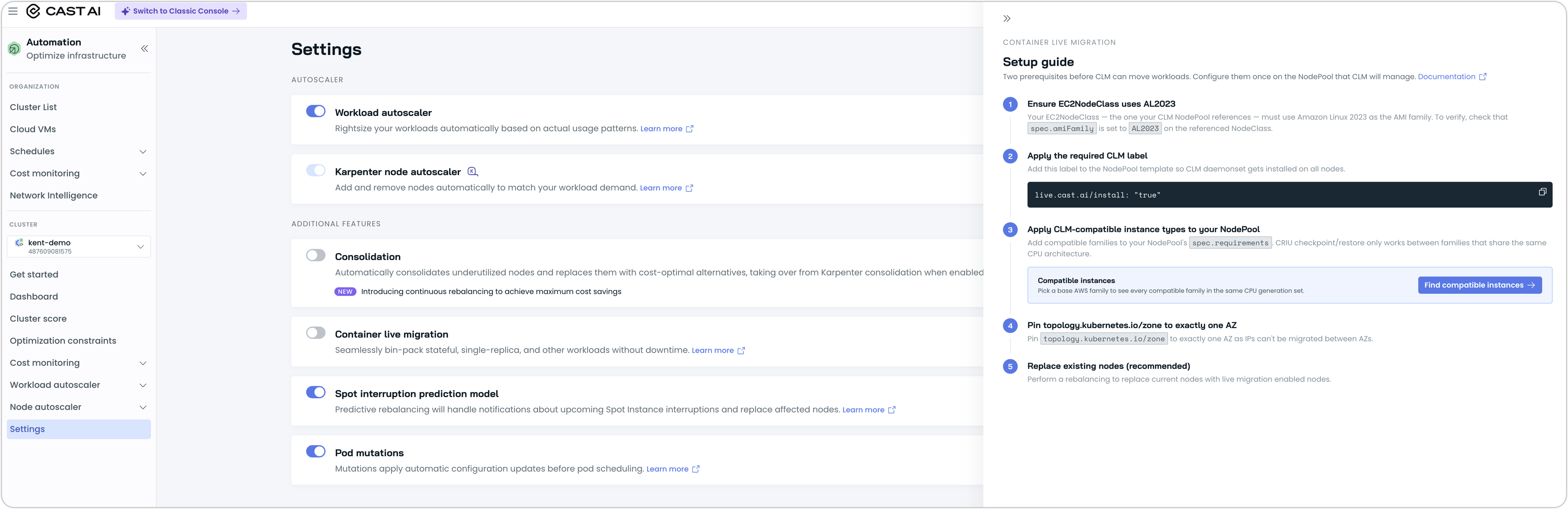
Container Live Migration Setup Helper
Karpenter Enterprise Suite now has a Container Live Migration (CLM) setup helper that walks you through enabling CLM on Karpenter-managed nodes. Whereas the previous flow required hand-applied YAML and a separate runbook, the helper now performs the prerequisite checks and applies the appropriate configuration for you.
Self-Updating Helm Releases for Karpenter Enterprise Suite Clusters
With the Karpenter Enterprise Suite now running most of its logic in-cluster, keeping a cluster current matters more than ever — new features, fixes, and the safer optimization defaults you'd expect from Cast AI all ship through the Helm release on your cluster. May added an in-cluster upgrader that does this for you.
When enabled, a Kubernetes CronJob runs helm upgrade on your Cast AI release on a schedule, pulling the latest chart from your configured source. Standard Helm repositories and OCI registries are both supported, including private registries that need authentication.
The upgrader ships as an optional component in the Cast AI umbrella chart and is off by default. Turn it on when you're ready to hand off routine upgrades; leave it off if your GitOps pipeline is already doing the same job.
Cluster Onboarding
Browser-Based castctl Login
castctl auth login now opens a browser-based login flow instead of asking you to copy and paste an API token from the console. Environment variables and flags remain available for non-interactive use. Requires castctl version >=0.5.0 .
Bring Your Own IAM Role or Service Account
castctl onboard now accepts a pre-existing IAM role (EKS), service account (GKE), or equivalent (AKS) instead of always creating its own. This unblocks security-conscious customers whose policies forbid third-party tools from creating cloud identities. Requires castctl version >=0.5.0 .
cluster connect and cluster disconnect
cluster onboard has been renamed cluster connect, and cluster offboard is now cluster disconnect. The old names continue to work, but the new names match the language already used throughout the console.
castctl Quality-of-Life Improvements
A handful of smaller castctl improvements that add up to a noticeably smoother onboarding experience:
- A new-version banner appears on castctl invocations when a newer release is available, with a 24-hour cache so it never adds noticeable latency.
- castctl now fails up-front when there's no access to the target cluster, rather than continuing into a doomed onboarding flow.
- Context selection is now interactive and supports onboarding multiple clusters in one run, including a "select all" option for bulk onboarding.
castctl connectrespects CLI flags as defaults for the interactive prompts.- A new
--umbrella-values-fileflag lets you pass a custom Helm values file tocastctl connect, mirroringhelm upgrade -f. - The AKS onboarding bug where castctl 0.3.0 failed with no AKS cluster found with node resource group has been fixed.
Permissions Center
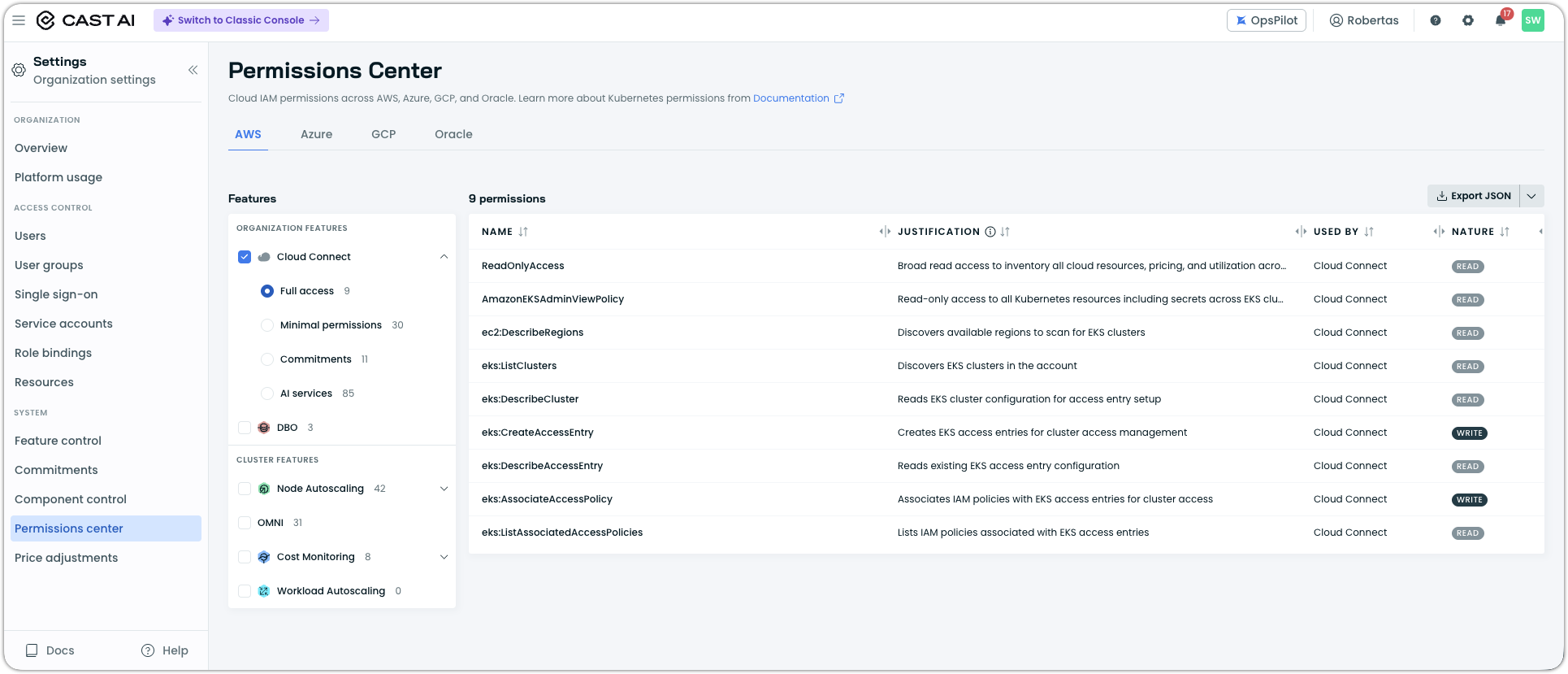
A new Permissions Center in the console lets you inspect, understand, and export the full set of permissions required for your enabled features. Both Kubernetes RBAC and Cloud IAM permissions are presented in a single, filterable table, with justifications for each permission.
The Permissions Center is accessible from Settings and the onboarding modal.
Hibernate Reliability
Cluster hibernate and resume now run a dry-run check first to validate prerequisites before attempting the operation, and return an actionable error when Workload Autoscaler or Pod Pinner aren't running, rather than a generic failure. New clusters now enforce CriticalAddonsOnly tolerations to keep critical add-ons schedulable during hibernate.
OMNI
Custom Edge Locations in Terraform
Custom edge locations can now be managed through the Cast AI Terraform provider, alongside the existing cloud-managed edge locations.
Configure Edge Nodes at Provisioning Time
When you join a Linux VM or bare-metal instance to a custom edge location, the castai-edge-initd installation script now reads a configuration file that lets you specify exactly how that node should join the cluster.
You can set:
- Node labels and taints, applied as the node registers, so workloads land where you intend from the first moment.
- GPU configuration, including NVIDIA MIG partitioning and time-slicing, so multi-tenant GPU instances are sliced up correctly before any pods are scheduled.
- NVMe block devices to use as ephemeral storage for the edge runtime, via the new
NVME_DEVICESparameter. By default, all non-root NVMe devices are striped together; this lets you pin ephemeral storage to a specific set of devices when the instance has more drives than you want to dedicate.
This makes custom edge locations meaningfully more powerful for the use cases they exist for — bringing your own GPU hardware, on-prem boxes, or compute from cloud providers that Cast AI doesn't natively integrate with.
For more information, see our Custom edge locations documentation.
Custom CIDR Routing via the Main Cluster Gateway
Edge nodes can now route traffic for configurable CIDR ranges through the main cluster's gateway. This allows workloads running on edge nodes to reach internal networks accessible only from the main cluster's VPC. Requires castai-omni-agent version ≥ 1.12.10 .
Privileged DaemonSets on Edge Nodes
Edge nodes now support privileged DaemonSets, so you can run host-level agents (logging, monitoring, network helpers) on edge locations the same way you would on regular nodes. Requires castai-omni-agent version ≥ 1.12.14 .
Container Live Migration
Faster Restored Pod Startup
When a migrated pod is restored on its new node, the destination pod's CPU limit is now applied only after CRIU has finished restoring the process, rather than during the restore itself. This avoids artificially throttling the restore on workloads with low CPU limits, noticeably reducing freeze time for affected workloads.
Istio sidecar support
Pods with Istio sidecars can now be live-migrated, though this does not preserve the TCP/IP stack. This improvement is planned for a future release and is actively being worked on.
Cost Management
Savings Estimations for Azure Cloud Connect
Azure savings estimations previously required a publicly reachable cluster. Customers running fully private AKS clusters had to wait until cluster connectivity was in place before seeing any savings numbers. Cloud Connect now also covers that case with a fallback, so private Azure customers can get savings estimates from the Cloud Connect data alone, without needing the cluster connected first.
Terraform Support for GCP Cloud Connect
GCP Cloud Connect can now be set up via the Cast AI Terraform provider, bringing it in line with the AWS and Azure Cloud Connect integrations already managed via IaC. Teams running GCP with Terraform no longer need to set up Cloud Connect manually.
Commitments API v2
A new Commitments API is now available, with pagination, server-side filtering, and consistent sort ordering. The previous endpoint had grown overly broad over time; the v2 endpoint replaces it with a plethora of improvements.
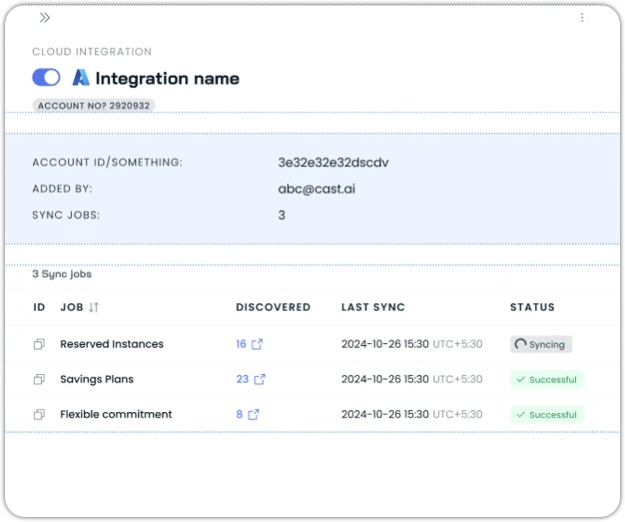
Per-Asset Sync Status
The Integrations view now shows per-asset sync status and clearer overall integration state, so when a particular asset hasn't synced, you can see it directly rather than having to look at logs to figure out where the gap is.
Cost Monitoring Returned to Its Previous Menu Placement
Cost Monitoring has been moved back to its previous menu position after customer feedback indicated that the recent move had reduced discoverability.
Namespace Filtering for Workload Labels in Allocation Groups
When creating an allocation group, workload-label filters can now be narrowed to a specific namespace. Picking a label no longer means scanning across every namespace in the cluster — you scope to the namespaces you care about, and only the labels present there show up.
Pod Mutations
Continuous Enforcement of Pod Mutations
Pod Mutations can now run a continuous enforcement loop. Pods that drift out of compliance with the mutation they were created under are evicted, with eviction rate and CPU usage capped to avoid impacting cluster stability. This closes the gap where mutations created after pods were already running wouldn't take effect until those pods were restarted for other reasons.
Requires castai-pod-mutator version >=0.12.0 .
Organization Management
Multi-Tenant SSO for Enterprise
Enterprise organizations can now allow their child organizations to maintain their own SSO configurations while keeping the parent enterprise SSO in place. In order to leverage this functionality, contact Cast to have it enabled for your organization. This is per-request-only.
Members Management
The Members list now has a search field, and duplicate member invitations produce a clear error message in the UI — with the action disabled up-front when it would fail — instead of the previous generic error.
Test a Webhook Alert Before You Trust It
The webhook configuration page now has a Test button — the same affordance that's been there for Slack notifications — so you can fire a test alert against your webhook (Microsoft Teams, custom endpoint, etc.) and see exactly how the message renders, without having to wait for or reproduce a real event in your cluster. Template variables are filled with placeholder values so the test message preserves the shape of a real one.
User Interface Improvements
Notifications
Opening the alerts configuration now always redirects to /notifications for a consistent entry point, and a new Category column makes the notifications page easier to scan by event type.
Date Range Timezone Indicator
Date range filters across the console now display the active timezone.
Terraform and Agent Updates
We've released an updated version of our Terraform provider. The latest changes are detailed in the changelog on GitHub, and the updated provider and modules are ready for use in your infrastructure-as-code projects via Terraform's registry.
We have also released a new version of the Cast AI agent. We ship agent updates multiple times a month, so staying current matters if you want the latest fixes and features as they land.
To upgrade in-place on a cluster:
helm repo update castai-helm
helm upgrade -n castai-agent castai-agent castai-helm/castai-agent --reuse-then-reset-values
If you're managing the agent through GitOps, bump the castai-agent chart version in your manifest (Helm chart, ArgoCD Application, etc.) and let your reconciler roll out the upgrade. You can also use the Component Control dashboard in the Cast AI console to upgrade the agent directly.