

December 2025
Reworked Pod Mutations, Azure Cloud Connect, and Improved Rebalancing Algorithms
In December, we introduced a major refresh of pod mutations with distribution groups, enabling percentage-based workload splitting across different configurations. Azure Cloud Connect now provides automated resource discovery for AKS environments, while improved rebalancing algorithms are delivering measurably better cost savings across production clusters of our customers.
December also included cluster-scoped authentication for AI Enabler-hosted models, expanded audit logging for Database Optimizer, and more streamlined organization management with quality-of-life improvements.
Major Features and Improvements
Reworked Pod Mutations with Distribution Groups and GitOps Support
Pod mutations now support distribution groups, enabling workload replicas to be split across multiple configurations with percentage-based control. This allows users to run different subsets of a workload's pods with distinct configurations. For example, 80% of pods on Spot Instances with specific labels, while 20% run on On-Demand instances with different tolerations.
Key improvements:
- Distribution groups for splitting replicas across configurations with independent labels, annotations, tolerations, and JSON patches per group
- Streamlined console UI with workload preview, improved JSON patch editor, and clearer filter configuration
- Full two-way sync between console and cluster resources—mutations created via Terraform, kubectl, or ArgoCD automatically appear in the console while remaining managed through infrastructure-as-code tools
Distribution groups are a preview feature available through both the console UI and Kubernetes custom resources, maintaining full compatibility with GitOps workflows. The cluster remains the single source of truth, with console-created mutations syncing to the cluster as PodMutation custom resources.
For configuration examples, see our Pod Mutations documentation.
Cloud Provider Integrations
AWS
Hyper-Threading Control for Bare-Metal Instances
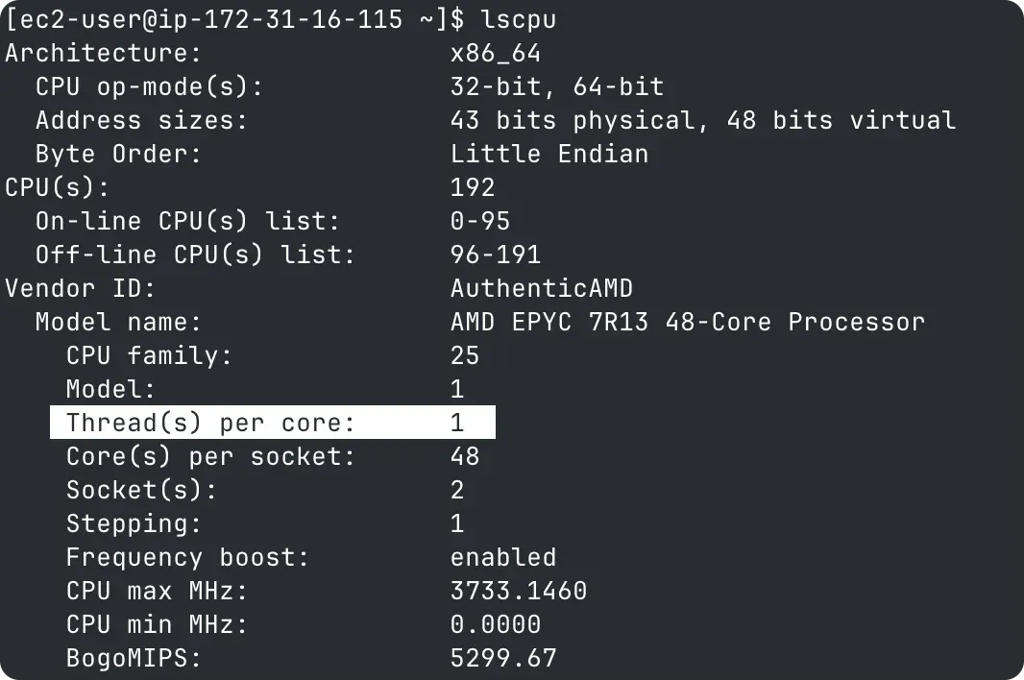
Cast AI now supports disabling hyper-threading on AWS bare-metal instances through node configuration settings. When hyper-threading is disabled in the node configuration (threads per core set to 1), Cast AI automatically configures the instance during provisioning to run with hyper-threading disabled.
This addresses AWS API limitations that prevent direct CPU configuration for bare-metal instance types. The implementation uses a systemd service that executes during node startup, ensuring hyper-threading configuration is applied consistently across Amazon Linux 2 and Amazon Linux 2023 instances without blocking node provisioning.
Azure
Cloud Connect for Azure
Cloud Connect is now available for Azure environments, enabling automated discovery and synchronization of AKS clusters, nodes, and Azure Reservations. Similar to the existing AWS and GCP implementations, Azure Cloud Connect uses hourly synchronization to maintain up-to-date resource information across all subscriptions.
The integration supports both comprehensive and minimal permission scopes, enabling organizations to configure access levels according to their specific security requirements. Cloud Connect simplifies initial setup and ongoing resource management by automatically detecting resources and commitment inventory without manual effort.
Workload Optimization
Automatic Scaling Policy Assignment Controls
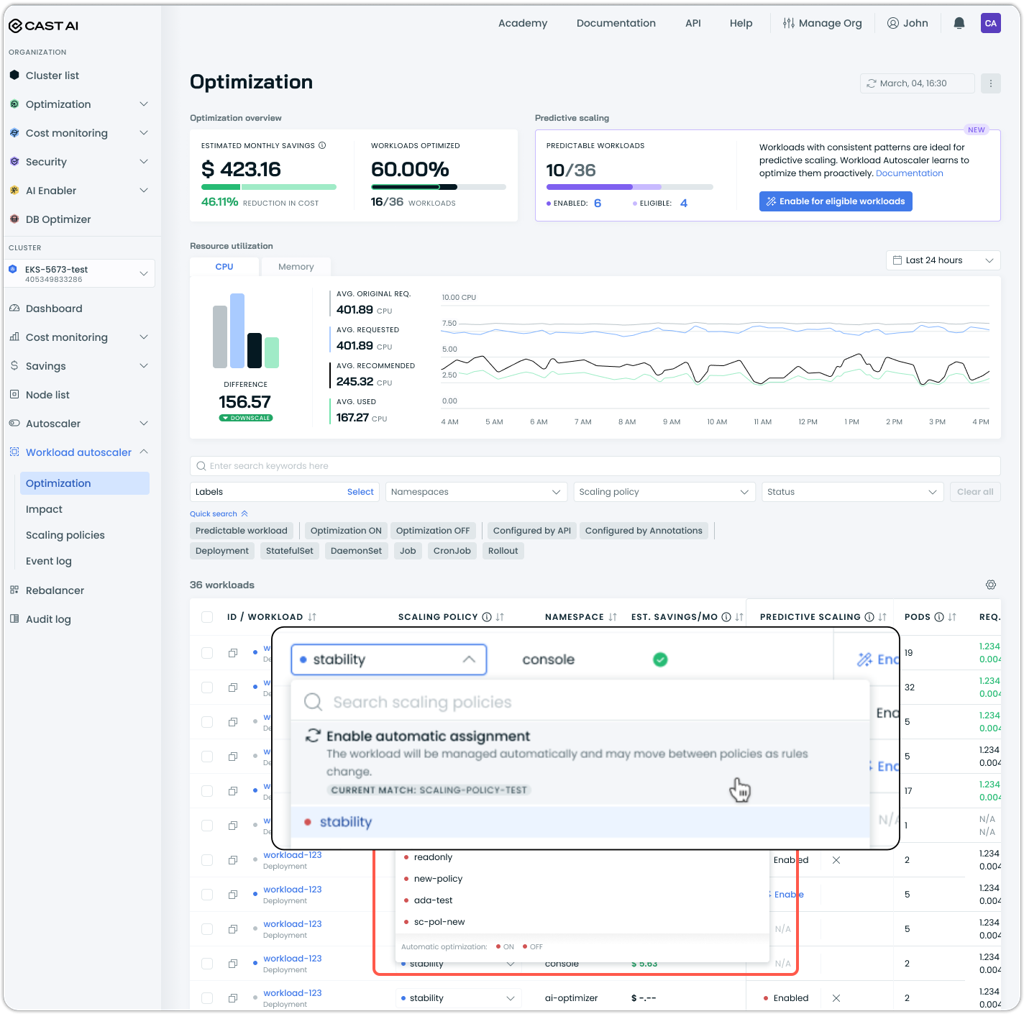
Workload Autoscaler now provides controls to enable or automatic policy assignment on a per-workload basis. This allows users to override or reverse manual workload-to-policy assignments and have the workload matched by policy assignment rules instead.
Users can toggle automatic assignment per workload through the scaling policy dropdown in the workload view, or apply it in batch by selecting multiple workloads from the workload list.
AI Enabler
Expanded Model Support
AI Enabler now supports additional models for deployment:
- Kimi K2 Thinking: High-performance reasoning model optimized for complex problem-solving and multi-step analysis tasks
- Regional AWS Bedrock models: Support for region-specific inference profiles enabling cross-region model deployment with AWS Bedrock provider
The model library now displays a "New" tag on recently added models for one month after their addition, making it easier to discover newly available models without manually tracking release announcements.
For the complete list of available models, see the AI Enabler documentation, which includes instructions for querying the API endpoint with the most up-to-date model catalog.
Model Library Filtering
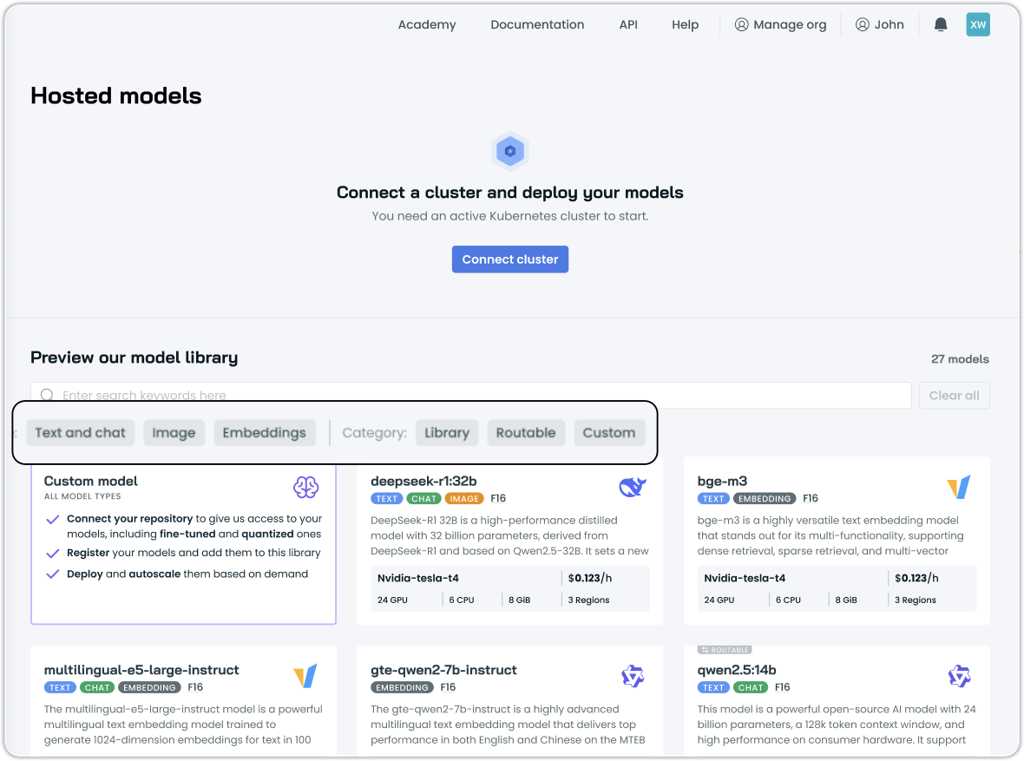
The AI Enabler model library now includes filtering options by model type and category. Users can filter models by type ("Text and chat," "Image," "Embeddings") and by category ("Library," "Routable," "Custom"), making it easier to discover relevant models for specific use cases. The "New" tag can also be used as a filter to quickly identify recently added models.
Cluster-Scoped Service Account Tokens for Hosted Models
AI Enabler now supports cluster-scoped service account tokens, enabling finer-grained access control for hosted model deployments. This capability allows organizations to create separate authentication credentials for different environments, such as staging and production clusters, with each token restricted to accessing only the models deployed in its assigned cluster.
When using cluster-scoped tokens, provider lists are automatically filtered to show only models hosted in the specified cluster, and usage tracking attributes costs to the correct cluster context. Fallback routing to SaaS providers continues to work transparently with cluster-scoped tokens, ensuring service continuity when hosted models are unavailable.
Organization-scoped tokens remain available for accessing SaaS provider models and for scenarios requiring cross-cluster access. For configuration details, see our AI Enabler Settings documentation.
Database Optimization
Audit Logging for Configuration Changes
Database Optimizer now tracks configuration changes through the audit log, providing visibility into cache configuration modifications, rule creation and updates, and deployment version changes. It records when caches are enabled or disabled, when caching rules are created or modified, and when DBO deployments are upgraded, helping users track configuration history and troubleshoot potential issues more effectively.
Cost Management
Persistent Auto-Enable Settings for Commitments
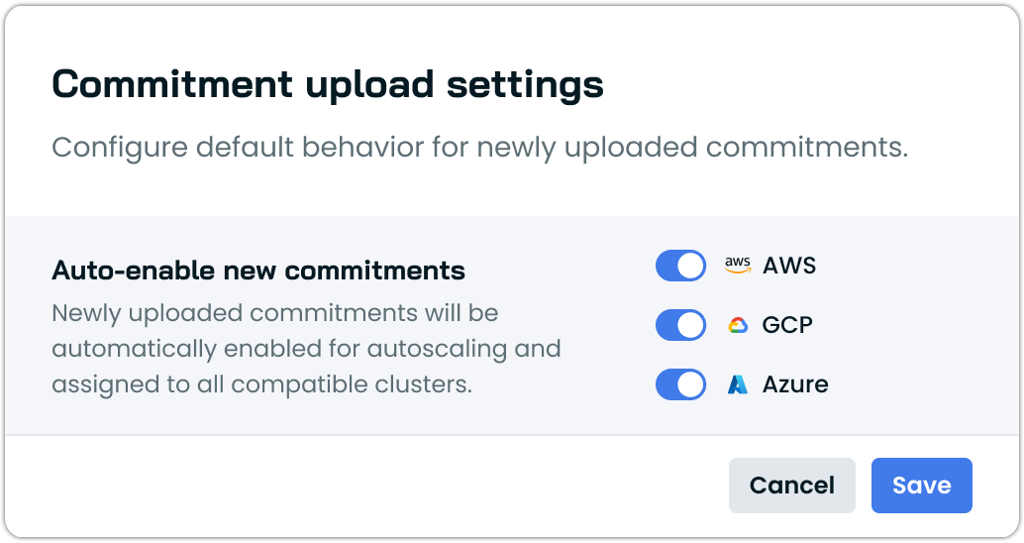
The commitments interface now includes persistent auto-enable settings that can be configured per cloud provider after initial commitment import. Previously available only during the import workflow, this setting can now be managed at any time through the commitments page, allowing users to control whether newly imported commitments are automatically enabled for autoscaling and assigned to all compatible clusters.
The setting is configured independently for each cloud service provider, enabling different behaviors for AWS, Azure, and GCP commitments based on organizational requirements. This enhancement is currently available for AWS and Azure commitments.
AWS Savings Plans Utilization History
The commitments detail view now includes a utilization history chart for AWS Savings Plans, displaying historical usage patterns over time.
Enhanced Rebalancing Algorithms
The autoscaler now uses improved rebalancing algorithms that deliver measurably higher cost savings during node rebalancing operations. Internal testing across nearly 500 clusters showed that 158 customer organizations achieved at least 5% improvement in savings per rebalance, with an average improvement of 11% for affected clusters.
The enhanced algorithms have been rolled out to all clusters, with the system automatically selecting the most effective algorithm for each specific rebalancing scenario.
Organization Management
User Invitation Workflow Improvements
The organization management interface now includes an "Invite users" button directly on the organization overview page, streamlining the process of adding new team members. Previously, users needed to navigate to the access control section to send invitations.
Additionally, the invitation blocking setting for Enterprise organizations now properly cascades to child organizations. When invitation blocking is enabled at the Enterprise level, it prevents user invitations to both the parent Enterprise organization and all child organizations, ensuring consistent access control across the enterprise hierarchy.
Organization Deletion
Organizations can now be deleted directly through the console interface, removing the need for support requests to clean up test or unused organizations. Any user with the Owner role can delete an organization from the Organization Overview page in the Details section.
Organizations must have all clusters removed before deletion is permitted. For Enterprise organizations, all child organizations must be deleted before the parent Enterprise organization can be removed. Child organization deletion is available through the Enterprise Management interface, while parent Enterprise deletion requires Admin API access.
User Interface Improvements
CSP Project Display in Cluster Dashboard
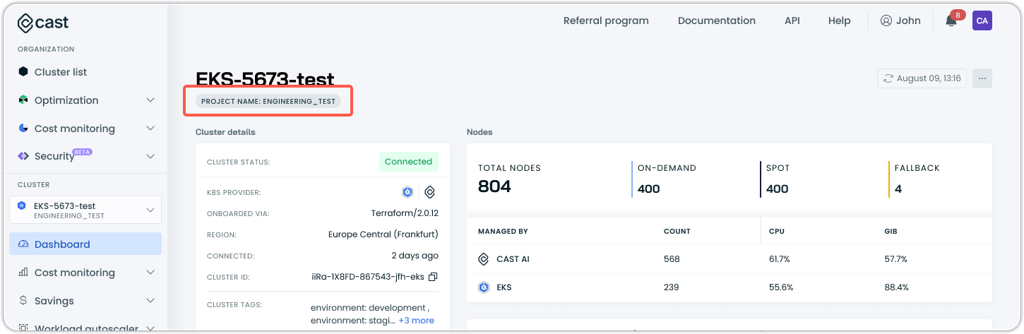
The cluster dashboard now displays additional identifying information directly under the cluster name. For AWS clusters, the account ID is shown, while GCP and Azure clusters display the project name. This makes it easier to copy and reference cluster identifiers when working with cloud provider consoles or documentation.
Price Adjustment Timestamp Tracking
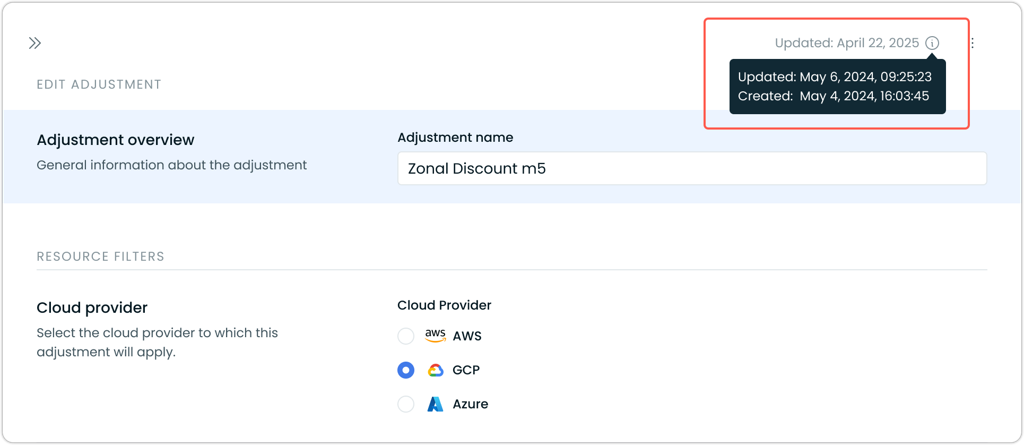
The price adjustments interface now displays creation and last updated timestamps for each adjustment. These timestamps appear in the adjustment detail drawer, providing visibility into when adjustments were originally created and when they were last modified.
Audit Log Performance Improvements
The audit log interface has been redesigned to handle high-volume scaling events and large audit records. The new implementation loads a lightweight list of events first, then fetches full event details only when users expand specific entries. This approach resolves issues where the audit log would fail to load for organizations with extremely rapid scaling activity, such as clusters scaling to 10,000+ CPUs.
The performance improvement reduces audit log page load times from approximately 10 seconds to under 1 second for high-activity clusters, while supporting larger individual audit records through increased system capacity.
Infrastructure as Code
OMNI Terraform Module Enhancements
The OMNI Terraform module now includes several improvements for managing multi-cloud edge deployments:
Simplified component installation: Liqo is now installed as a subchart within the OMNI agent Helm chart, consolidating component management into a single installation process. This simplifies onboarding by eliminating the need to manage Liqo and OMNI agent separately, and ensures version compatibility between components.
Flexible deployment options: The terraform-castai-omni-cluster module now supports excluding Helm chart installation through a dedicated parameter. This enables GitOps workflows where tools like ArgoCD manage Kubernetes resources while Terraform handles cloud infrastructure.
Cluster Onboarding
SUSE Rancher Certification
Cast AI has achieved certification as a SUSE Rancher solution partner. Cast AI Anywhere is now officially certified for use with SUSE Rancher-managed Kubernetes clusters, providing validated compatibility and support for organizations running Rancher in their infrastructure.
Terraform and Agent Updates
We've released an updated version of our Terraform provider. As always, the latest changes are detailed in the changelog on GitHub. The updated provider and modules are now ready for use in your infrastructure-as-code projects in Terraform's registry.
We have released a new version of the Cast AI agent. The complete list of changes is here.