

July 2026
Unified Umbrella Chart Migration and Commitments for Karpenter clusters
Clusters still running the older per-component Cast AI Helm releases can move to the unified umbrella chart with a single castctl command, keeping their cluster ID and any custom values. Karpenter clusters can now be covered by EC2 Instance Savings Plans, with commitments managed from the console. Workload Autoscaler alerts now also have their own notification category, and we created the corresponding alert configurations so nobody loses coverage. Elsewhere this month: add-ons for OMNI edge locations, a cost ceiling for Spot provisioning on node templates, and Windows Server 2025 on AKS.
To take full advantage of all features in this release, update your Cast AI umbrella Helm chart to version 0.43.0 or later. You can upgrade by running:
helm repo update castai-helm
helm upgrade -n castai-agent castai-agent castai-helm/castai --reset-then-reuse-values
If you manage Cast AI through Terraform, update the provider to the latest version. OMNI users should update the omni-agent chart.
Notification Changes
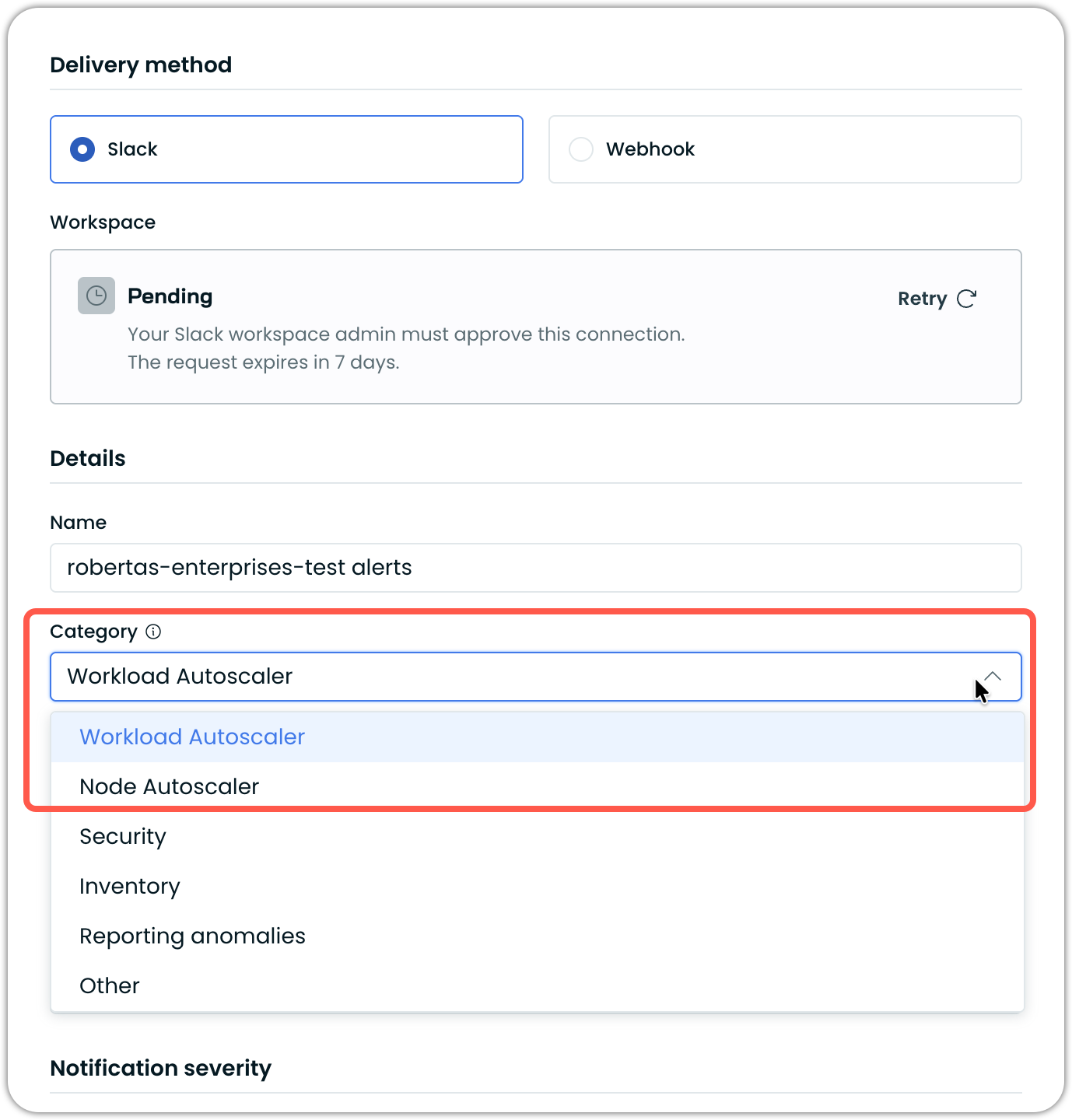
New Workload Autoscaler Notification Category
No action needed. If you had an alert configuration in the Other category, we added a matching Workload Autoscaler configuration. You will see that extra entry in the console, and your alerts continue unchanged.
Workload Autoscaler alerts, such as OOM kills and memory leaks, now have their own notification category, rather than sitting under the uncategorized Other category, where they were hard to find. Because an alert configuration can target only one category, we created matching configurations for you across both Slack and webhook channels if you previously had the Other category configured.
Major Features and Improvements
Migrate to the Unified Umbrella Chart with castctl
castctlIf your cluster was connected using individual Cast AI Helm releases, one chart per component, castctl cluster migrate consolidates them into a single unified umbrella chart. Run it against the cluster you want to migrate:
castctl cluster migrateThe command reads the currently installed standalone releases, captures their values, uninstalls them, and installs the umbrella chart with the reconstructed configuration. Your cluster keeps its Cast AI ID, carries forward any custom Helm values you supplied, and installs only the components that were already running. Clusters where the agent was installed with a raw kubectl apply rather than Helm are handled too, which covers read-only agent-only clusters. The castai-agent namespace and resources not owned by the charts are left in place.
Expect a brief interruption. The migration uninstalls the standalone releases before installing the umbrella chart, so Cast AI components are absent from the cluster during that window. Node Autoscaling and Workload Autoscaling are paused until the install completes.
If the umbrella install fails, castctl rolls back what it can and writes the captured values to a local file alongside a debug snapshot. Fix the underlying problem, then retry with that file:
castctl cluster migrate --values-file castai-migrate-values-<timestamp>.yamlIn this mode castctl skips detection and uninstall entirely and only runs the umbrella chart install.
State driftDo not use this on clusters connected with the Terraform provider or ones managed via ArgoCD, since the CLI does not coordinate with those and it will result in drift.
Shipped in castctl v0.10.2.
Commitments Support for Karpenter Clusters
Karpenter clusters can now be covered by EC2 Instance Savings Plans, joining the existing support for Reserved Instances and Compute Savings Plans. Commitments are managed in the console for Karpenter clusters, so you no longer need to use the API to view or adjust coverage.
Under the hood, node pools are managed from the commitment budget, so provisioning aligns with what you have committed to, and per-CPU offering prices for each instance family are tied to the budget, so Compute Savings Plans can be applied correctly. Node pools that currently have no nodes are skipped when cloning pools to cover a commitment.
Database Optimization
MySQL on ECS
The Database Optimizer's ECS deployment now supports MySQL. The database agent ECS module supports MySQL databases, and the MySQL ECS Fargate module includes a connection-pooling sidecar.
Workload Optimization
Two-Phase Startup Recommendations via Annotations
Two-phase startup CPU recommendations, added to scaling policies last month, can now be enabled or disabled per workload with an annotation, alongside the console and Terraform options.
See annotations documentation.
Safer Handling of Unhealthy Workloads
Two changes make Workload Autoscaler behave better around workloads that are struggling:
- The safeguard that disables optimization after repeated out-of-memory kills now also triggers when the recommendation cannot be applied, such as when a resource quota blocks it, instead of missing the workload entirely.
- When cleanup is blocked, for instance by a pod disruption budget on a crash-looping workload, Workload Autoscaler stops retrying after a bounded period and releases the workload rather than looping indefinitely.
Other Workload Optimization Improvements
Several smaller changes across Workload Autoscaler:
- First-seen resources are reported in the workload summary, so you can compare current requests against what the workload started with.
- Submitting an unchanged scaling policy no longer records an update or emits an event, which keeps the event log cleaner.
- All active errors on a workload are exposed, rather than only the first, each with a title, message, and severity.
- Horizontal recommendations no longer expire early.
- Workload charts support per-container and per-workload views.
Node Autoscaling
Maximum Price per CPU on Node Templates
Node templates accept a maximum price per CPU, providing a cost ceiling for Spot provisioning. When the adjusted Spot price per CPU rises above your threshold, Cast AI stops adding nodes to the affected pods and resumes automatically once prices fall back below that threshold. The adjusted price is the raw Spot price multiplied by the performance penalty multiplier. This is useful for batch workloads on a tight budget, where a Spot price spike could otherwise quietly push spend beyond what you planned. The setting is also available through Terraform.
Configurable Drain Concurrency for Rebalancing
You can now set the number of nodes that drain at once during a manual or scheduled rebalance. The default is unchanged, with all nodes draining together, but setting a batch size lets you control the blast radius of a large rebalance. The overall drain timeout is calculated from the batch size and node count, so a deliberately low concurrency setting does not cause a timeout on its own.
Instance Category Targeting on EKS
Building on top of the workload-level instance constraints introduced last month, EKS nodes now carry a scheduling.cast.ai/instance-category label, so a workload can target a broad class of instances without enumerating every instance family by name. Use c for compute-optimized or m for general-purpose.
Spot Reliability with Custom Instance Family Priority
When a node template specifies a custom instance family priority, Spot reliability scores are now applied within each priority group rather than being skipped entirely. You get your preferred families in the order you set, with the most reliable Spot options chosen inside each tier.
GPU Sole-Tenant Node Packing
GCP sole-tenant node configurations accept an explicit GPU-to-vCPU ratio, so you can specify the shape you want, such as 1 GPU to 12 vCPUs or 2 GPUs to 24 vCPUs, rather than relying on whatever the autoscaler assembles at that moment. Because GCP will not run VMs without GPUs attached on a GPU-enabled sole-tenant host, vCPU capacity left over after provisioning is stranded for the life of the host, so getting the ratio right matters. The node templates table also shows a Sole Tenant count alongside the existing Spot, Fallback, and On-Demand counts.
For more information, see Node templates documentation.
Rebalancing and Provisioning Compatibility
Rebalancing and provisioning handle a few more cluster setups correctly:
- Pods annotated with cluster-autoscaler.kubernetes.io/daemonset-pod are treated as DaemonSet pods during rebalancing, matching upstream behavior. This unblocks rebalancing on clusters running the AWS Mountpoint S3 CSI driver v2.5.0 and later, whose node agent pods are pinned to a node but have no DaemonSet owner.
- AWS instance types that cannot provide the requested ENA queue count per interface are filtered out during provisioning.
- The endpoint for canceling a rebalancing plan is now published in the API reference and documented.
- The dead node timeout is longer for edge nodes, so a slow-to-provision edge node is not removed mid-provisioning.
Cluster Onboarding and Node Configuration
Cluster Discovery and Configuration Import with castctl
castctlThe automatic node configuration import introduced last month is now driven end-to-end by castctl. Discovery reads your EKS cluster's node groups and autoscaling groups, generates matching node configurations and node templates, including each group's subnets and discoverable constraints, and presents the result as a plan you can review before applying it with castctl apply-config. The console output has been cleaned up, so the plan is readable. Discovery also accounts for existing node templates and configurations, so re-running it does not duplicate what is already there, and the import runs automatically as part of onboarding.
Hibernate Reliability
Resuming a hibernated cluster is hardened against several more conditions that could previously leave a resume stuck partway:
- On AKS, cluster start and stop are used so that system node pools are not forcefully un-hibernated.
- Resumption succeeds on clusters running node-local DNS without CoreDNS on the resume node.
- Webhooks that would block resumption are detected up front and reported as a prerequisite or warning.
- A node deletion that times out during hibernation is retried rather than failing the operation.
- Cloud API throttling responses and transient AWS internal errors are treated as retryable.
- Component readiness is evaluated against the current cluster state rather than a stale snapshot.
Ubuntu 24.04 on AKS
AKS node configurations support Ubuntu 24.04. The existing Ubuntu image family now resolves to 22.04 or 24.04, depending on your Kubernetes version, and explicit Ubuntu 22.04 and Ubuntu 24.04 options are available if you need to pin one. This matters because Azure does not support Ubuntu 22.04 on Kubernetes 1.36, and AKS is deprecating 22.04 in June 2027.
See AKS image family support documentation for more information.
Windows Server 2025 on AKS
Windows Server 2025 is supported on AKS clusters running Kubernetes 1.32 or later with Windows support enabled.
Where you have not set an image family explicitly, the Windows version Cast AI provisions follow your Kubernetes version:
- Below 1.33: Windows Server 2019
- 1.33 up to 1.37: Windows Server 2022
- 1.37 and later: Windows Server 2025
Kubernetes 1.37 is not yet released, so nothing changes for your existing clusters today. A cluster without an explicit image family moves to Windows Server 2025 when you upgrade it to 1.37.
See AKS image family support documentation for more information.
GCP Capacity Reservations
GCP capacity reservations are synced from your project as a commitment type and exposed through the API, and the autoscaler can provision into them on GKE.
See GCP capacity reservations documentation.
Node Configuration Additions
Node configurations pick up several more settings and smarter defaults:
- The ENA queue count per interface can be set in the node configuration.
- The pod subnet ID is exposed in the AKS node configuration.
- GPU-capable AWS instance types are detected from the instance inventory rather than a maintained list, so newly released GPU instance types are picked up as AWS publishes them.
- Direct node bootstrap is rolled out for AKS.
See Node configuration documentation for these updates.
Restricted Pod Security Profile Support
The cluster-controller and pod-mutator now ship with the security context settings required by the Kubernetes Restricted pod security profile, so they run on clusters that enforce it without per-component exceptions.
Karpenter Enterprise Suite
Clearer Rebalancing Outcomes
Rebalancing plans that do not run are now reported accurately rather than appearing as failures. A plan that was evaluated but did not meet its execution criteria, such as projected savings below your minimum threshold, is shown as Skipped rather than Failed. Plans that fail because the cloud provider had no capacity report insufficient capacity as the reason, rather than an unknown error, so a temporary cloud limitation reads as one.
Reliability Metrics Without Extra Configuration
Enabling reliability metrics on a Karpenter cluster now brings up the agent that collects them in the same step, so there is no separate configuration to apply.
Shipped in castctl v0.10.1.
Rebalancing Controls
Continuous rebalancing gains more control over when and how it acts:
- Rebalancing schedules can require a minimum level of guaranteed savings before executing, configurable in the console.
- Pods can be marked disposable with the autoscaling.cast.ai/disposable annotation, matching how this already works elsewhere in Cast AI, instead of only through the advanced eviction configuration.
- Aggressive eviction, handling of PDB-blocked pods, and the drain timeout are treated as related settings with sensible defaults, so enabling one does not leave deletions blocked.
- When several node disruption budgets apply, the under-utilized one is used.
- The remaining continuous rebalancing parameters are exposed in the API, so they can be read and set without environment variables.
Node Overlays
Node overlays are exposed in the API, with overlays you created distinguishable from those Cast AI creates for price adjustments. Changes to node overlays are recorded in the event log.
Event Log and Connectivity
Karpenter clusters are better represented in the Event Log and more tolerant of losing their connection to Cast AI:
- Karpenter and Cast AI events on Karpenter clusters appear in the organization Event Log.
- A dropped connection to Cast AI no longer restarts the controller. It keeps running and resumes when the connection returns.
- Eligibility detection recognizes clusters where the controller is already installed.
- Kentroller status is now exposed in the API, providing additional observability details about the component and its stream.
Persistent Volume Optimization
Configuration and Dry-Run Visibility
Persistent Volume Optimization gains a Configuration page showing the settings currently in effect, read-only for now. When the volume monitor is running in dry-run mode, a banner says so, and a summary widget reports how many actions would have been taken if it were enabled. Volumes with a pending suggestion are marked in the table and on the volume detail page, so you can see what optimization would do before turning it on. A separate view reports the state of the underlying data sources, so it is clear whether storage statistics, cloud disk collection, and the volume monitor are each in place.
See Storage autoscaling documentation for more information and configuration options.
Filtering, Coverage, and Charts
The persistent volumes views pick up filtering, clearer coverage, and more readable charts:
- The persistent volumes list can be filtered, with available values suggested per filter.
- A managed-versus-monitored widget on the dashboard, with the same information on the volume table and detail view, makes coverage clear at a glance.
- Volumes flagged as urgent show the specific metric and value behind the flag.
- Size, IOPS, and throughput charts mark the baseline and maximum for the disk type, so a volume at its floor no longer looks underutilized.
- Used and provisioned values remain distinguishable on the detail charts when they are equal.
- Resize events have moved into the drawer.
OMNI
Edge Location Add-Ons
You now choose which add-ons to install on an edge location, rather than having every available component deployed by default. Fewer components means faster provisioning, less resource usage on the edge, and no chance of an unused component failing and blocking node provisioning.
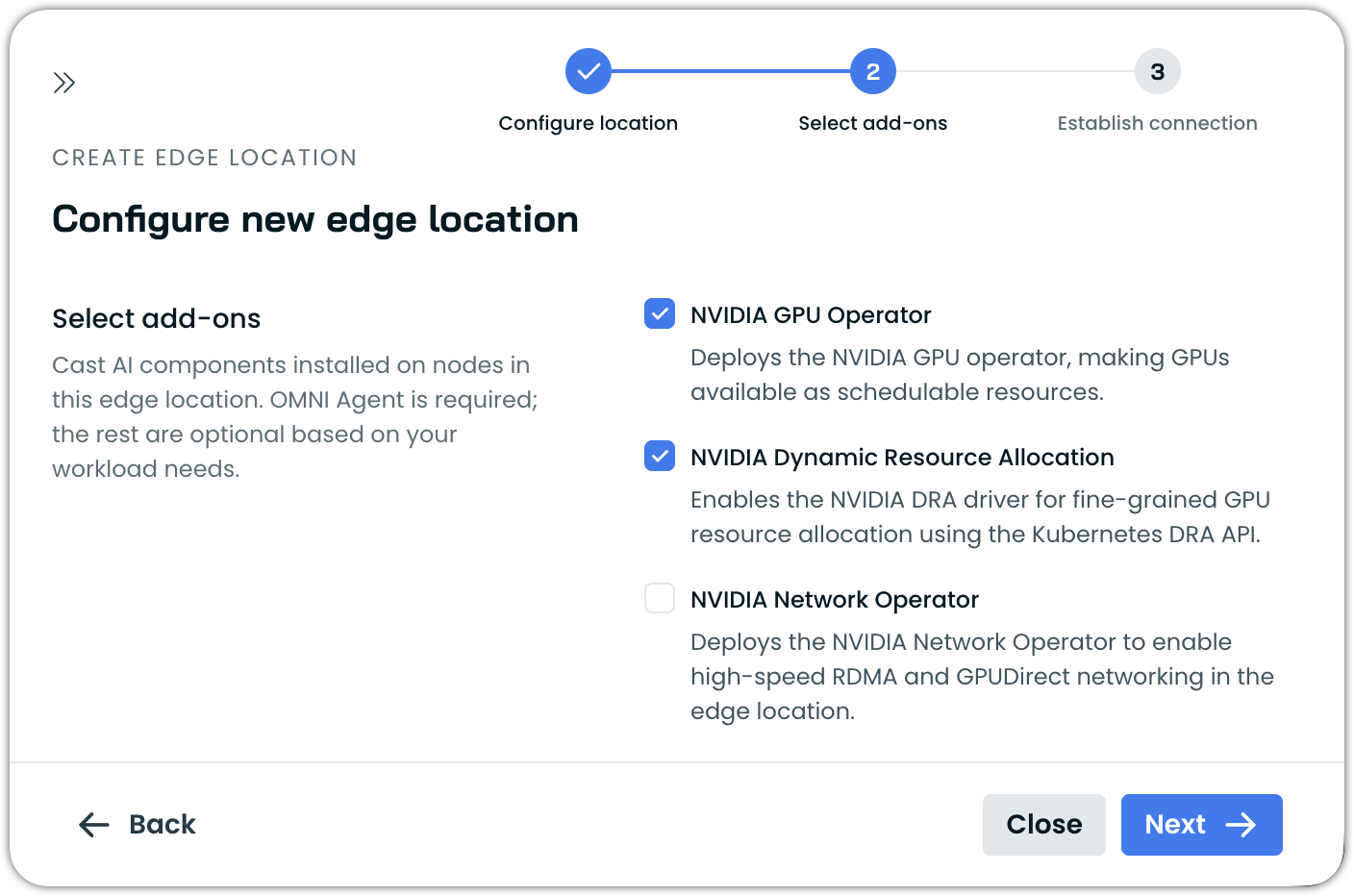
Add-ons can be selected when you create an edge location and changed afterward, and each one reports its own status as it is installed or removed. Add-ons are also configurable through the Terraform modules.
Edge Configuration and Edge Provisioning in the Console
Edge Configurations have a full console journey. A new Edge Configurations tab under Node Autoscaler configuration lists them, including the default configuration created for each edge location, and lets you create, update, and delete configurations scoped to a specific edge location. The edge provisioning flow has been tidied up so the selected edge location is visible at each step, and the labels match what they refer to.
GPU and High-Performance Networking
Edge provisioning now covers more of the setup that GPU and high-performance networking workloads need:
- RDMA and InfiniBand are configured automatically as part of edge provisioning rather than requiring a manual network operator install.
- Dynamic Resource Allocation is supported, with the required components installed and edge nodes provisioned with DRA enabled.
Edge Node Improvements
Edge nodes are easier to target and work in more environments:
- Workloads with topology spread constraints are scheduled onto edge nodes correctly.
- Edge nodes carry an
omni.cast.ai/edge-node: truelabel, so node selectors can target them with a Cast AI label. - Edge provisioning is supported on GKE/AKS/EKS clusters onboarded via Cast AI Anywhere to OMNI. This is for cases when traditional CSP clusters use native autoscalers, for example.
- Separate storage classes are available per volume type, covering local path storage and OCI block and file storage.
- The gateway template supports affinity and node selectors.
- GKE clusters with intra-node visibility enabled are rejected during onboarding with a clear error message, and this limitation is documented.
Container Live Migration
Capacity Handling During Migrations
Handling of insufficient capacity on the destination node during migration has been improved. When insufficient capacity is detected, additional capacity is now provisioned to allow the migration to proceed.
Global Parallel Migration Limit
The limit on parallel migrations can now be applied globally rather than only per workload group. Leaving the grouping empty puts all workloads in one group, which gives you a single ceiling on how many migrations run at once cluster-wide.
Failing Fast and Health Checks
Two changes surface migration problems sooner:
- A migration is abandoned up front when the container image cannot be found, instead of removing the source pod for a migration that was always going to fail.
- A health check marks a node as not live-migratable when its container runtime changes underneath it, so the problem surfaces immediately rather than at the next migration.
Reporting
List and Discounted Prices on the Cluster List
The cluster list summary can report list prices and discounted prices, bringing it in line with the other cost reports.
Cluster-Level OOM Kill Breakdown
The cluster OOM kill chart is now explorable. Selecting a point in the chart shows which workloads were killed, so you can go from "something is being OOM-killed in this cluster" to the specific workload without hunting. On the workload page, the OOM chart follows the container selector, so in a multi-container workload, you see the kills for the container you are looking at.
Other Reporting Improvements
Several smaller reporting fixes:
- The monthly total on the cluster network cost screen now matches the sum of the per-namespace network costs.
- GPU metrics are processed for Cast AI Anywhere clusters.
- Re-running
castctl cluster connecton a cluster with reliability metrics enabled no longer removes the ClickHouse operator, so later changes still apply. - The reliability metrics components scale themselves to the load on each node instead of running into memory limits.
OpsPilot
Explain a Recommendation
Workload Autoscaler recommendations have an Explain recommendation action that passes the recommendation to OpsPilot for analysis. Rather than pasting a large payload into chat, OpsPilot reads the recommendation directly and explains how the values were arrived at, which is the question most often asked about a recommendation.
Organization Management
Event Log Improvements
The Event Log picks up refinements from the first month of use:
- A share button in the event drawer copies a direct link to that event.
- Quick filters are served from the backend with their display names and values, so the filter list reflects what is actually in your event log.
- Notification channel operations are recorded. Connecting or removing a Slack workspace and creating, updating, or deleting a Slack or webhook notification configuration now all appear in the log.
- Event actions use a single, consistent vocabulary across all services, so filtering by action behaves predictably regardless of which part of the platform emitted the event.
Deprecations
Cluster-Level Minimum CPU
The cluster-level minimum CPU setting is deprecated. It was respected only by the node downscaler, while the Evictor and the Rebalancer ignored it, making its behavior inconsistent and hard to reason about. The setting is hidden in the console and marked deprecated in Terraform, where a warning is emitted on plan and apply. The cluster-level maximum CPU setting is unaffected and remains fully supported.
AWS Rebalance Recommendations in Interruption Prediction
Spot interruption prediction no longer offers a choice of prediction source. AWS rebalance recommendations have been removed as an option, and the Cast AI model is used in all cases. Clusters currently configured to use AWS rebalance recommendations are automatically moved to the Cast AI model, and Terraform remains backward-compatible. Enabling interruption prediction is now a single toggle with nothing further to choose.
Terraform and Agent Updates
We've released an updated version of our Terraform provider. The latest changes are detailed in the changelog on GitHub, and the updated provider and modules are ready for use in your infrastructure-as-code projects via Terraform's registry.
We have also released a new version of the Cast AI agent. We ship agent updates multiple times a month, so staying current matters if you want the latest fixes and features as they land.
To upgrade in-place on a cluster:
helm repo update castai-helm
helm upgrade -n castai-agent castai-agent castai-helm/castai --reset-then-reuse-values
If you're managing the agent through GitOps, bump the castai-agent chart version in your manifest (Helm chart, ArgoCD Application, etc.) and let your reconciler roll out the upgrade. You can also use the Component Control dashboard in the Cast AI console to upgrade the agent directly.