

November 2025
Karpenter Enterprise Suite, OMNI Terraform Support, and Expanded Operator Component Management
This month, we're introducing Karpenter Enterprise Suite, bringing enterprise optimization capabilities to clusters running open-source Karpenter without requiring a replacement of your existing setup. On the workload optimization front, the new Impact Dashboard provides real-time visibility into savings as they occur, while startup failure detection and pod-level resource support improve optimization reliability. OMNI gains full Terraform support for automated multi-cloud deployments, and AWS users can now leverage fractional GPUs for cost-effective AI workloads. We've also expanded the Cast AI Operator to manage Spot Handler and Cluster Controller, further simplifying component lifecycle management.
Major Features and Improvements
Karpenter Enterprise Suite (Early Access)
Karpenter Enterprise Suite brings enterprise optimization capabilities to clusters running open-source Karpenter. Rather than replacing Karpenter, this integration layers Cast AI's node autoscaling, workload rightsizing, and Spot intelligence features on top of your existing Karpenter deployment.
Organizations running Karpenter at scale often encounter gaps that open-source Karpenter doesn't address. Karpenter Enterprise Suite addresses these gaps while preserving your existing Karpenter configuration.
Key capabilities:
- Consolidation with minimal disruption: Evictor coordinates with Workload Autoscaler and Container Live Migration to improve node utilization while minimizing workload disruption
- Cluster rebalancing: Identifies nodes that could be replaced with more cost-effective alternatives across NodePools
- Spot interruption prediction: Identifies at-risk nodes up to 30 minutes before interruptions occur, extending AWS's standard two-minute warning for graceful workload migration
- Workload rightsizing: Continuously adjusts resource requests to match actual utilization, enabling better bin-packing and reducing total compute capacity requirements
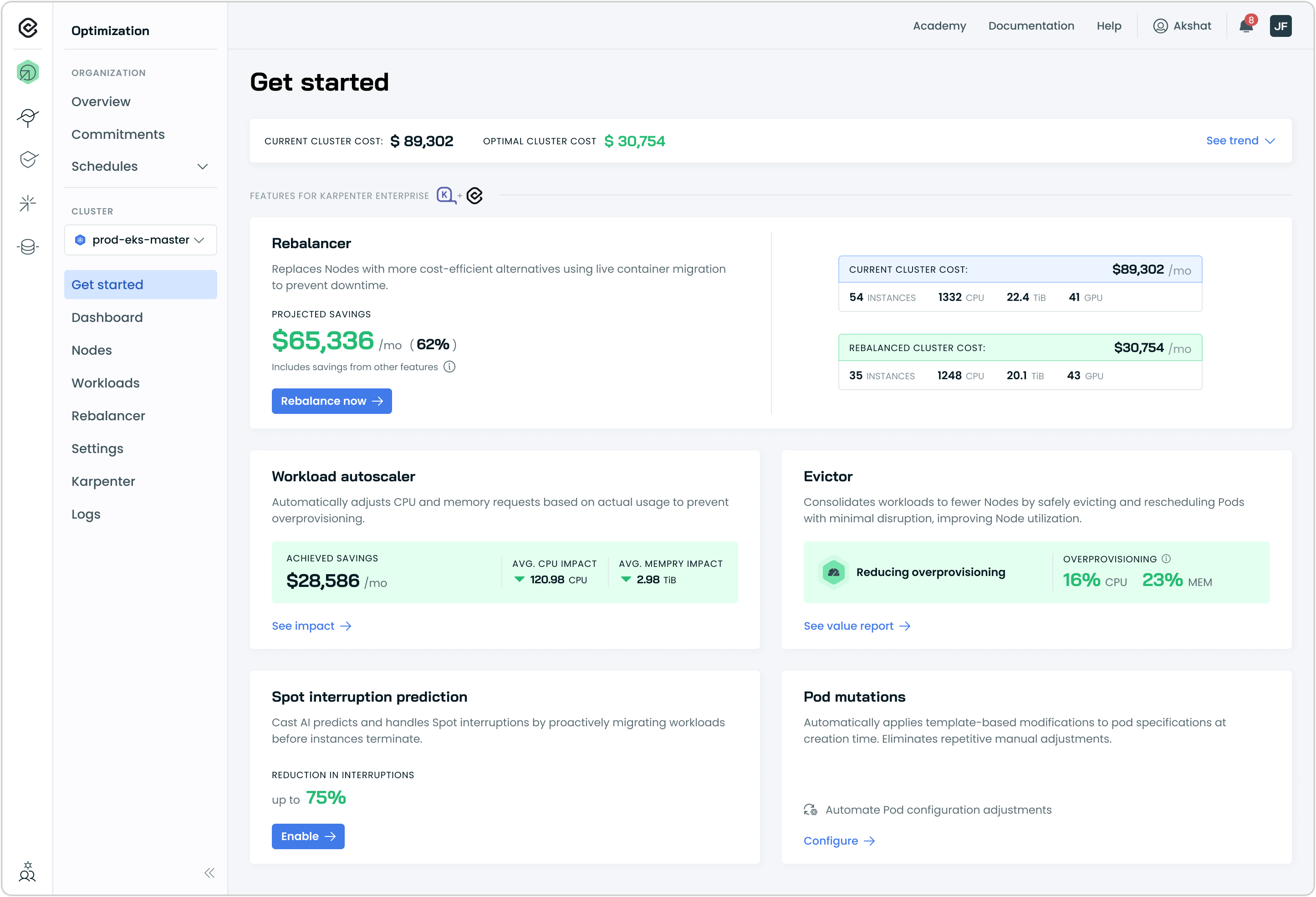
Karpenter Enterprise Suite uses a CRD-first approach that maintains Kubernetes-native configuration patterns. Cast AI components work alongside Karpenter, guiding its decisions through CRD modifications rather than replacing its core functionality. Your NodePools and EC2NodeClasses remain the source of truth, and rollback is straightforward.
Karpenter Enterprise Suite is currently available in early access for EKS clusters. For setup instructions, see our Karpenter Enterprise Suite documentation.
Cloud Provider Integrations
EKS
Fractional GPU Support for AWS EKS
Cast AI now supports AWS EC2 G6 instances with fractional NVIDIA L4 GPUs, enabling workloads to use portions of a GPU rather than requiring full GPU capacity. This provides significant cost savings for development, light inference, and batch processing workloads that don't need complete GPU resources.
Fractional GPUs are available from AWS in sizes ranging from 1/8 GPU (3 GB memory) to 1/2 GPU (12 GB memory), pre-partitioned for use. Unlike time-slicing or MIG configurations that require setup, fractional GPUs work out of the box—enable the option in your node template, and Cast AI automatically considers G6 fractional instances when provisioning GPU nodes.
Key capabilities:
- Flexible sizing: Choose from 1/8, 1/4, or 1/2 GPU fractions based on workload requirements
- Automatic selection: Let Cast AI's autoscaler choose the most cost-effective option, or target specific fraction sizes using the
scheduling.cast.ai/gpu.countlabel - Combinable with time-slicing: Stack time-slicing on top of fractional GPUs for maximum density (e.g., 4 workloads sharing a 1/8 GPU)
- Supported images: Bottlerocket and Amazon Linux 2023
To enable fractional GPUs, set Fractional GPUs to Yes in your node template's instance constraints:
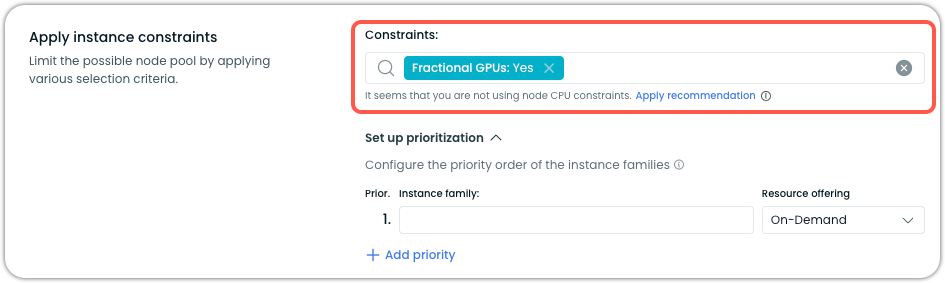
For configuration details and workload examples, see our Fractional GPUs documentation.
Cluster Onboarding
Spot Handler Included in Phase 1 Onboarding
The Spot Handler component is now installed by default during Phase 1 cluster onboarding. This enables Spot interruption detection and reporting for read-only clusters before they transition to full Cast AI management in Phase 2.
In Phase 1, the Spot Handler operates with read-only permissions, allowing it to monitor and report Spot Instance interruption events without requiring write access to cluster resources. Upon upgrading to Phase 2, the component automatically gains the additional permissions needed for active workload management during interruption events.
Expanded Component Management in Cast AI Operator
The Cast AI Operator now manages more cluster components, extending automated lifecycle management to Spot Handler and Cluster Controller.
Spot Handler support:
- Phase 1 onboarding now includes Spot Handler enablement via the Operator
- Clusters with existing Spot Handler installations are automatically updated upon Operator installation
- Terraform-managed clusters can define Spot Handler as an Operator-managed component
Cluster Controller support:
- Phase 2 onboarding now includes Cluster Controller management via the Operator
- The Operator inherits the same permissions required by Cluster Controller
These additions simplify component lifecycle management by centralizing updates through the Operator. See Operator documentation for details.
Workload Optimization
Impact Dashboard
A new Impact dashboard provides real-time visibility into Workload Autoscaler optimization results, displaying cost savings and resource efficiency improvements as they occur. The dashboard enables teams to see quantifiable value within hours of enabling optimization rather than waiting for a full billing cycle.
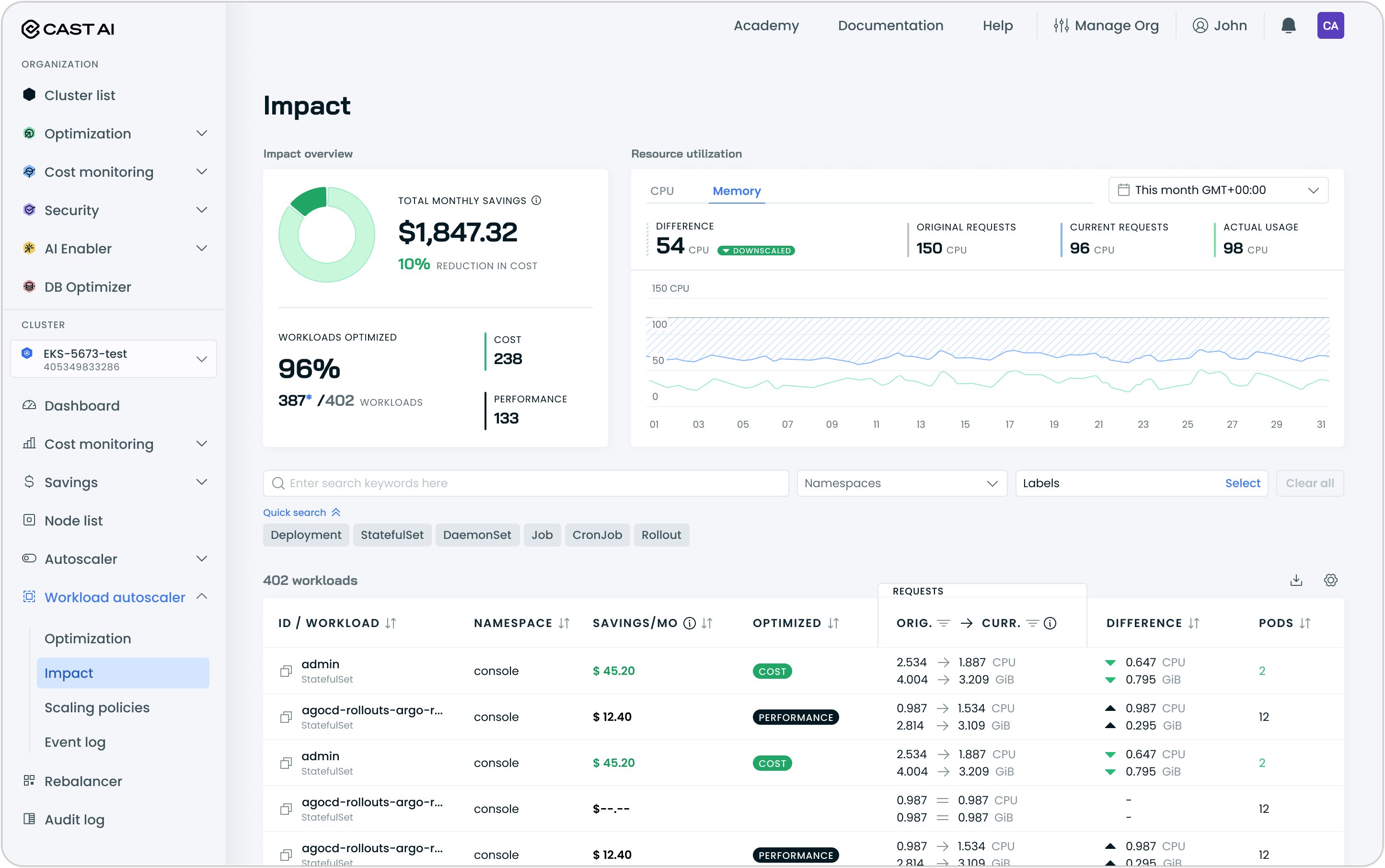
The dashboard displays:
- Total savings: Monthly cost savings with percentage reduction
- Workloads optimized: Count of optimized workloads with a breakdown between cost-optimized (downscaled) and performance-optimized (upscaled)
- Resource utilization graphs: CPU and memory usage over time, comparing original requests, current requests after optimization, and actual usage
- Per-workload breakdown: Individual workload savings, optimization status, original vs. current resource requests, and resource differences
Access the Impact dashboard under Workload Autoscaler in the cluster navigation.
Pod-Level Resources Support
Workload Autoscaler now supports workloads that use Kubernetes pod-level resources, a feature enabled by default in Kubernetes v1.34. When workloads define resource requests and limits at the pod level rather than the container level, Workload Autoscaler automatically detects this configuration and converts it to fine-tuned container-level values during optimization.
This handling is automatic and requires no configuration changes or manifest updates. Workloads using pod-level resources are optimized normally, with the UI properly tracking original pod-level requests alongside the optimized container-level values.
Requires Workload Autoscaler v0.65.0 or later.
Startup Failure Detection
Workload Autoscaler now automatically detects and responds to startup and readiness probe failures. When probe failures are detected during workload startup, the system automatically adds a 20% overhead to both CPU and memory recommendations to help applications start successfully. This overhead gradually decays over time, similar to out-of-memory handling, balancing startup reliability with ongoing optimization.
This addresses a common challenge where optimized resource recommendations are sufficient for steady-state operation but can cause CPU exhaustion during application startup, particularly when multiple workloads restart simultaneously.
Requires Workload Autoscaler Exporter v0.60.0 or later, which is installed by default during cluster onboarding.
Evictor for Workload Autoscaler-Only Deployments
Evictor is now available as part of the Workload Autoscaler onboarding flow for clusters that don't use Cast AI's node autoscaler. Previously, Evictor was only accessible to customers using full Phase 2 automation. Now, organizations using Workload Autoscaler standalone can benefit from Evictor's workload consolidation capabilities alongside rightsizing recommendations.
During Workload Autoscaler installation, Evictor is automatically installed but not enabled. After installation, enable Evictor directly from the Workload Autoscaler page or through the Autoscaler settings.
For more information, refer to Evictor documentation.
Custom Metrics Exporter for Cast AI Anywhere Clusters
The Workload Autoscaler Exporter component is now installed on Cast AI Anywhere clusters, enabling Workload Autoscaler to access PSI (Pressure Stall Information) metrics for resource optimization. This extends the same workload metrics capabilities available on managed cloud clusters to Anywhere deployments, improving recommendation accuracy for self-managed, on-premises, and other Cast AI Anywhere Kubernetes environments.
OMNI
Terraform Support for OMNI
OMNI can now be fully managed through Terraform for GKE and EKS clusters, with AKS support in development. There are two options to enable OMNI:
- Existing modules: Add
install_omni = trueto your terraform-castai-eks-cluster or terraform-castai-gke-cluster configuration - Dedicated module: Use terraform-castai-omni-cluster for more flexibility, with examples available for each Kubernetes provider
Once OMNI is enabled on a cluster, edge locations can be added using provider-specific Terraform modules.
The Cast AI Terraform provider also includes a castai_edge_location resource for defining edge locations with full configuration, including region, availability zones, VPC settings, and security groups directly in Terraform configurations.
This enables automated provisioning of multi-region and multi-cloud OMNI deployments alongside existing cluster infrastructure.
Spot Interruption Handling for Edge Nodes
OMNI edge nodes now include the labels required for Spot interruption handling, enabling proactive workload management before Spot Instance terminations occur. Edge nodes provisioned as Spot Instances are automatically labeled with the necessary identifiers, allowing the Spot handler to detect pending interruptions and report them to the platform.
This improvement ensures that Spot Instances in edge locations receive the same interruption handling capabilities available for nodes in the main cluster region.
Edge Location Reconciliation
OMNI now validates cloud resources for edge locations during the cluster reconciliation process. If resources required for an edge location are missing or misconfigured—whether due to manual changes, infrastructure-as-code overwrites, or security policy enforcement—the edge location is automatically marked as failed and excluded from Autoscaler instance selection.
Reconciliation runs on schedule or can be triggered manually via the console UI or API.
Cost Monitoring
Idle Resources Report
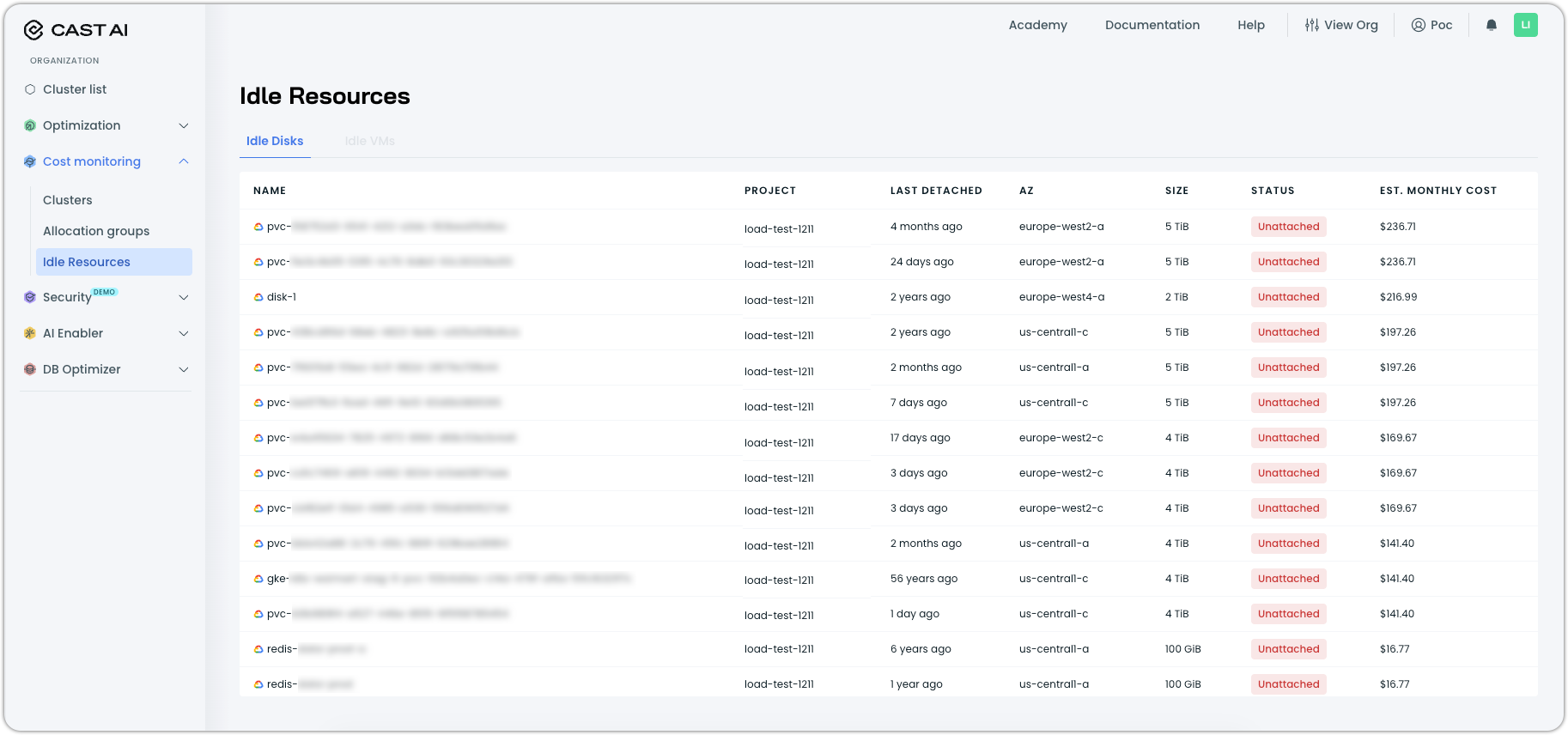
A new organization-level report helps identify cloud resources that persist after their associated clusters are deleted, accumulating costs without providing value. The Idle Resources report surfaces unattached disks and other forgotten infrastructure components that result from default cloud provider behaviors, such as persistent volumes retained after GKE cluster deletion.
The initial release supports the detection of idle disks in Google Cloud Platform, with AWS and Azure support planned. The report displays resource details, including name, project, last detached date, availability zone, size, and estimated monthly cost. Access requires Cloud Connect to be configured for your organization.
Navigate to Idle resources under Cost monitoring in the left sidebar to access the report:
Redesigned Available Savings Page
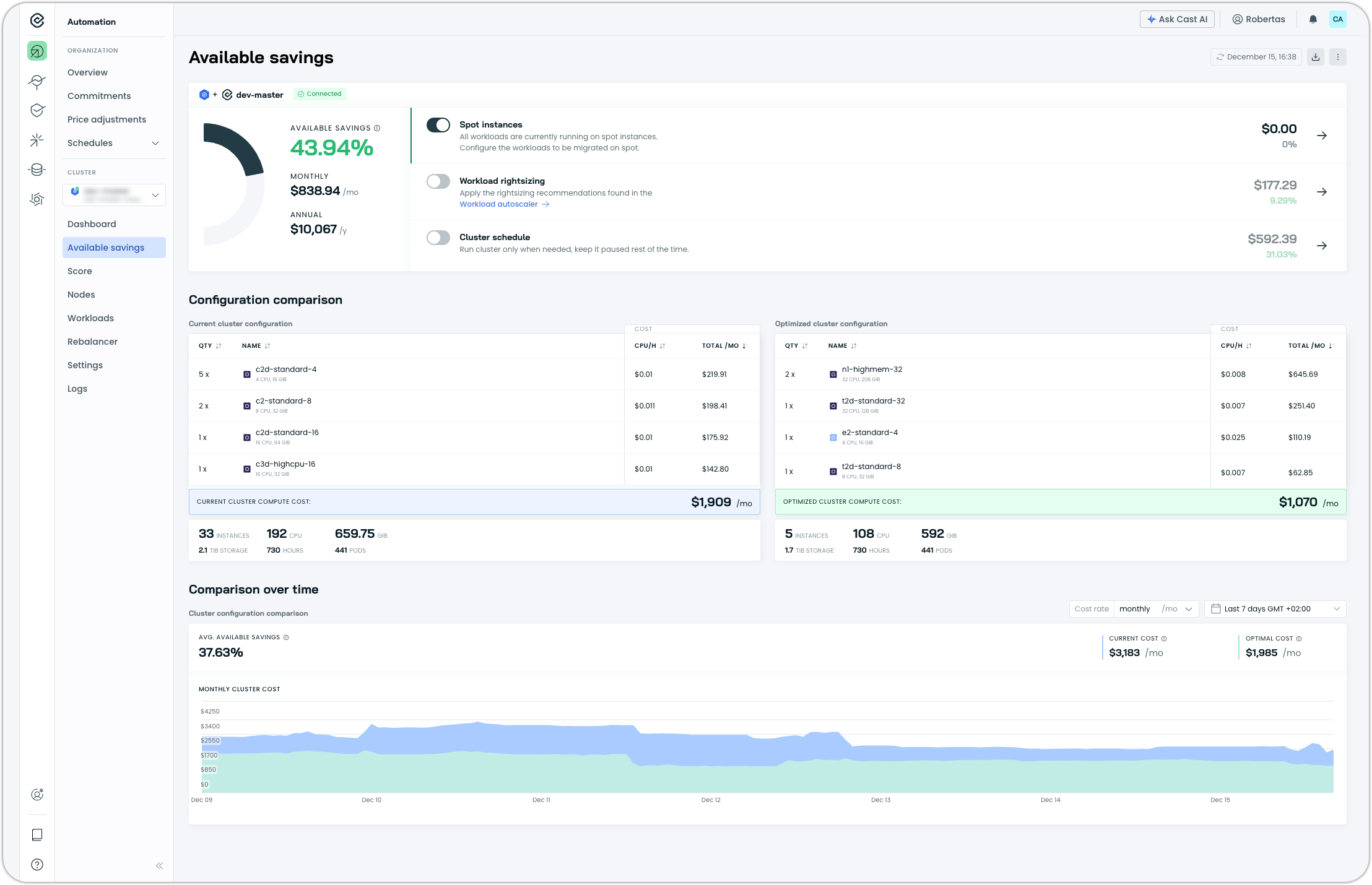
The Available Savings page has been redesigned to provide clearer visibility into optimization opportunities across your clusters. The updated interface replaces the previous Potential Savings page with an improved layout that highlights actionable savings categories and cluster configuration comparisons.
This redesign provides a more actionable view of where savings can be realized and how cluster configurations would change after optimization.
Database Optimization
Automatic Logical Database Discovery
Database Optimizer now automatically discovers logical databases receiving traffic without requiring manual configuration. Previously, users needed to explicitly define each logical database before DBO could begin caching and collecting metrics. The proxy now accepts traffic for all databases and automatically creates the necessary resources in the background as new databases are detected.
This simplifies the onboarding experience by eliminating manual database specification steps, allowing customers to start gaining insights and optimization benefits immediately.
Terraform Support for Cache Management
The Cast AI Terraform provider now includes resources for managing Database Optimizer cache configurations as infrastructure-as-code. Teams can define cache groups, database configurations, and caching rules directly in Terraform, enabling version-controlled and repeatable DBO deployments.
New resources include:
castai_cache_group: Define cache groups with database endpoints for PostgreSQL or MySQL instancescastai_cache_configuration: Configure caching behavior per logical databasecastai_cache_rule: Set TTL policies for specific tables or query templates
A companion Terraform module (terraform-castai-dbo) is available to deploy the DBO proxy to your Kubernetes cluster with customizable resource settings.
See the cache_group, cache_configuration, and cache_rule documentation in the Terraform Registry.
Direct Mode for Cache Debugging
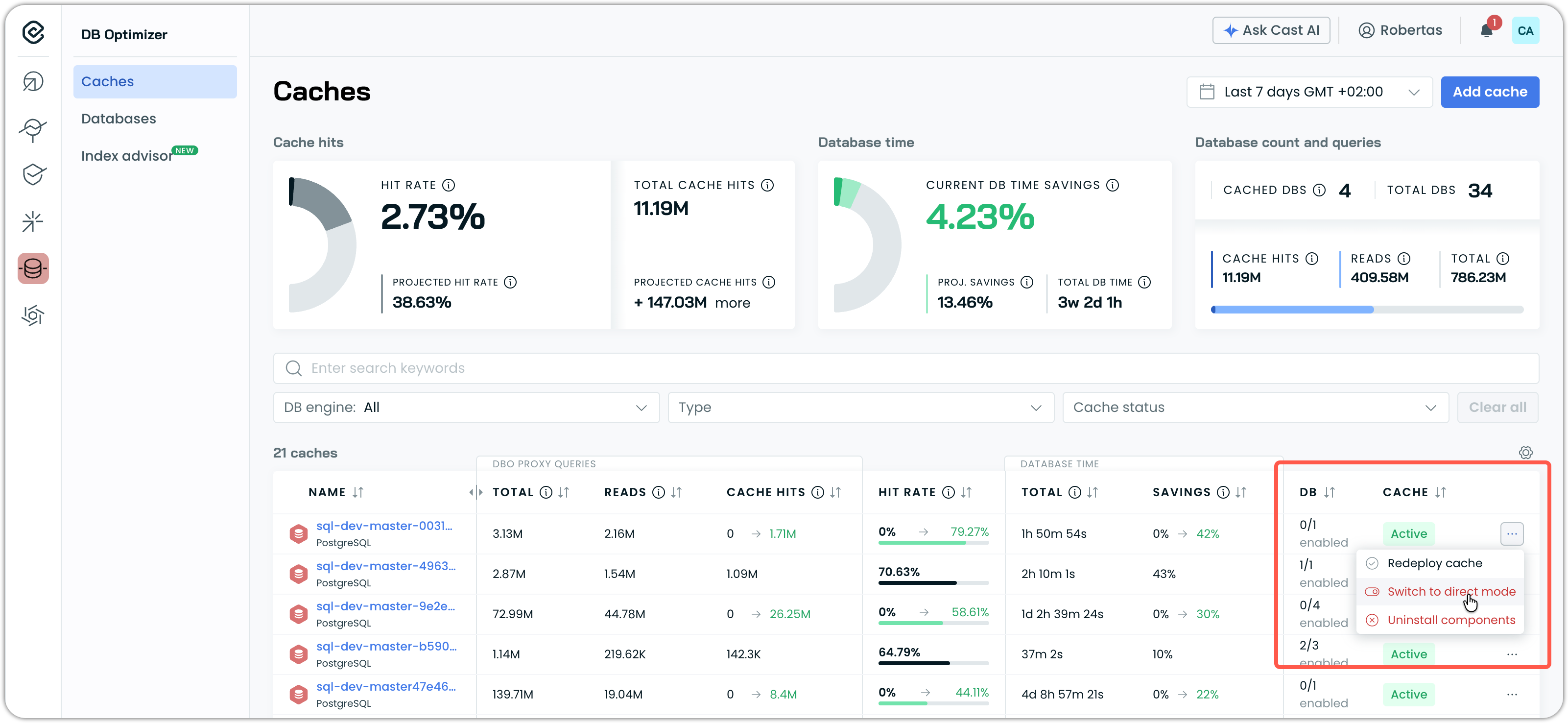
Database Optimizer now supports a direct mode option that bypasses DBO proxy processing and caching entirely. When enabled, queries pass through to the database, allowing for isolation of whether performance or stability issues originate from the cache layer or the underlying database.
Direct mode can be enabled per cache through the cache list context menu. The cache status updates to "Pending" while the configuration is applied, and a tooltip indicates when direct mode is active. This feature is intended for debugging scenarios and should be disabled after troubleshooting to restore caching benefits.
AI Enabler
AWS Bedrock Integration
AI Enabler now supports AWS Bedrock as a SaaS provider, enabling users to route requests to Bedrock-hosted models through AI Enabler.
The integration supports multiple authentication methods, including IAM Role, Access Key/Secret, and API Key. Available models today include the Claude family (Claude 3 Haiku and Opus, Claude 3.5 Haiku and Sonnet, and the Claude 4.x series) as well as Llama models (Llama 3, 3.1, and 3.2 variants ranging from 1B to 70B parameters).
Expanded Model Support
AI Enabler added support for additional language models:
- GLM-4.6: High-performance bilingual (Chinese-English) language model
- Qwen3-235B-A22B: Large-scale mixture-of-experts model from Alibaba's Qwen family
These additions expand AI Enabler's model catalog for routing and provider registration.
For the complete list of available models, see the AI Enabler documentation, which includes instructions for querying the API endpoint with the most up-to-date model catalog.
Improved Hosted Model Status Reporting
Hosted model deployments now display a "Warning" status for temporary issues such as crash loops or extended GPU unavailability, distinguishing these recoverable conditions from permanent failures. Previously, both temporary and permanent issues were reported as "Failed," which made it unclear whether a model might recover and prevented users from stopping or deleting models that were still consuming resources.
Demo Mode
AI Enabler now includes a demo mode that allows users to explore the interface using realistic sample data without requiring a connected cluster or live model providers. Demo mode provides access to the full Cost/Savings Report, Managed Models view, and Hosted Models view, making it easier to evaluate AI Enabler capabilities before deployment.
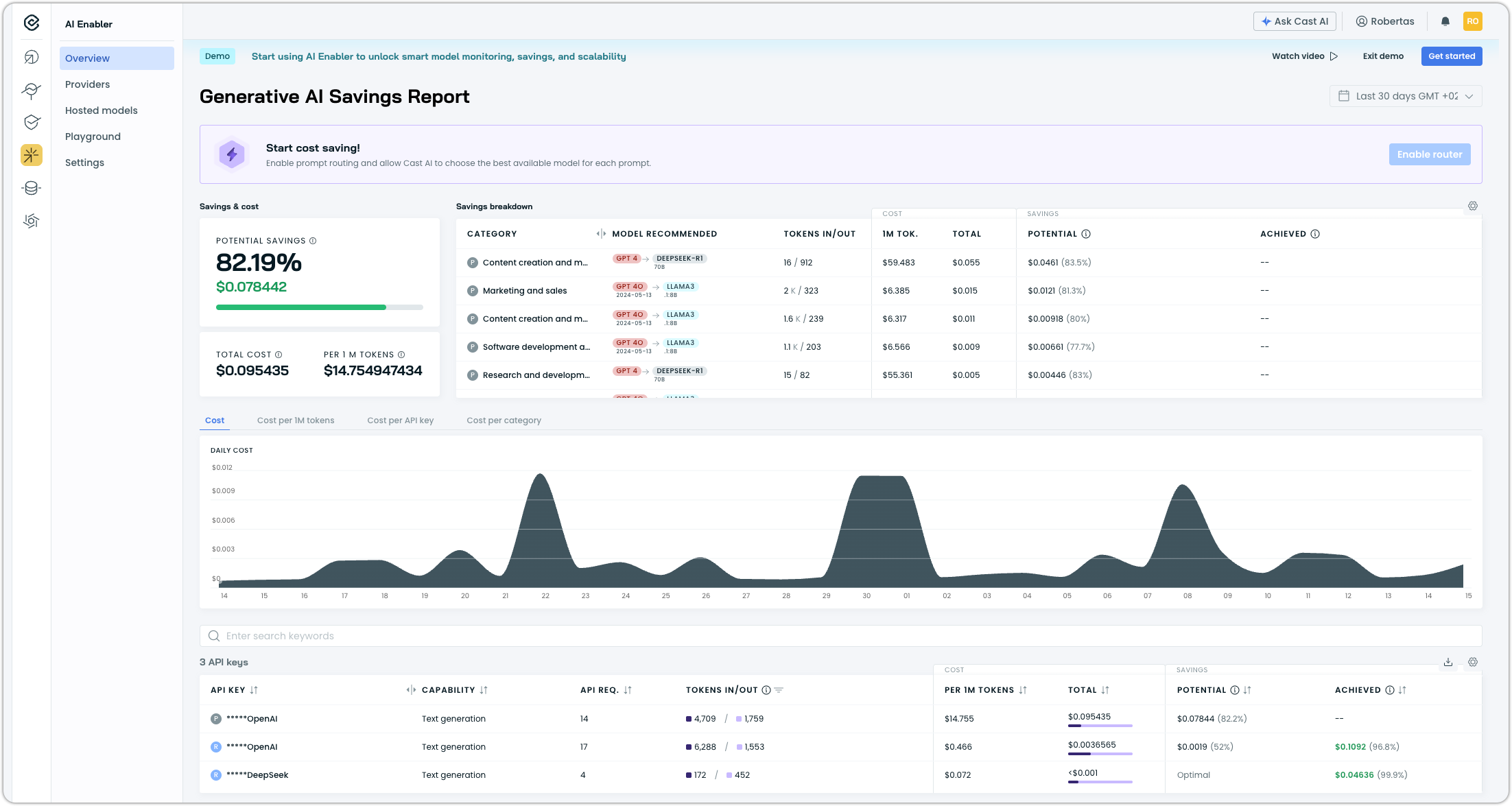
Access demo mode by clicking Try Demo in the AI Enabler section of the console.
Simplified GKE Load Balancer Configuration for AI Enabler Proxy
The AI Enabler Proxy Helm chart now uses the same port for health checks as the proxy service itself, removing the need for custom BackendConfig resources when deploying on GKE. The chart also accepts custom annotations for the proxy service, making it easier to configure cloud provider-specific load balancer settings without modifying the chart directly.
Kubernetes Security Posture Management
Vulnerability Management Overview
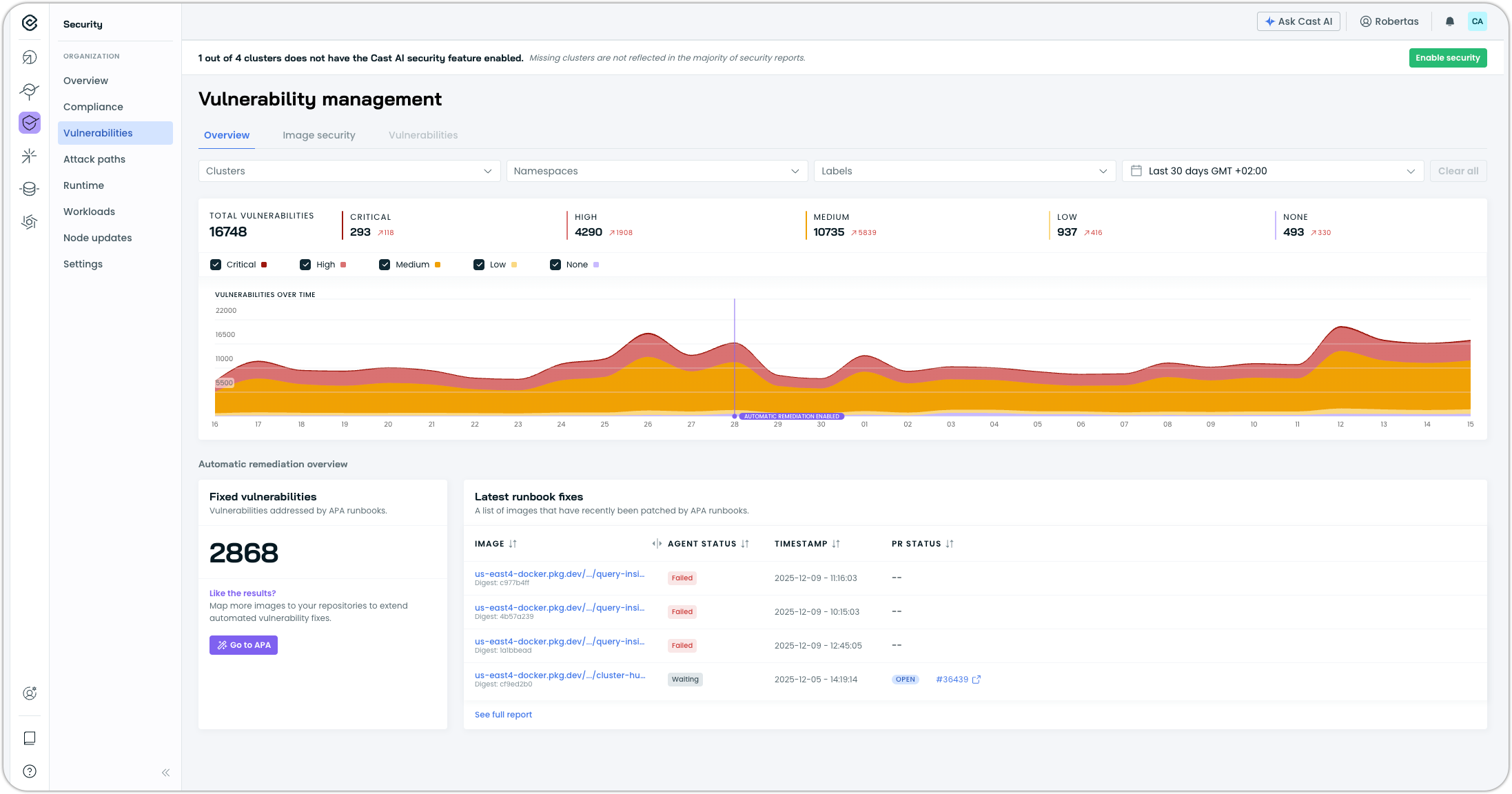
The Vulnerabilities page now includes an Overview tab, providing a consolidated view of the security posture across all clusters with security features enabled. The overview displays total vulnerability counts by severity level (Critical, High, Medium, Low, None) along with a historical chart showing vulnerability trends over time.
The historical view tracks vulnerabilities for up to 3 months, with findings deduplicated across clusters and workloads. This trend visualization helps teams understand whether their vulnerability management efforts are reducing exposure over time or if new vulnerabilities are accumulating faster than they can be remediated.
Organization Management
Enterprise Role Bindings for SSO-Synced User Groups
Enterprise organization owners can now assign child organization role bindings to SSO-synced user groups at the Enterprise level. When SSO Group Sync is enabled, user groups synchronized from your Identity Provider can be granted access to child organizations and their clusters without manual group creation in each organization.
A single Enterprise user group can be associated with multiple role bindings across different child organizations and clusters, each with independently selected roles.
Child Organization Role Bindings for Enterprise User Groups
Enterprise Owners can now assign child organization role bindings directly to user groups created at the Enterprise level. This enables centralized access management for organizations using SSO Group Sync, where user groups are automatically synchronized from the Identity Provider rather than created manually in each child organization.
A single Enterprise user group can be associated with multiple role bindings across different child organizations and clusters, each with its own role assignment. This capability applies only to user groups created at the Enterprise level; user groups created within child organizations retain their existing behavior.
Protected SSO-Synced User Groups
User groups synchronized from an Identity Provider (IdP) are now protected from modification and deletion in the Cast AI console. This ensures the IdP remains the single source of truth for group management when SSO Group Sync is enabled, preventing accidental changes that would be overwritten on the next sync cycle or cause inconsistencies between systems.
Enterprise API Key Support for Child Organizations
Enterprise API keys can now access resources within child organizations. Enterprise Owners and Viewers can automate workflows and manage all enterprise resources using a single API key, eliminating the need to generate separate keys for each child organization.
To access child organization resources, generate a user API key for the parent organization (Enterprise) and include both the API key and the target child organization ID in the X-CastAI-Organization-Id header when making API requests. The system automatically validates the parent-child relationship and grants access if the requesting organization is authorized to manage the target organization.
User Interface Improvements
Predictive Scaling Integration in Workload Autoscaler
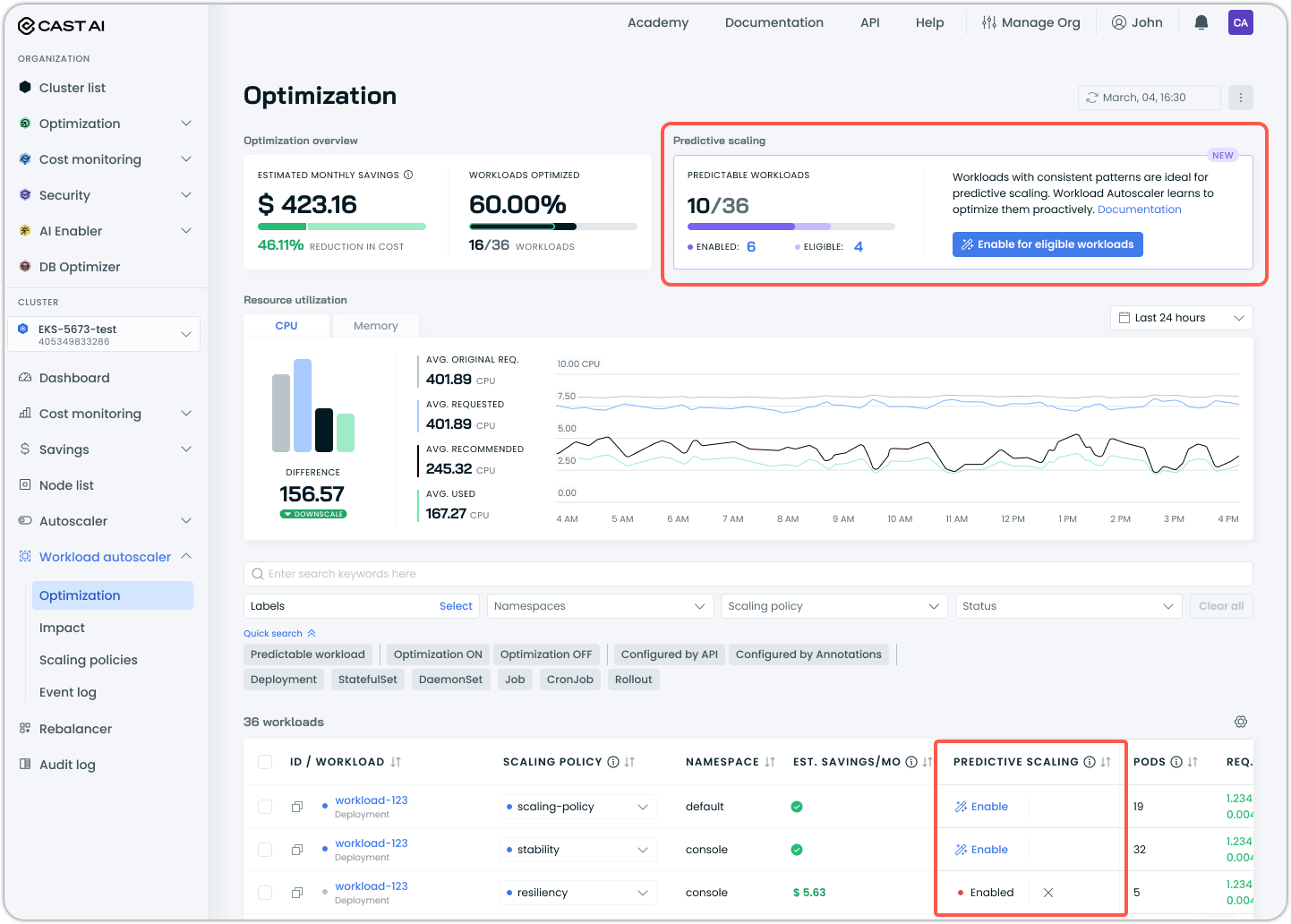
The Workload Autoscaler optimization page now includes visibility and controls for predictive scaling. A new Predictive Scaling summary displays the total number of predictable workloads, the number with predictive scaling enabled, and the number that are eligible but not yet enabled. A one-click option enables predictive scaling for all eligible workloads at once.
The workloads table now includes a Predictive Scaling column showing the status of each workload. Hovering over the chart icon displays resource usage graphs, with predictive workloads showing forecasted scaling patterns. Quick search filters allow filtering by "Predictable workload" alongside existing optimization status filters.
Improved Repository Connection Dialog for Self-Hosted Models
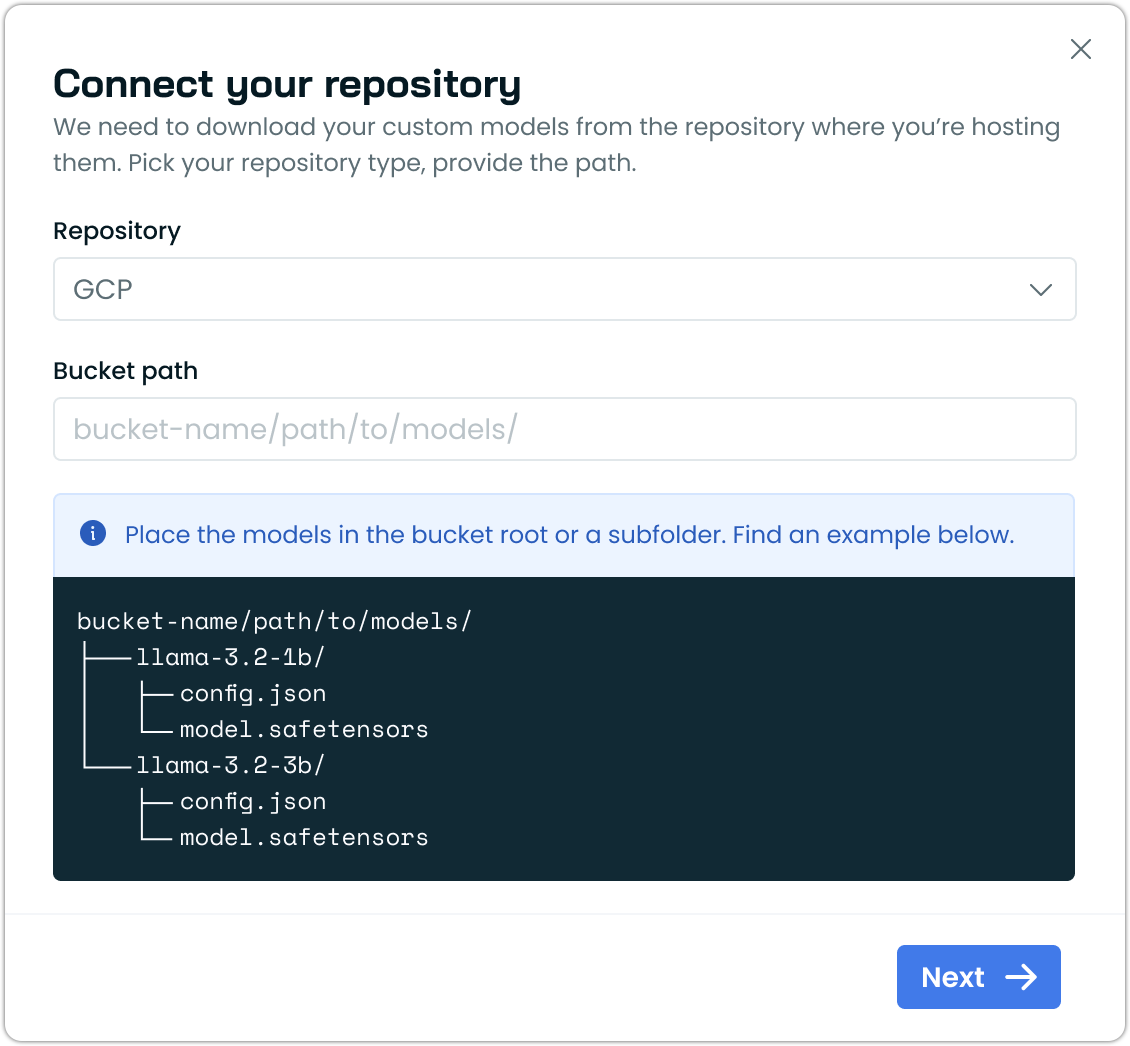
The repository connection dialog for self-hosted model deployments now includes visual examples showing the expected folder structure for cloud storage buckets. The dialog displays a directory tree illustrating how to organize model files (such as config.json and model.safetensors) within bucket paths, making it easier to set up custom model repositories correctly.
Billing Report Renamed to Platform Usage
The Billing Report has been renamed to "Platform Usage" to better reflect its purpose. The report displays usage metrics, such as billable CPU hours and provisioned CPUs across clusters, rather than invoices or payment details, and the new name aligns with this functionality.
The report is now accessible exclusively through the Organization management navigation under Manage Organization > Platform Usage, consolidating access in a single location.
Corrected Date Preset Behavior
The "Last 2 weeks" and "Last 3 months" date presets now use rolling date ranges as their names suggest. Previously, these presets returned data for the previous complete 2-week or 3-month periods rather than the trailing period from the current date.
Infrastructure as Code
Terraform Support for Cast AI Operator
The Cast AI Operator can now be deployed and configured through Terraform using a helm_release resource. This enables teams using infrastructure-as-code workflows to onboard clusters with Operator-managed components without manual Helm commands.
resource "helm_release" "castware_operator" {
  name             = "castware-operator"
  namespace        = "castai-agent"
  create_namespace = true
  repository       = "castai-helm"
  chart            = "castware-operator"

  set {
    name  = "apiKeySecret.apiKey"
    value = var.castai_api_key
  }

  set {
    name  = "defaultCluster.provider"
    value = "gke"  # or "eks", "aks"
  }
}
Secret Reference Support for Watchdog Configuration
The Watchdog Helm chart now supports referencing cluster ID and organization ID values from Kubernetes secrets, aligning with the configuration pattern used by other Cast AI components.
The new clusterIdSecretKeyRef and organizationIdSecretKeyRef options allow specifying a secret name and key for each value:
castai:
  clusterIdSecretKeyRef:
    name: "my-cluster-secret"
    key: "CLUSTER_ID"
  organizationIdSecretKeyRef:
    name: "my-org-secret"
    key: "ORGANIZATION_ID"
This change enables consistent secret management across all Cast AI components. For more information, see the relevant Pull Request on GitHub.
Terraform and Agent Updates
We've released an updated version of our Terraform provider. As always, the latest changes are detailed in the changelog on GitHub. The updated provider and modules are now ready for use in your infrastructure-as-code projects in Terraform's registry.
We have released a new version of the Cast AI agent. The complete list of changes is here.