
February 2026
AWS Capacity Blocks, Connection Pooling for Databases, and Batch Processing for AI Workloads
In February, Cast AI introduced full support for AWS Capacity Blocks, enabling the scheduling of reserved GPUs and specialized instances. Database Optimizer expanded significantly with the release of connection pooling. AI Enabler added batch processing for self-hosted models and shipped serverless model APIs, accommodating cost-efficient AI-assisted coding for almost any environment.
February also included GKE Autopilot support for the Workload Autoscaler, JVM workload auto-detection, Kubernetes Resource Quota awareness, and a range of cloud provider improvements, including AKS permission reductions, Azure Savings Plans import, and GCP TPU support.
Major Features and Improvements
AWS Capacity Reservations
Cast AI now supports AWS capacity reservations as first-class commitments, covering two types: On-Demand Capacity Reservations (ODCRs), which guarantee EC2 instance availability in a specific Availability Zone with no fixed end date, and EC2 Capacity Blocks for ML, which reserve GPU instance capacity (such as p5 or p4d families) for a fixed future time window. Both are imported through the existing commitments workflow and appear on the Commitments page under a new Capacity reservations tab.
The autoscaler provisions into reserved capacity by targeting reservations through Node Templates — reservations are consumed first before falling back to RI/SP-covered or standard on-demand capacity. For Capacity Blocks, Cast AI handles node drain automatically as the block's expiration approaches.
For more details on configuration and Node Template setup, see the AWS capacity reservations documentation.
Database Optimizer Connection Pooling
Connection pooling for PostgreSQL databases is now available in Database Optimizer (DBO). The feature reduces the number of direct database connections by routing client traffic through a connection pool, allowing thousands of application connections to share a small number of actual server connections. This significantly reduces memory pressure on the database and improves throughput under high concurrency.
See DBO documentation for more information.
AI Enabler Batch Processing for Self-Hosted Models
AI Enabler now supports batch-processing jobs for self-hosted models. Users can submit a JSONL file of inference requests, track job progress, and retrieve results without managing the infrastructure for parallel inference.
An organisation-level API endpoint returns the full list of batch jobs for programmatic access.
Cloud Provider Integrations
AWS
Reuse Existing InstanceProfileARN for Default EKS Node Configuration
InstanceProfileARN for Default EKS Node ConfigurationWhen adding nodes to EKS clusters that already have non-Cast AI-managed nodes, Cast AI now reuses the existing InstanceProfileARN for the default Node Configuration rather than requiring a separate IAM profile to be created. This reduces the IAM setup steps required when integrating Cast AI into existing EKS environments.
Azure
Reduced Required Permissions for AKS
Two sets of Azure RBAC permissions have been removed from Cast AI's required permission list for AKS clusters. START and STOP permissions are no longer required, and validation of gallery and snapshot permissions has been removed. This reduces the permissions needed for AKS integrations, making it easier to satisfy least-privilege security policies.
Ephemeral OS Disk Support for AKS
Support for Ephemeral OS Disks on AKS nodes is now implemented. NVME has been added as a placement option for ephemeral OS disks, enabling lower-latency storage for nodes using NVMe-backed instance types.
Azure Savings Plans Import
Azure Savings Plans (SPs) can now be imported into Cast AI's commitment management system, making them visible alongside Azure Reserved Instances (RIs).
Spot Instance Zone Handling Fix
Azure VM types that do not support Spot pricing are no longer included in Spot Instance zone calculations, preventing incorrect scheduling recommendations for instance families where Spot is unavailable.
GCP
Flexible CUDs in Commitments
GCP Flexible Committed Use Discounts are now displayed in the Commitments list alongside AWS Savings Plans, Azure Reserved Instances, and GCP resource-based CUDs. Like AWS Savings Plans, Flex CUDs are spend-based commitments that apply across any machine type in the committed region rather than locking to specific instance families. The Effective Commitment Amount for GCP CUDs is now calculated correctly, accounting for non-Kubernetes usage so that only the portion available to Cast AI-managed workloads is shown.
For details on how Flex CUDs interact with resource-based CUDs and the autoscaler priority order, see the Commitments documentation.
minCPUplatform Support for Node Provisioning
GCP node templates can now specify a minimum CPU platform when adding nodes, allowing workloads that require a specific processor microarchitecture — such as Ice Lake or Cascade Lake — to be scheduled on compatible instances.
User-Managed GPU Drivers on GKE
GKE clusters can now opt for self-managed NVIDIA GPU drivers rather than relying on Cast AI's driver management. This option is available in Node Templates and is useful for organizations that need to control driver versions independently — for example, to match a certified driver version required by a specific CUDA workload.
TPU Instance Support
The Cast AI Autoscaler can now provision Google Cloud TPU nodes on GKE clusters. When a pending pod requests google.com/tpu resources, Cast AI automatically selects the correct TPU instance type based on the pod's node selectors — no device plugins or manual node configuration required. GKE handles TPU driver installation automatically. TPU v5e and TPU v5p are supported; single-host slices only.
For workload configuration examples and supported topologies, see the TPU instances documentation.
Billing Account IAM Roles Added to GCP Onboarding Script
The GCP onboarding script now grants the roles/billing.viewer and roles/consumerprocurement.orderViewer at the billing account level, in addition to the existing project- and organization-level bindings. This enables Cast AI to access commitment and procurement data without requiring customers to manually configure IAM after onboarding.
Workload Optimization
GKE Autopilot Support
Workload Autoscaler now supports GKE Autopilot clusters. Previously available only for standard GKE node pools, rightsizing recommendations can now be applied to workloads running on Autopilot, where Google manages the underlying node infrastructure. This extends Cast AI's optimization coverage to organizations that use only Workload Autoscaler and wish to keep Autopilot for node provisioning.
JVM Workload Auto-Detection and Scaling
Workload Autoscaler can now automatically detect Java workloads in a cluster and apply JVM-aware optimization settings without requiring manual configuration. The detection logic identifies JVM-based applications, and once detected, JVM-specific settings become available in the scaling policy and workload detail pages.
For workloads where JVM metrics aren't available, a fallback mechanism allows scaling to continue based on custom metrics or standard CPU/memory signals. This combination makes it practical to enable rightsizing across mixed Java and non-Java environments without creating separate policies for each type.
Resource Quota Awareness
Workload Autoscaler now respects Kubernetes Resource Quota hard limits when generating recommendations. When a cluster has active Resource Quotas that impose hard CPU or memory ceilings, the autoscaler will no longer produce recommendations that would exceed those limits — preventing situations where a recommendation looks valid in isolation but would be rejected by the scheduler.
See Workload Autoscaler configuration for more information.
Request/Limit Ratio Preservation
A new rightsizing mode preserves the existing ratio between resource requests and limits when generating recommendations. When enabled, the autoscaler scales requests up or down while maintaining the same proportional gap between request and limit — for example, if a workload's limit is set to 2× its request, that 2× ratio is preserved as the request value changes.
This addresses use cases where teams have deliberately set request/limit ratios — often for quality-of-service guarantees or JVM heap headroom — and don't want rightsizing to alter that relationship.
See Workload Autoscaler configuration for more information.
HPA Event Log Completeness
Event log entries for HPA configuration changes now include all relevant fields, resolving cases where changes appeared in the log with incomplete information.
Karpenter Enterprise Suite
Aggressive Mode Enhancements
Aggressive rebalancing mode now includes two additional tuning parameters, giving users more control over how aggressively underutilized nodes are consolidated. When aggressive mode is toggled in the UI, the list of problematic pods and workloads is now re-fetched to reflect the current state immediately after the mode change, rather than showing stale data.
Node Details Page
The node details page is now available for clusters running Karpenter, mirroring the node investigation functionality already available for Cast AI-managed clusters. Users can drill into individual node details — instance type, resource utilization, running pods, and status.
Audit Log
The audit log is now accessible for Karpenter-managed clusters under the Node Autoscaler section. This gives users visibility into autoscaling decisions and configuration changes that were previously only available for Cast AI-managed clusters.
Node Autoscaling
Topology Spread Constraint — nodeAffinityPolicy and nodeTaintsPolicy Support
nodeAffinityPolicy and nodeTaintsPolicy SupportThe autoscaler now correctly handles Topology Spread Constraints that use the nodeAffinityPolicy and nodeTaintsPolicy fields. These fields, introduced in Kubernetes 1.26 to control how TSC respects node affinity and taints, are now factored into scheduling decisions rather than being ignored.
Audit Log: Instance Family Display for Blacklisted Events
Audit log entries for blacklisted instance events now display the instance family and type of the affected node. Previously, these entries showed that a blacklisting occurred without identifying the specific instance configuration involved, making it harder to determine why a particular instance was blocked and whether the rule was configured as intended.
AI Enabler
Expanded Model Support
AI Enabler's model library has been expanded with multiple new additions:
- Mistral Ministral-3B and Ministral-14B — Mistral's compact instruction-tuned models suited for efficient inference and edge deployments
- Qwen3-Next (80B MoE) — Qwen's large mixture-of-experts model, optimized for complex reasoning at lower active-parameter cost
- MedGemma — Google's medical-domain variant of Gemma, designed for healthcare and life sciences inference tasks
- Translation models — A set of models added specifically for multilingual translation use cases
- Reranker models — Models for relevance scoring and reranking in RAG pipelines
For the complete list of available models, see the AI Enabler documentation.
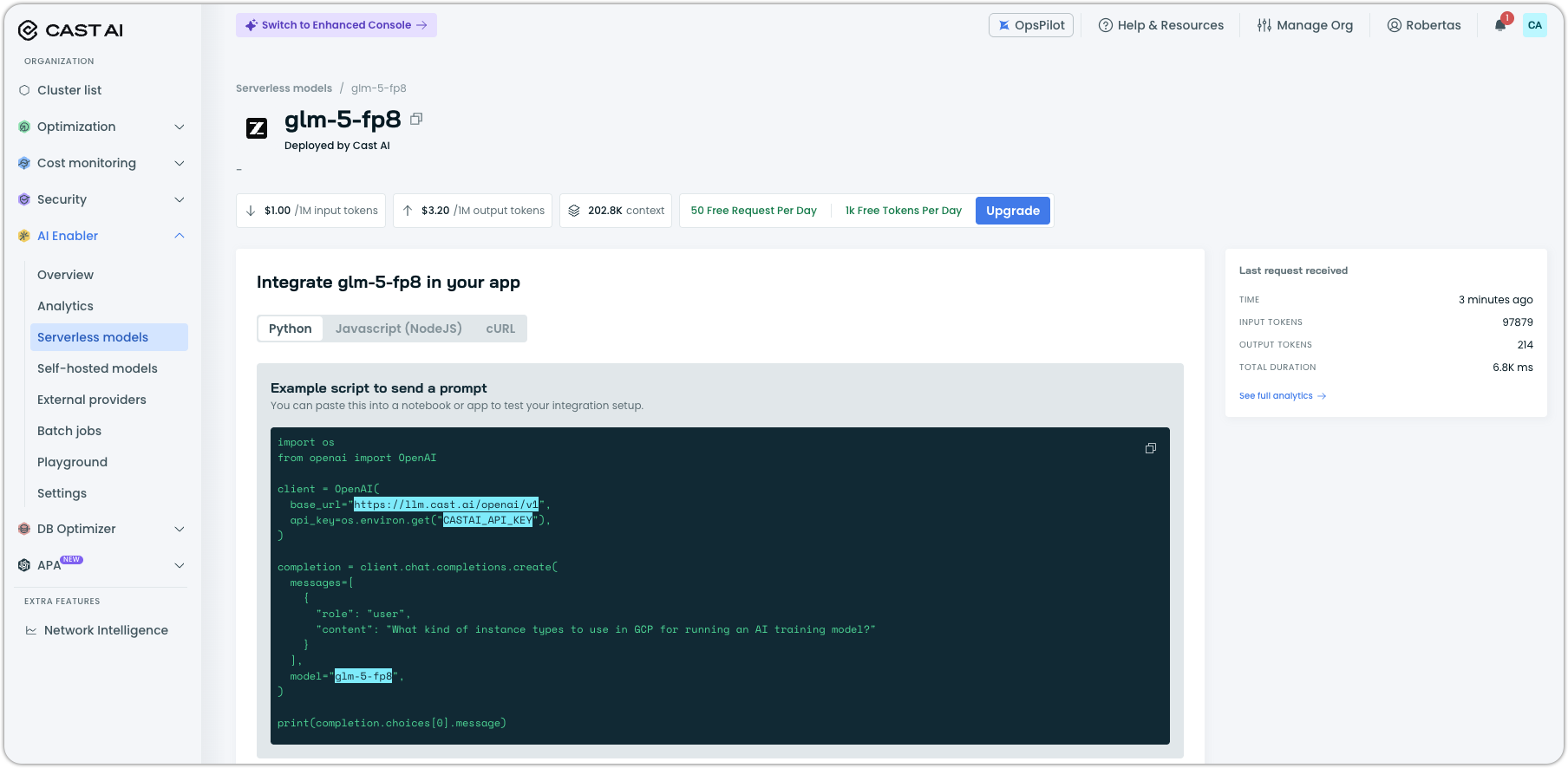
Serverless Models: Rate Limits, Cleaner Listings
The Serverless models experience received an important update last month, addressing several usability gaps.
Rate limits and plan visibility. Serverless models now show rate limit information.
Cleaner model listings. The /supported-providers and /providers API endpoints now return only models that are actually deployed and available for use.
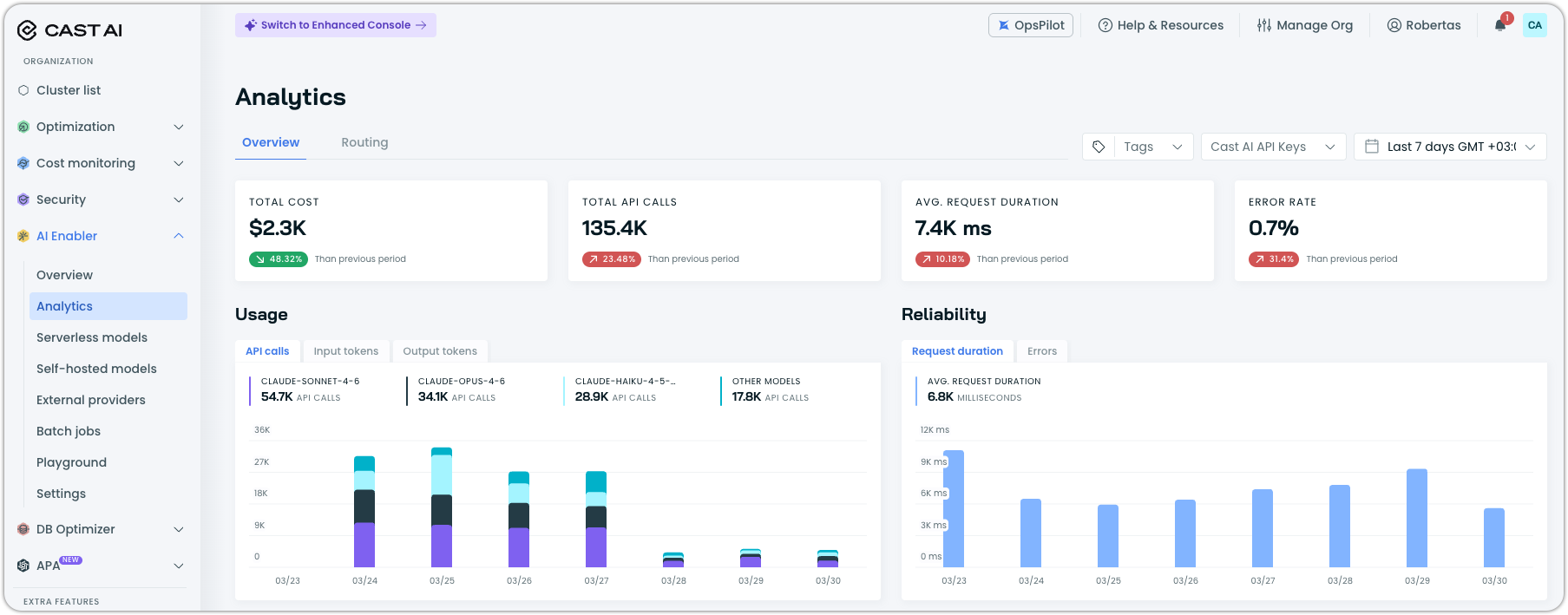
Analytics: Complete Request Coverage, API Key Filtering, and Improved Visuals
The AI Enabler Analytics page is generally available. It shows a complete picture of model usage. Embedding requests and reranker requests are now tracked alongside standard chat completions, and all request types are included in the analytics view. Users can filter the Analytics report by API key, making it straightforward to attribute usage to specific applications or teams.
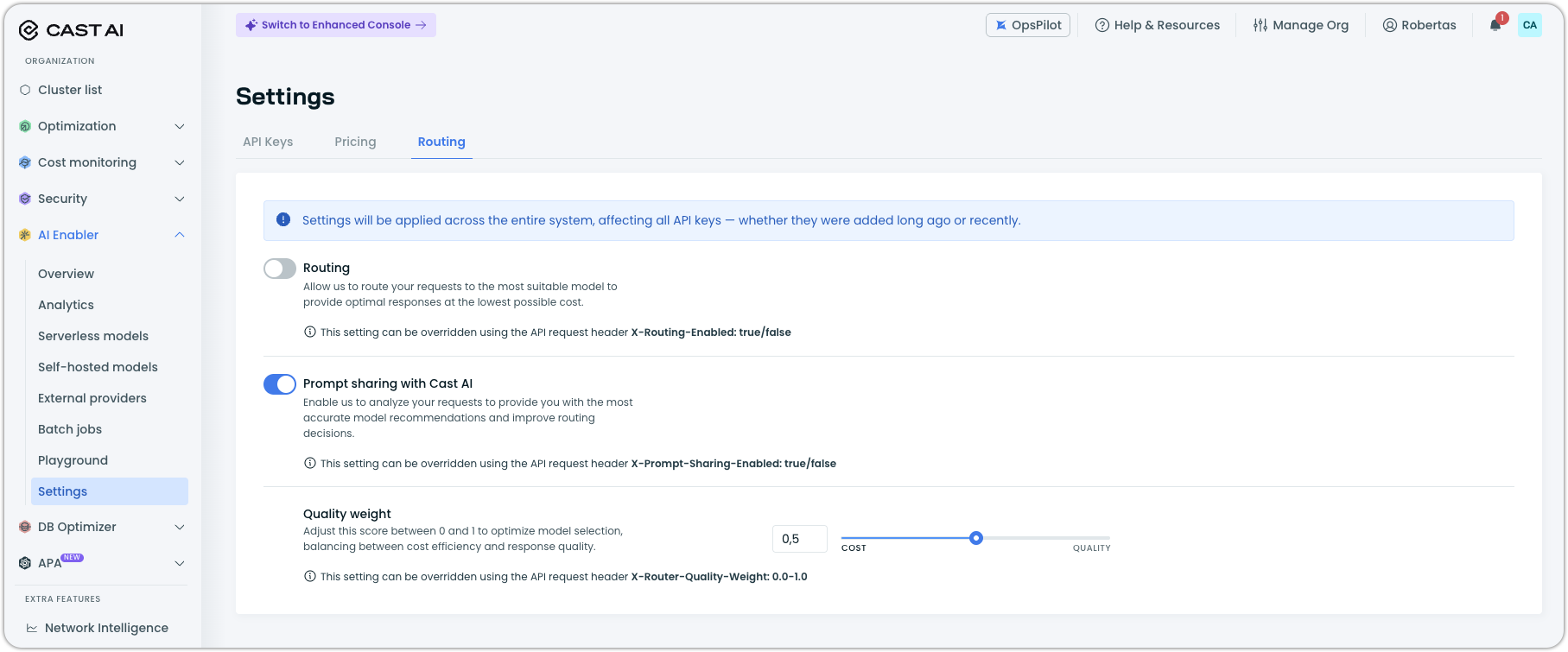
Settings: Routing Tab and Reordered Navigation
The "Organization" tab in the AI Enabler Settings section has been renamed to "Routing" to better reflect its function. The Settings tabs have also been reordered to swap the positions of API Keys and Routing, placing more frequently accessed configurations first.
Application Performance Automation (APA)
Service Discovery, Generic Integrations, and Global Settings
APA shipped a substantial set of improvements across three areas last month.
Service Discovery. APA can now discover repositories and services continuously on a configurable schedule. Discovery results are published as they become available rather than waiting for a full scan to complete. Re-scans are incremental — only updated or new repositories are processed, rather than re-scanning everything from scratch. The scan frequency is configurable in the settings, giving you control over how often the discovery agent runs.
Generic integrations. APA previously supported GitHub and GitLab exclusively. It now supports generic integration types, allowing connections to version control systems or other services beyond the named providers.
Global settings. A new Global Settings page in the console allows users to configure which models are used across all runbooks and set organization-wide runbook defaults in one place, rather than managing these settings per-runbook.
Runbook reliability. Failed runbook runs can now be manually retried from the UI with a dedicated retry button. Runbooks can also be deleted cleanly — the previous implementation could leave orphaned resources when a runbook was removed.
Anthropic and Gemini Models in Compliance Runbook
The Compliance runbook now supports Anthropic Claude and Google Gemini models as provider options, expanding beyond the models it previously supported.
Integration Status and Multiple Repository Tokens
Integration status is now surfaced in APA, allowing you to see at a glance whether connected integrations (version control, etc.) are healthy or experiencing connectivity issues. This provides an earlier signal when an integration breaks rather than waiting for a runbook to fail.
APA can now support multiple authentication tokens per repository. This is useful in environments where different CI/CD pipelines or teams use separate credentials for the same repository and need APA to use the correct token for each context.
Database Optimization
Index Advisor: Affected Query Visibility and Broader Parser Support
The Index Advisor now shows which queries are affected by each recommendation, along with their execution statistics. Previously, a recommendation appeared as an index suggestion without context about what was driving it — users now see the specific query templates and associated performance data alongside each suggestion. This makes it considerably easier to understand its expected impact.
Index Advisor's Postgres parser has been extended to support additional statement types, broadening the range of query patterns it can analyze and recommend indexes for.
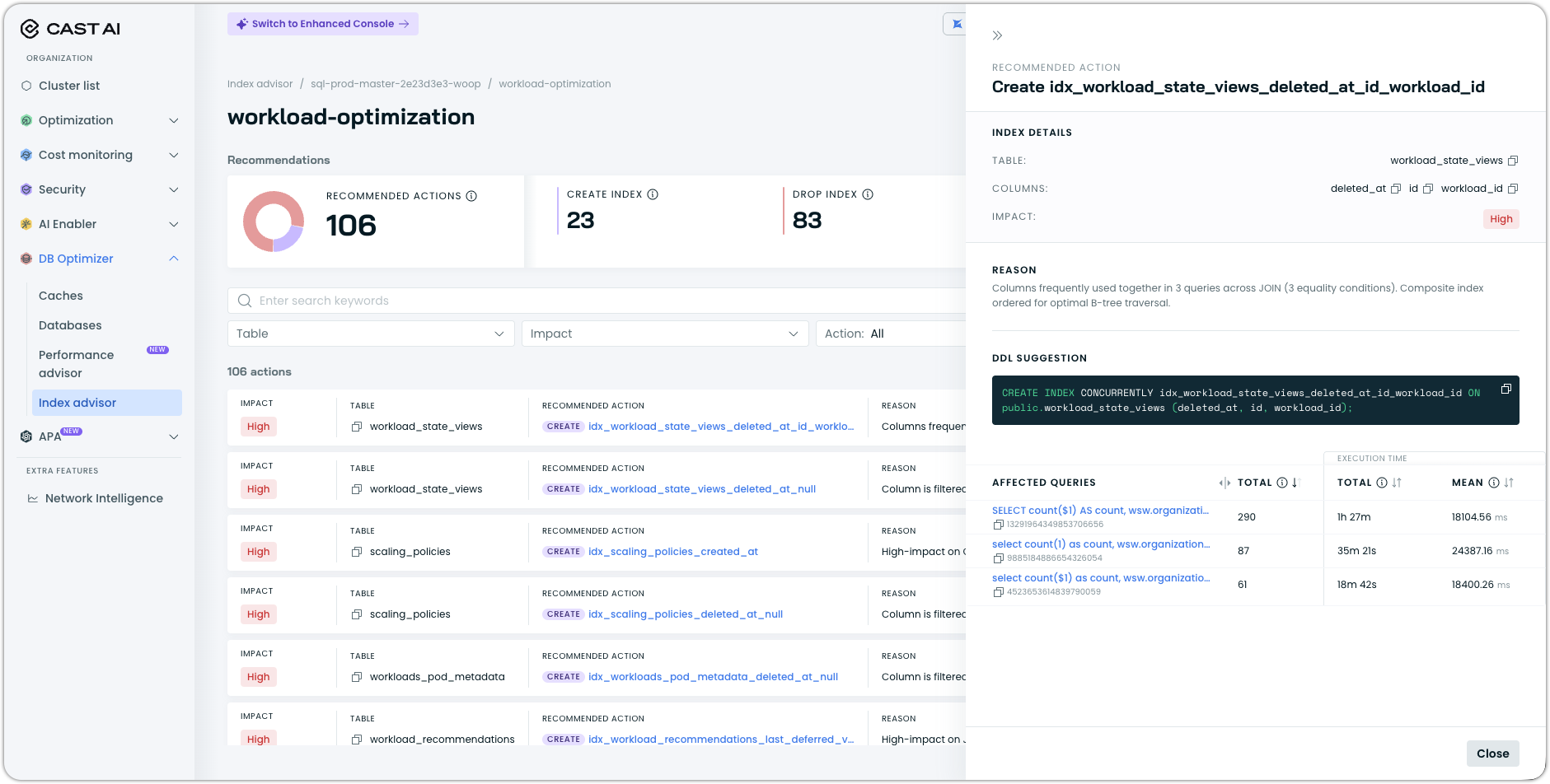
See Index advisor documentation for more information.
DBO Helm Chart DNS Configuration Support
The Database Optimizer Helm chart now accepts dnsPolicy and dnsConfig options, enabling deployments in clusters with custom DNS configurations. For example, clusters that use a private DNS resolver or have non-default nameserver settings.
UI Improvements
DBO pages now use routed tabs, meaning each tab is directly addressable via URL. This allows you to bookmark or share a link to a specific DBO tab and have it open in the correct state, rather than defaulting to the first tab.
Cost Management
Network Cost Reporting: Cloud Traffic, Cross-Region, and Destination IPs
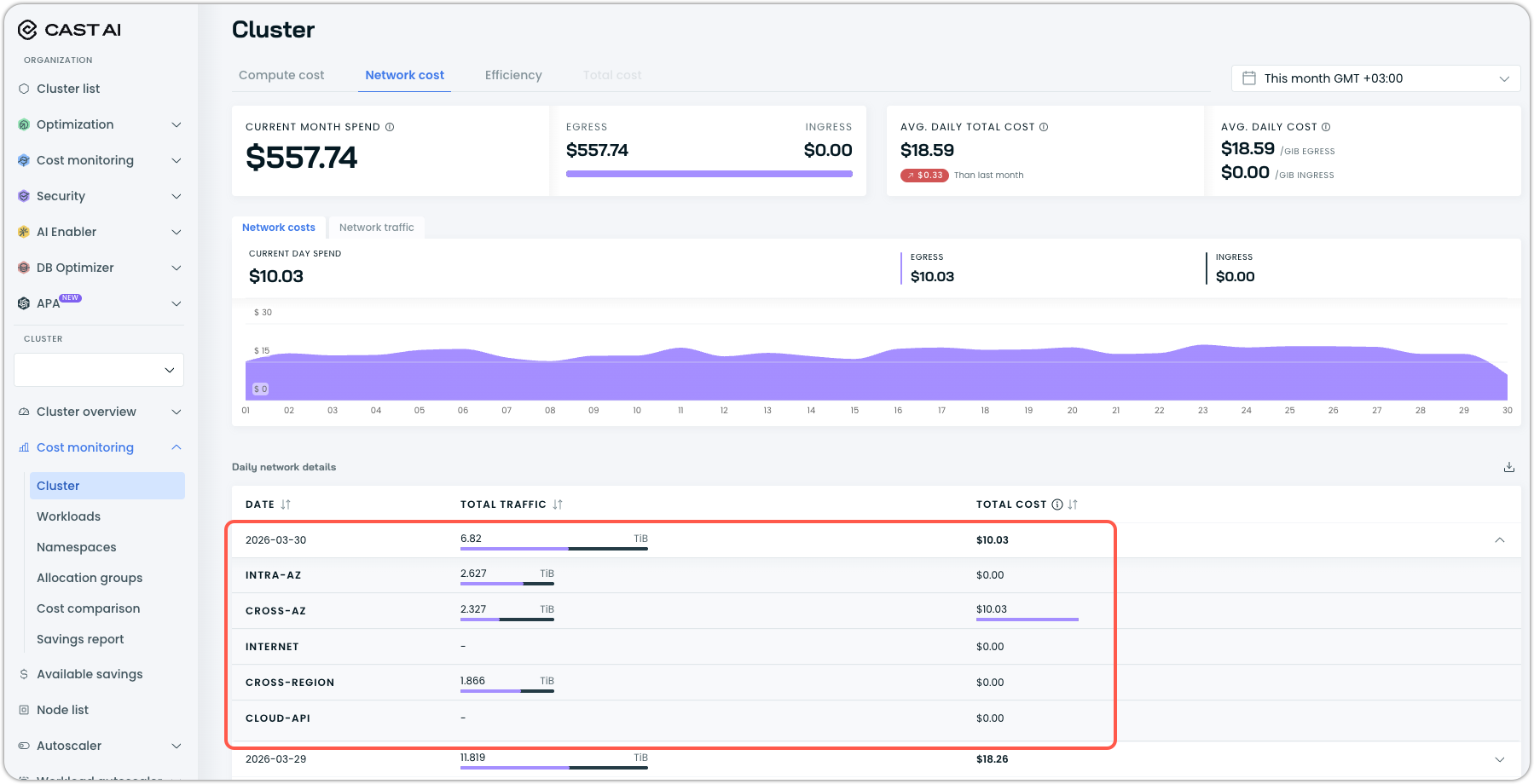
Network cost reporting now covers a broader set of traffic types. Cloud-to-cloud traffic is now included in network reports, cross-region data transfer costs are surfaced in the network cost report, and the data transfer costs API response now includes destination IP addresses. Together, these additions give users a more complete picture of their network egress spend, particularly in multi-region or multi-cloud architectures, such as those powered by our own OMNI edge provisioning.
Ephemeral Storage Metrics
Ephemeral storage is now reported as a first-class metric in Cast AI. Per-node allocatable, requested, and used ephemeral storage values are now exposed, and Kvisor can collect storage metrics based on the container runtime interface (CRI) used in the cluster.
Price Adjustments for Anywhere Clusters
Custom price adjustments — used to account for third-party software costs like monitoring agents, security tools, or per-node licensing — are now available for Cast AI Anywhere clusters. Previously, this capability was limited to standard cloud provider clusters.
Notifications and Alerts
Slack Notifications: Preview, Testing, and Setup Improvements
Several improvements make Slack notification configuration more reliable and less error-prone. A message preview is now shown for desktop client notifications before the configuration is saved, and a test button allows users to send a test notification without first committing the configuration — making it straightforward to verify that the correct workspace and channel are selected before going live.
Set up Slack notifications for your org if you have not already done so by following our guide.
OMNI Edge Provisioning
OMNI received significant infrastructure work last month, hardening the networking layer for production multi-cloud edge deployments.
EdgeNode and EdgeCluster Lifecycle Management
EdgeNodes and EdgeClusters now have explicit phase states — enabling Cast AI to track and surface where a node or cluster is in its lifecycle (provisioning, ready, terminating, etc.) and handle deletion cleanly without leaving orphaned resources. The provider ID is now set on virtual nodes, giving them a proper Kubernetes node identity that schedulers and monitoring tools can use.
OMNI component logs are now collected by the agent, providing observability into what the agent itself is doing at the edge — useful when troubleshooting deployment or connectivity issues.
Networking Improvements
The VPC CIDR for edge clusters is now retrieved and stored, and passed to Liqo as the ReservedSubnet parameter to ensure proper network isolation between the edge cluster and the host network. A vpc_peered flag has been added to distinguish VPC-peered network topologies, enabling the agent to apply the correct networking configuration for peered environments.
EKS clusters using Network Load Balancers can now use them for both the Kubernetes APIServer and the Liqo GatewayServer, enabling OMNI deployments in EKS environments where NLB is the required load balancer type.
The Kubernetes zone topology label has been removed from OMNI nodes. This label was causing incorrect zone-aware scheduling decisions for workloads with zone-spread constraints, because edge nodes don't map cleanly to cloud-provider availability zones.
Component and Deployment Improvements
CRD upgrades are now handled via the Flux Helm controller rather than Helm pre-install jobs, making the upgrade process compatible with GitOps workflows where ArgoCD or Flux manages Kubernetes resources. NVME SSDs are now supported in cloud-init for edge node provisioning, enabling edge deployments on hardware with NVMe-backed storage.
The Liqo Gateway priorityclass has been set in the Helm chart to improve scheduling stability for the gateway component during resource pressure, and the GPU Operator is now installed as a managed component.
Container Live Migration
TCP Connection Preservation Across Multi-Node Migrations
Live migration now preserves active TCP connections when migrating workloads from one node to another. Socket IP addresses in checkpoint images are updated to reflect the destination node's IP address, and TCP connections are actively migrated along with the workload state. This eliminates connection drops for workloads that maintain persistent TCP sessions — such as databases, message queue consumers, or stateful gRPC services — during a live migration event.
Extended Migration Status
Migration CRDs now expose more detailed status information, including an extended classification of failure modes. When a live migration does not complete successfully, the status field now identifies the specific failure category rather than reporting a generic error, making it faster to diagnose whether the issue is a precondition failure, a checkpoint error, or a restoration problem.
Organization Management
Organization Management UI Fixes
Several navigation and interaction issues in the Organization Management pages have been resolved:
- Broken links to enterprise user and user group pages have been fixed.
- Role loading and binding issues have been addressed — roles now load correctly, display accurately, and persist through updates without requiring page refreshes.
- Users can no longer modify their own roles or permissions, or remove themselves from an organization, directly in the UI, preventing accidental self-lockout.
User Interface Improvements
Annotation-Managed Workloads Now Fully Interactive
Workloads managed through Kubernetes annotations rather than Cast AI's native configuration were previously rendered as entirely non-interactive in the workload detail view — no fields were clickable or editable. These workloads are now fully interactive, allowing users to inspect details, view recommendations, and navigate related resources.
Compact Numeric Formatting
Large numeric values throughout the console are now formatted in compact notation — for example, 1.2M instead of 1,200,000 and 45K instead of 45,000. This improves readability in tables and charts where space is limited and precise digit counts are less important than magnitude.
Chart Readability Improvements
Graph line visibility and contrast have been improved across the console. Lines are more distinct from one another, improving readability when multiple metrics are displayed on the same chart. Node metrics bar charts now include clear axis labels and correct color-coding, making it easier to distinguish between allocatable, requested, and used values at a glance.
Workload Reporting Linked with Workload Autoscaler
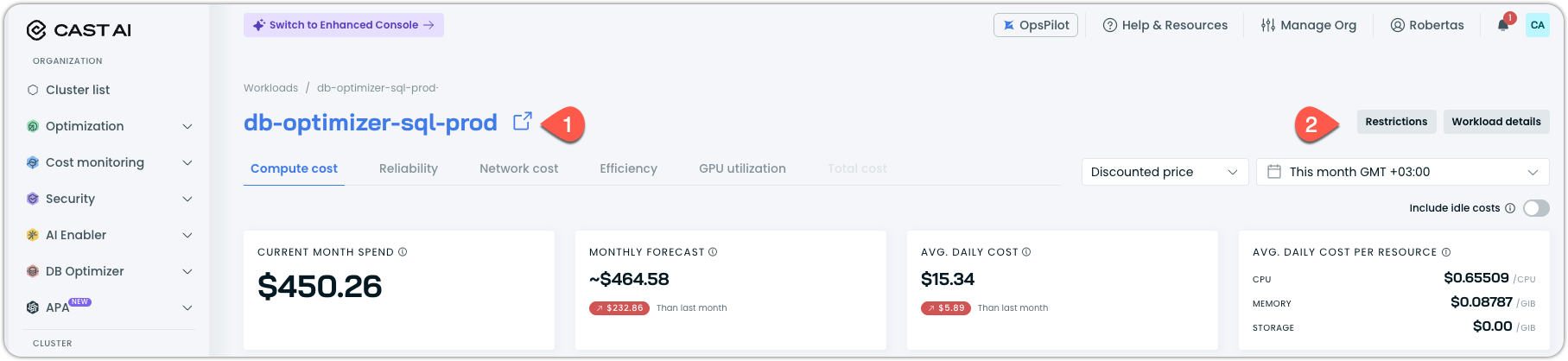
Every workload in the Workloads cost report is now linked to the Workload Autoscaler and any active restrictions. You can open the workload in Workload Autoscaler by clicking on its name (1), or open a drawer with workload details or restrictions that affect its optimization potential (2).
Terraform and Agent Updates
We've released an updated version of our Terraform provider. As always, the latest changes are detailed in the changelog on GitHub. The updated provider and modules are now ready for use in your infrastructure-as-code projects in Terraform's registry.
We have released a new version of the Cast AI agent. The complete list of changes is here.