

January 2026
DBO Index Advisor, Cluster Hibernation General Availability, and Slack Notifications
In January, we launched the DBO Index Advisor, which automatically analyzes query patterns and recommends index optimizations for PostgreSQL databases. AI Enabler introduced a redesigned Analytics Dashboard with comprehensive usage metrics.
January also brought container-level exclusion from workload autoscaling, native Slack integration for notifications, and continued infrastructure expansion, including AWS Inferentia support, AKS v6 instance enablement, and GCP Flexible CUD support.
Major Features and Improvements
Cluster Hibernation Generally Available
Cluster hibernation has graduated to general availability following extensive reliability improvements over the past several months. Hibernation allows organizations to scale clusters to zero nodes while preserving the control plane, significantly reducing costs for non-production environments, development clusters, or any cluster that doesn't need to run around the clock.
The team has focused on eliminating common failure modes and improving the experience:
- Reduced hibernation failures by removing the
nodeGroupArndependency and reusing the default node configuration's instance profile, and by including the required permissions by default in both script and Terraform onboarding methods - Faster resume startup — Cast AI components (Workload Autoscaler, Pod Mutator) now include tolerations for resume nodes by default, so they land correctly during the resume sequence as expected
- Improved observability with clearer audit log feedback when hibernation or resume operations encounter issues
Hibernation can be triggered manually from the cluster dashboard or cluster list, or automated through schedules configured in the console, API, or Terraform. For details, see the Cluster hibernation documentation.
DBO Index Advisor
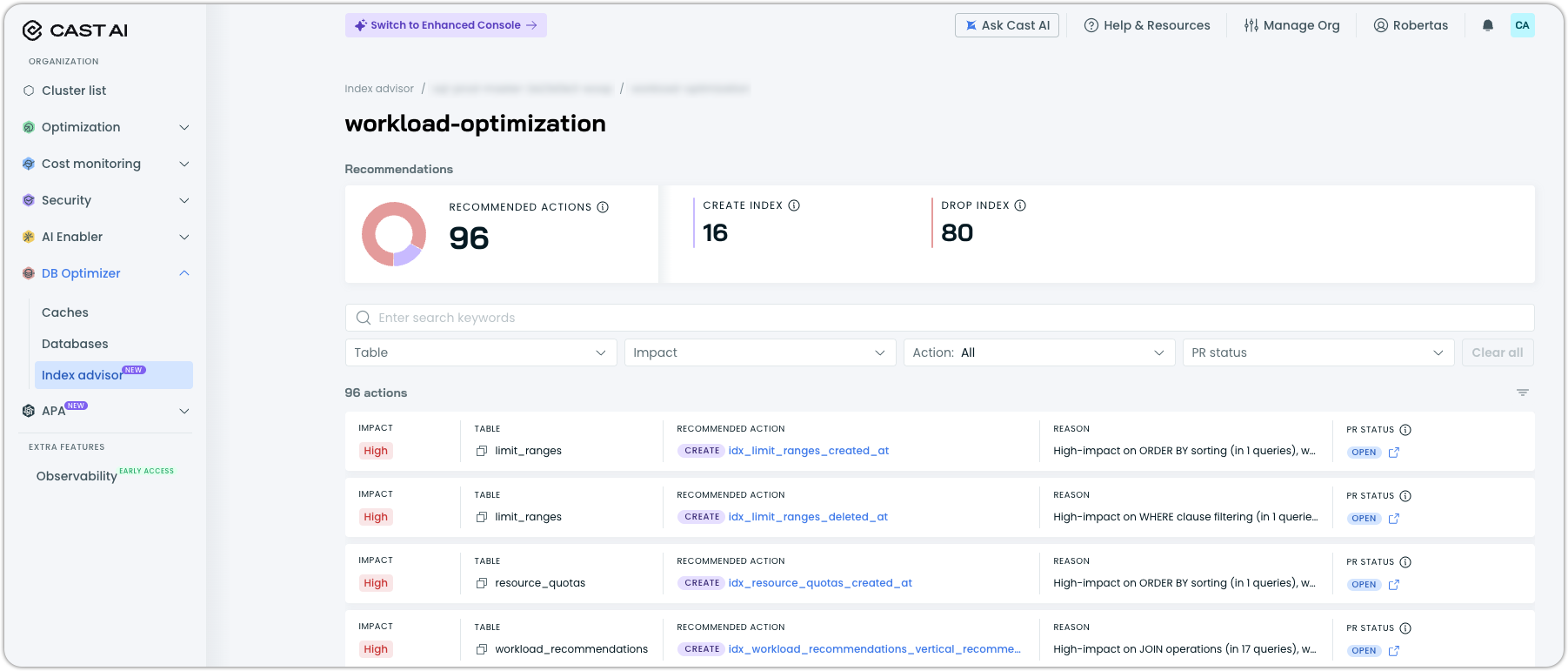
Index Advisor is a new Database Optimizer capability that automatically analyzes PostgreSQL workloads and provides actionable index optimization recommendations. A lightweight agent connects to your database, collects query statistics, gathers execution plans, and examines table structures and existing indexes to identify optimization opportunities. All through read-only access with no modifications to your application queries.
Key capabilities:
- Create index recommendations for missing indexes that could accelerate frequent queries, with each recommendation including the specific CREATE INDEX statement, expected impact rating (High/Medium/Low), and clear reasoning based on observed query patterns
- Drop index recommendations for unused or redundant indexes that consume storage without providing benefit, with the full index DDL displayed for review before action
- Automatic database autodiscovery across all databases in a cache group, with optional exclusion filters for databases that should not be analyzed
- Impact-based prioritization with recommendations ranked by potential performance improvement, filterable by table, impact level, action type, and PR status
Index Advisor is independent from DBO's query caching and can be used standalone or alongside caching for comprehensive database optimization. It is enabled per cache group from the Index Advisor page under DB Optimizer in the console, with the agent deployed via Helm.
For setup instructions and prerequisites, see the Index Advisor documentation.
Slack Integration for Alert Notifications
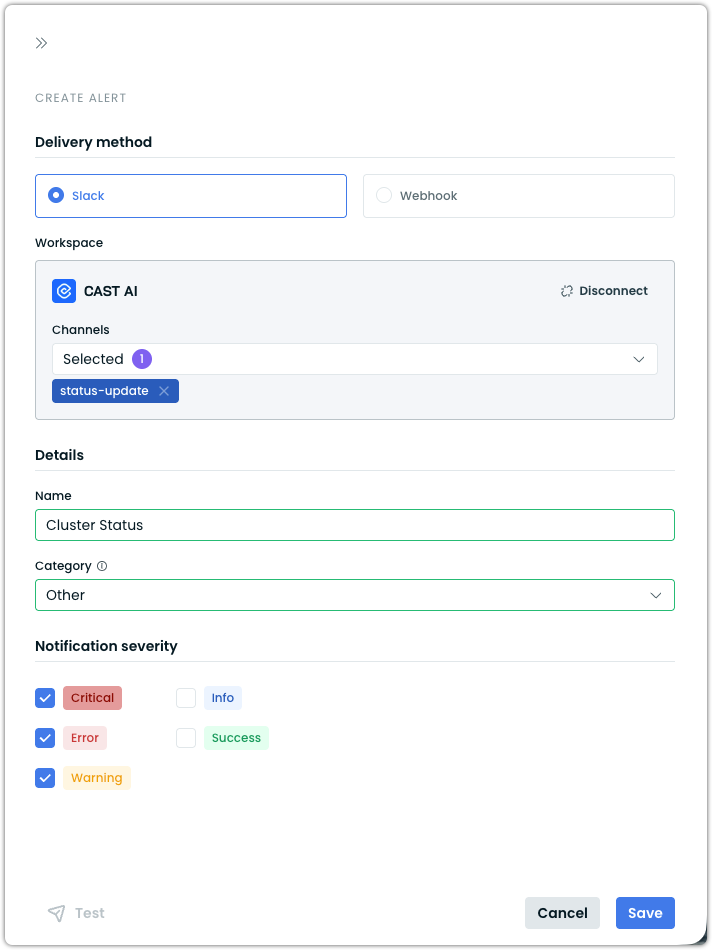
Cast AI now supports native Slack integration as a delivery method for alert notifications. Organizations can connect their Slack workspace directly through OAuth from the Cast AI console, eliminating the need to manually create and manage Slack incoming webhooks.
Once a workspace is connected, users can create alerts that deliver notifications to up to 5 selected Slack channels per alert. Each alert is configured with a category (Reporting anomalies, Inventory, Security, or Other) and severity filters (Critical, Error, Warning, Success, Info), so teams receive only the notifications relevant to them. Notifications include severity indicators, a summary message, and a direct link to the Cast AI console for full details. A built-in Test button allows verifying delivery before relying on the alert in production.
For setup instructions, see Set up Slack notifications.
Cloud Provider Integrations
AWS
AWS Inferentia and Trainium Support
Cast AI now supports AWS Inferentia and Trainium instances with Neuron resource request types. The autoscaler recognizes Neuron device requests, enabling workloads that use AWS Neuron SDK to be scheduled on Inferentia and Trainium instance types.
This enables organizations running machine learning inference and training workloads on AWS Neuron-based hardware to benefit from Cast AI's automation.
Azure
AKS v6 Instance Support
Cast AI now supports Azure v6-series virtual machines for AKS clusters. V6-series instances offer improved performance at virtually the same price as their v5 predecessors, so clusters benefit from the upgrade without increased costs. This is enabled through automated VHD image management using Cast AI-managed image galleries, which replicate and maintain node images across Azure regions.
GCP
GCP Cloud Connect Commitments Sync
Cloud Connect for GCP now includes automatic commitment synchronization as part of its hourly sync cycle, matching the existing behavior for AWS and Azure. Previously, importing GCP commitments required running a separate one-off script.
GCP Flexible CUD Support
Cast AI now supports GCP Flexible Committed Use Discounts (Flex CUDs). This enables organizations using GCP flexible commitments to see their commitment utilization in the console and have Cast AI factor these discounts into node placement decisions.
Infrastructure Optimization
Dynamic Resource Allocation (DRA) Support
The node autoscaler now supports Kubernetes Dynamic Resource Allocation (DRA), enabling a more flexible approach to GPU resource management compared to traditional device plugins. When workloads use DRA ResourceClaims to request GPU access, Cast AI detects the requirements and automatically provisions appropriate GPU nodes.
DRA provides several advantages over the device plugin model: workloads can select GPUs using attribute-based filtering (by model, architecture, brand, or memory capacity via CEL expressions), multiple pods can share a single GPU through a common ResourceClaim, and resource definitions are centralized rather than requiring explicit resource quantities in each container spec.
Key capabilities:
- Automatic GPU node provisioning — Cast AI reads DRA ResourceClaims and ResourceClaimTemplates, identifies the required GPU characteristics, and provisions matching nodes
- Attribute-based GPU selection — Workloads can target specific GPU attributes, including product name, architecture, brand, memory capacity, and device count
- Cross-pod GPU sharing — Multiple pods can reference a shared ResourceClaim for GPU access without time-slicing or MIG configuration
- Provider support — Available on EKS and GKE clusters running Kubernetes 1.34+, with AKS support coming soon
For installation instructions, driver setup, and workload configuration examples, see the DRA documentation.
Evictor Live Migration for StatefulSets
The Evictor now live-migrates StatefulSet pods by default when Container Live Migration is available. Previously, StatefulSet evictions used a drain-and-recreate approach. This significantly reduces disruption for stateful workloads during node consolidation and rebalancing operations.
Workload Optimization
Container Exclusion by Name
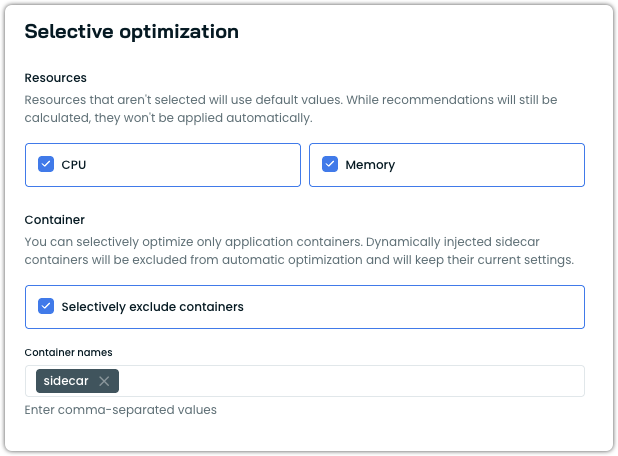
Workload Autoscaler now supports excluding specific containers from automatic optimization. Excluded containers retain their current resource settings and are not scaled, while recommendations are still generated.
This is configured under the Selective optimization section of a vertical scaling policy. Users enable Selectively exclude containers and enter the container names to exclude. This is useful for protecting sidecar containers, init containers, or application containers with fixed resource requirements from being modified, while continuing to optimize the remaining containers in the same pod. Dynamically injected sidecar containers (such as those from Istio's mutating webhook) are already excluded by default.
For configuration details, see the Available settings documentation. Container exclusions can also be configured via annotations.
Startup Recommendation Constraints Fix
Startup resource recommendations now respect minimum and maximum configuration boundaries defined in scaling policies. Previously, startup overhead adjustments could push resource recommendations outside configured limits. This ensures that startup-period scaling remains within the expected bounds.
AI Enabler
Redesigned Analytics Dashboard
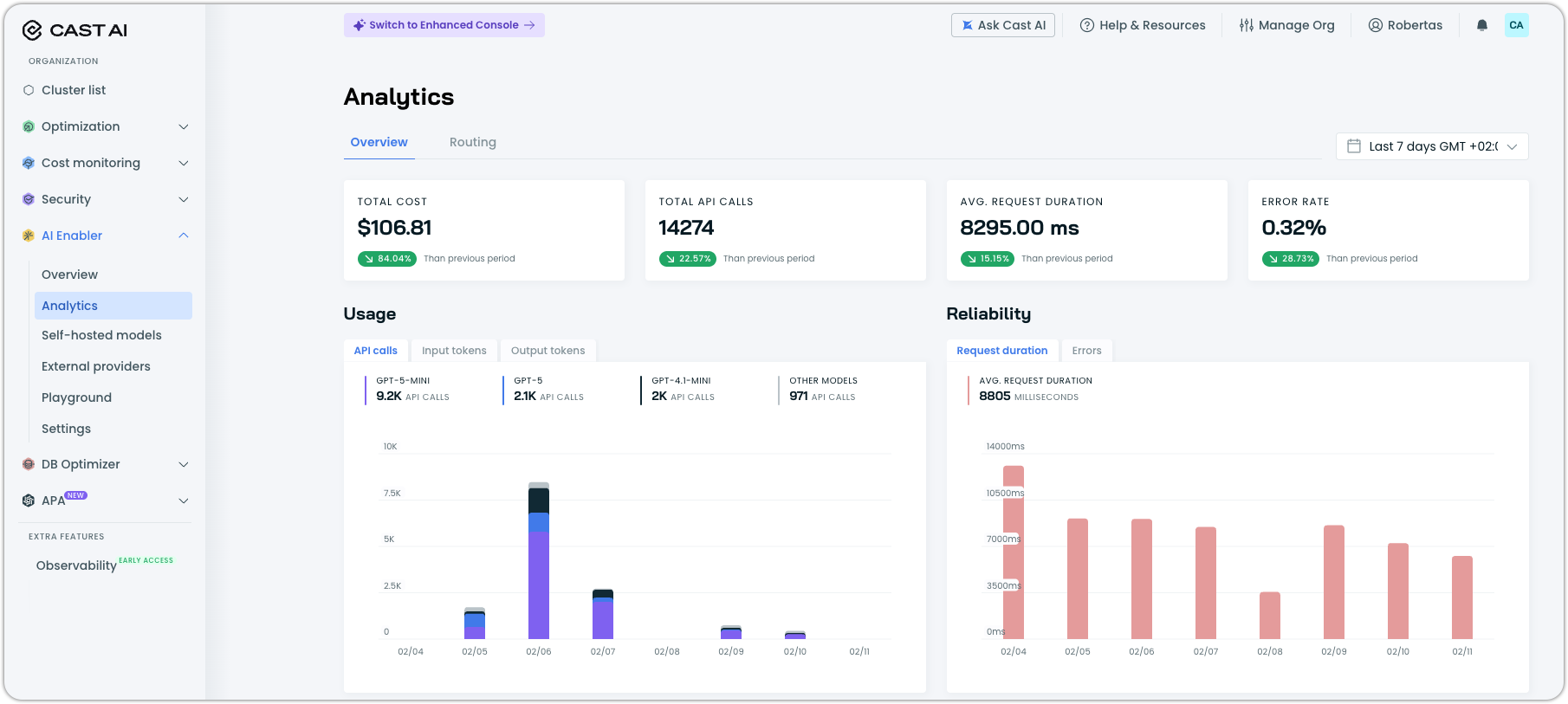
The AI Enabler Analytics Dashboard has been rebuilt with more comprehensive usage metrics and improved visualizations for the data you care about most. The new dashboard includes request volume, latency metrics (including time-to-first-token), throughput, idle time for hosted models, error rate tracking with error code breakdowns, and a recovered requests metric showing the effectiveness of fallback routing.
The GPU metrics exporter is now installed by default during AI Enabler setup, ensuring analytics data is available immediately for clusters with hosted model deployments.
Expanded Model Support
AI Enabler added support for additional models and model types:
- AWS provider catalog sync: Automated import of all available models into the AI Enabler catalog from all supported providers
- Claude Opus 4.5 on Bedrock: Support for Anthropic's Claude Opus 4.5 through the AWS Bedrock provider
S3 Repository Support for Custom Models
Custom model deployments now support Amazon S3 as a model repository source, in addition to the existing GCS support. This enables organizations using AWS storage to deploy fine-tuned and custom models without transferring model artifacts to GCS.
See our tutorial on how to deploy a custom model with AI Enabler to get started.
Cost Report Renamed to Routing
The AI Enabler "Cost Report" has been renamed "Routing" to better reflect its purpose: showing routing decisions, traffic distribution, and provider usage patterns rather than solely cost data. You can find it in the re-worked Analytics dashboard.
OMNI Integration for AI Enabler
AI Enabler now installs OMNI components by default when connecting a cluster for hosted model deployments. The OMNI deployment journey has been updated to streamline the setup process for multi-cloud model hosting scenarios as well.
Database Optimization
Expanded SQL Parser Coverage
The DBO SQL parser now supports additional PostgreSQL statement types, including GRANT ROLE, ALTER statements, and DISCARD statements. This expanded coverage reduces parsing errors and improves caching accuracy for a broader range of SQL workload patterns.
Node Configuration
Instance Type Weighting in Node Templates
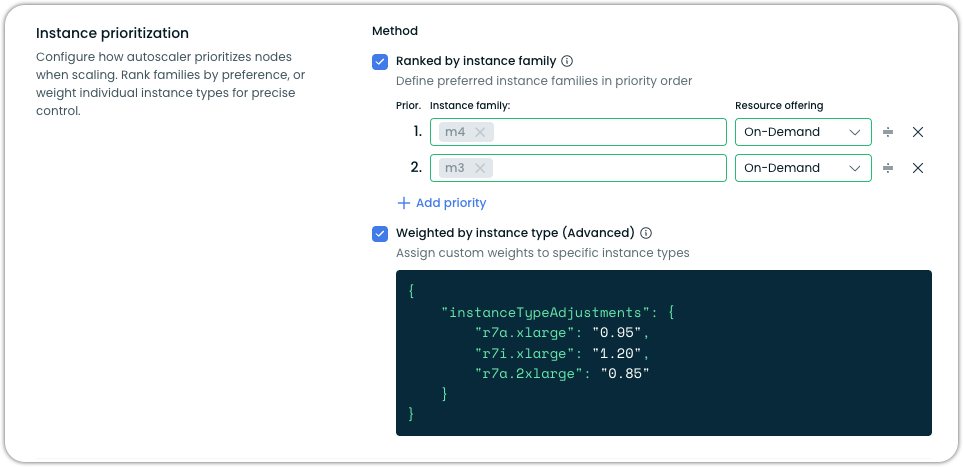
Node templates now support custom weight adjustments for individual instance types, available as an advanced option alongside instance family prioritization. Users can assign weight multipliers that adjust an instance type's perceived cost in the eyes of the autoscaler. For example, applying a 0.85 weight to make r7a.2xlarge appear more favorable or a 1.20 weight to make r7i.xlarge appear more expensive — without fully excluding any instance type from consideration.
Pod Mutations
Rebalancer Integration with Pod Mutations
The Rebalancer now applies pod mutation configurations during node rebalancing operations. When the Rebalancer replaces nodes with more cost-effective alternatives, pods recreated on the new nodes automatically receive the mutations defined in their matching PodMutation custom resources — such as labels, tolerations, node selectors, Spot/On-Demand distribution, and JSON patches.
Previously, pod mutations were only applied through the admission webhook during standard pod creation. With this integration, rebalancing operations maintain consistency with your defined mutation rules, ensuring that workloads land on the correct node types and retain their intended configurations after a rebalance completes.
For more information, see the Pod mutations documentation.
Application Performance Automation (APA)
Image Vulnerabilities Runbook Improvements
The Image Vulnerabilities runbook received several improvements:
- CI integration for automated build verification – PRs are now created as drafts and marked ready only after CI checks pass
- Improved summaries showing all remaining system vulnerabilities
- Enhanced PR descriptions with integrated system solution selector reports
- Chainguard base image integration for minimal-footprint container recommendations
General Runbook Enhancements
The APA runbook platform received several overarching improvements:
- Pagination for runbook runs with search capability across run details
- Better agent error state handling with visualization in the API and console
- APA component visibility in the Component Control dashboard
- Resource cleanup capabilities for APA and runbook resources
- DBO runbook integration with new priority field support
User Interface Improvements
Commitments Utilization Charts Rework
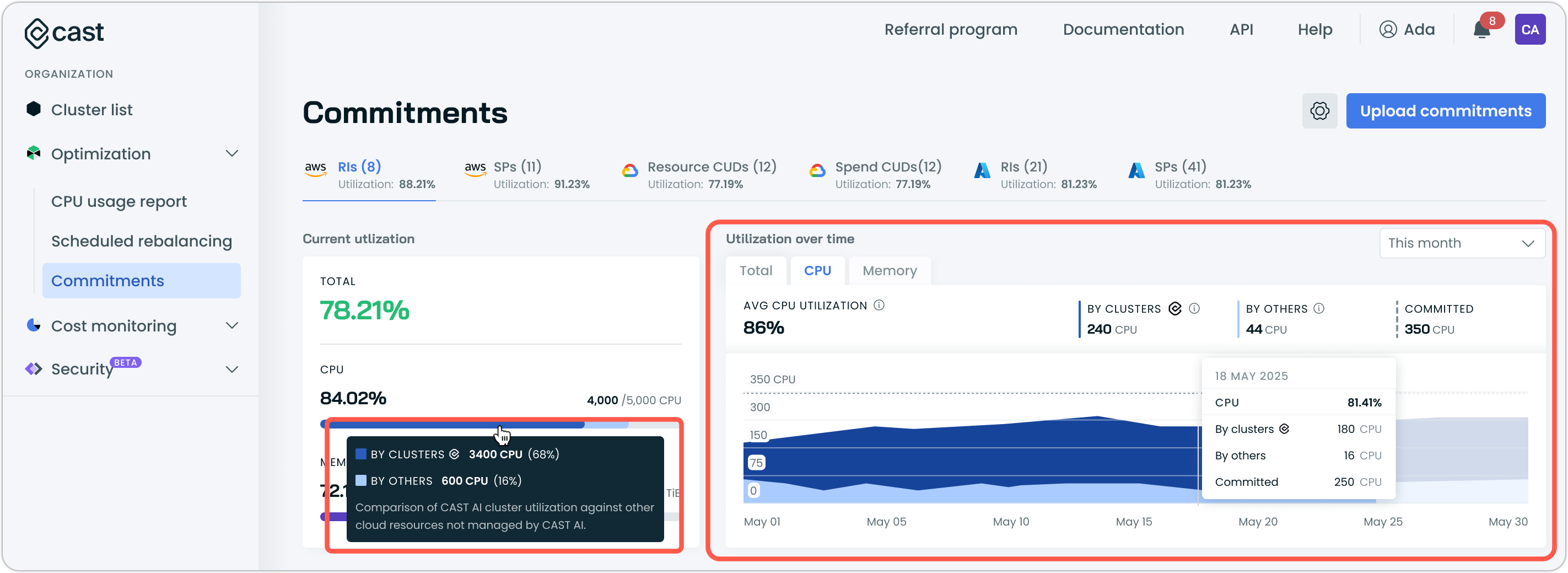
The commitments interface now features reworked utilization charts that display resource utilization split by type, showing utilization by Cast AI-managed clusters separately from utilization by other clusters.
Ephemeral Storage Display
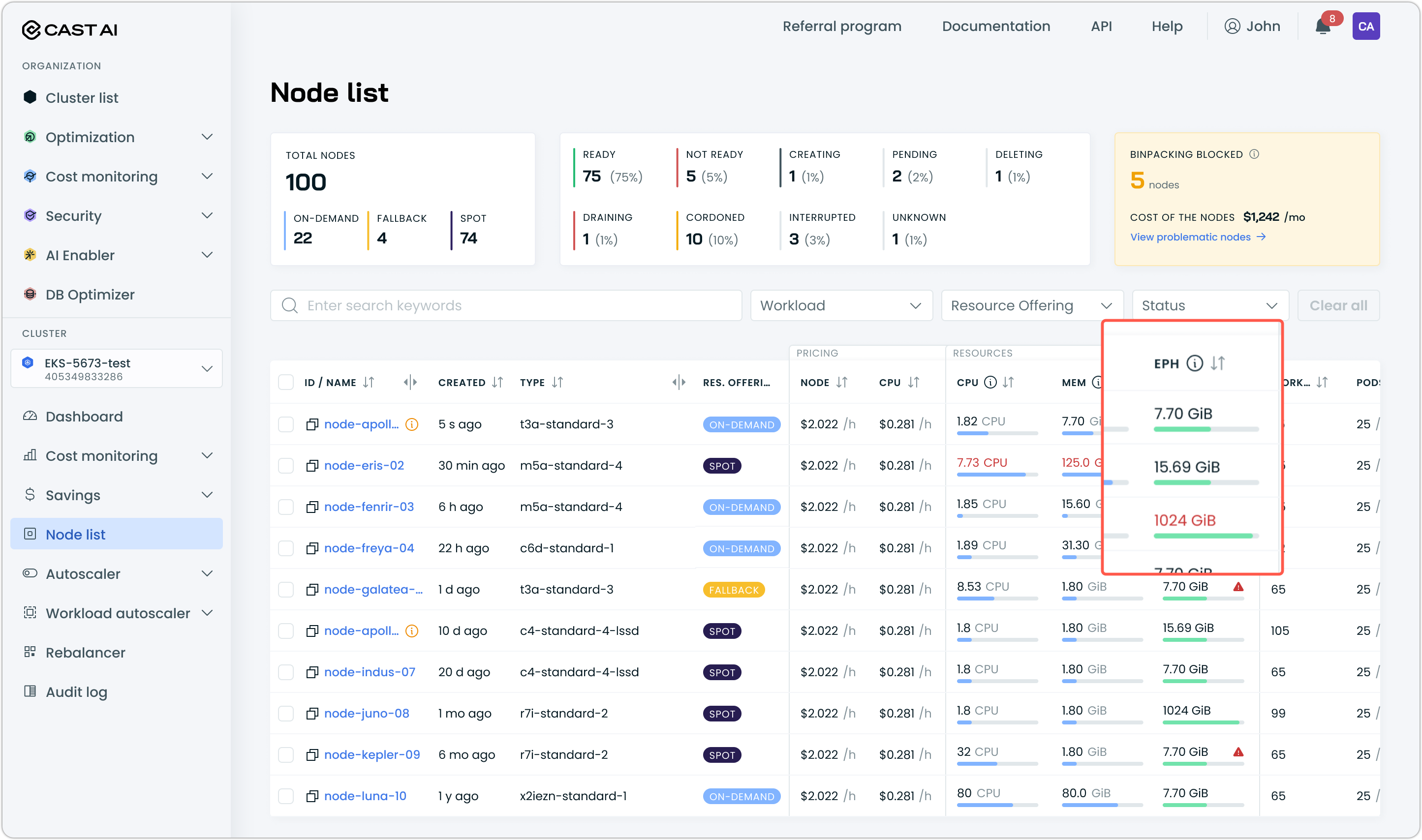
The node list table and node details panel now display ephemeral storage metrics, including allocatable capacity, requested amounts, and utilization percentages with progress bar visualization. This provides visibility into ephemeral storage alongside existing CPU and memory utilization data.
Requires kvisor to be installed in the cluster and configured for observability to show utilization data. Follow our documentation for instructions.
Aggressive Rebalancing for Karpenter Clusters
Aggressive rebalancing mode is now available for clusters running Karpenter Enterprise Suite, in both read-only and managed modes. This enables Karpenter users to run rebalancing plans that include workload types normally skipped in standard mode — such as single-replica deployments, bare pods, and Jobs — for more comprehensive node replacement and more aggressive cost optimization.
Savings Report Fixes
Several savings report issues were resolved:
- Savings numbers now display as rounded integers instead of showing excessive decimal points
- The savings report is now accessible for Workload Autoscaler-only customers in read-only clusters
- The "Last 12 months" date range selector now works correctly when less than 12 months of data is available
The Workload Autoscaler event log now includes an "Other Events" category to display previously hidden, unknown event types, ensuring all events are visible for debugging purposes.
Cluster ID Button Restored
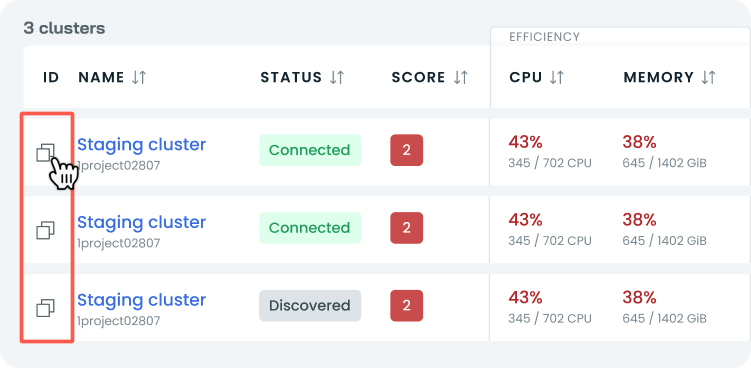
The cluster ID copy button has been restored in the Enhanced Console's cluster list view, addressing user feedback about its removal as a frequently used feature.
Infrastructure as Code
OMNI Terraform Enhancements
The OMNI Terraform modules received several updates:
- AWS edge location module now supports using existing VPCs instead of requiring new VPC creation
- Edge location security improvements with port 443 removed from default firewall ingress rules across GCP, AWS, and OCI Terraform modules
- SSH key configuration support for AWS and GCP edge location virtual machines
- NVMe storage support for edge location instances
AKS Terraform Impersonation Support
The AKS Terraform module now accepts a federationId parameter for impersonation support, enabling Terraform-managed AKS clusters to use federated identity for Cast AI authentication. Impersonation service account cleanup is now automated when no Phase 2 clusters remain in the organization.
Terraform and Agent Updates
We've released an updated version of our Terraform provider. As always, the latest changes are detailed in the changelog on GitHub. The updated provider and modules are now ready for use in your infrastructure-as-code projects in Terraform's registry.
We have released a new version of the Cast AI agent. The complete list of changes is here.