
Reference
This reference document outlines the installation and configuration of the Pod Mutator component, including the PodMutation custom resource definition (CRD), all available configuration options, and troubleshooting guidance.
For an introduction to pod mutations concepts, see Pod mutations overview. For a step-by-step first setup, see the Pod mutations quickstart.
Installation
Prerequisites
The pod mutator requires the following Cast AI component Helm chart versions:
| Component | Minimum chart version |
|---|---|
castai-agent | 0.123.0 |
castai-cluster-controller | 0.85.0 |
Verify your installed versions:
helm list -n castai-agent --filter 'castai-agent|cluster-controller'Install via console
- In the Cast AI console, select your cluster from the cluster list.
- Navigate to Autoscaler → Pod mutations in the sidebar.
- If the pod mutator is not installed, copy and run the provided installation script.
Install via Helm
Which upgrade method to useThe Helm commands on this page use the umbrella chart (
castai-helm/castai) by default. If you need to use a different method:
- castctl: To upgrade all Cast AI components at once without managing Helm flags:
This preserves your existing configuration. See the castctl documentation for installation and authentication instructions.castctl castware upgrade- Individual charts: If you installed each component as a separate Helm release (e.g., for ArgoCD or custom GitOps), replace the release name and chart reference with the component-specific ones (e.g.,
castai-workload-autoscalerandcastai-helm/castai-workload-autoscaler) and remove theautoscaler.castai-workload-autoscaler.value prefix.Not sure which method you used? Run
helm list -n castai-agent. A single release namedcastaimeans umbrella chart; separate releases likecastai-workload-autoscalermean individual charts.
-
Add the Cast AI Helm repository:
helm repo add castai-helm https://castai.github.io/helm-charts helm repo update -
Install the pod mutator:
helm upgrade --create-namespace -n castai-agent castai \
  castai-helm/castai \
  --reset-then-reuse-values \
  --set autoscaler.castai-pod-mutator.castai.apiKey="${CASTAI_API_KEY}" \
  --set autoscaler.castai-pod-mutator.castai.clusterID="${CLUSTER_ID}"
On Anywhere clusters, component configuration is passed through the
autoscaler-anywhereprefix instead ofautoscaler:helm upgrade --create-namespace -n castai-agent castai \ castai-helm/castai \ --reset-then-reuse-values \ --set autoscaler-anywhere.castai-pod-mutator.castai.apiKey="${CASTAI_API_KEY}" \ --set autoscaler-anywhere.castai-pod-mutator.castai.clusterID="${CLUSTER_ID}"
Replace ${CASTAI_API_KEY} and ${CLUSTER_ID} with your actual values. You can find these in the Cast AI console under User → API keys and in your cluster's settings.
Required Helm values
| Value | Description |
|---|---|
castai.apiKey | Your Cast AI API key. Find this in User → API keys in the console. |
castai.clusterID | Your cluster's ID. Find this in your cluster's settings in the console. |
Where to find your API key and Cluster ID
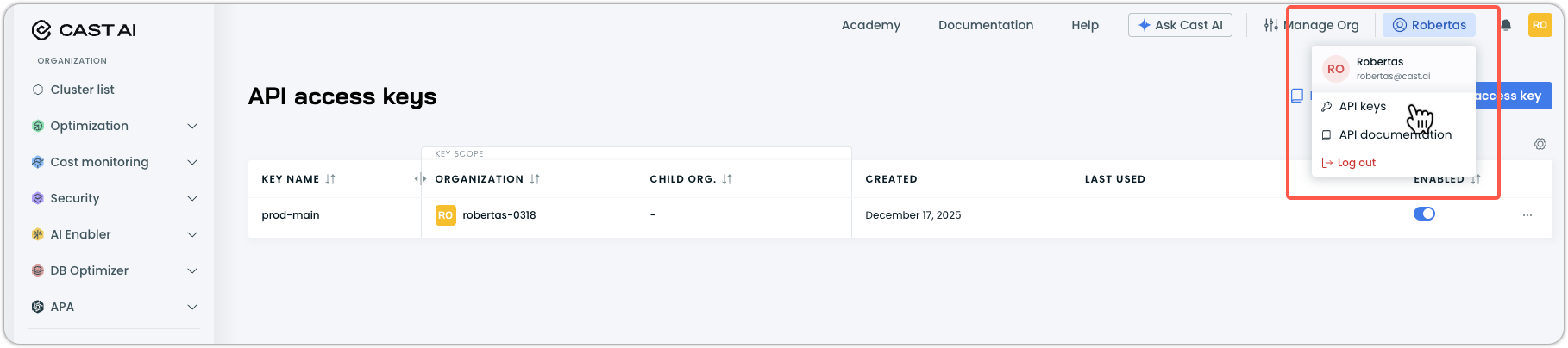
API Key:
- In the Cast AI console, click your profile in the top right corner.
- Select API keys from the dropdown menu.
- Use an existing key, or click Create access key to generate a new one.
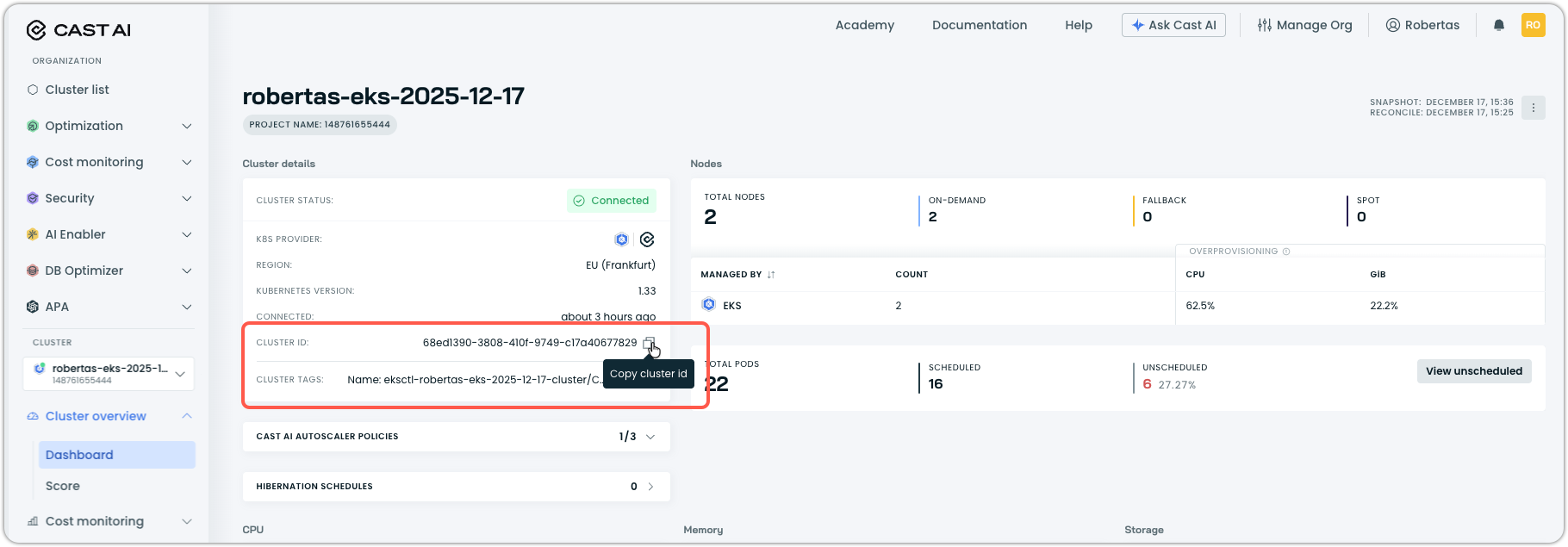
Cluster ID:
- Navigate to your cluster list in the Cast AI console.
- Select the cluster you want to install the pod mutator on. It will take you to Cluster overview > Dashboard in the sidebar navigation.
- Copy the Cluster ID value from the cluster details section.
Optional Helm values
| Value | Default | Description |
|---|---|---|
castai.apiUrl | $CASTAI_API_URL | Cast AI API endpoint. See API access for regional endpoints. |
webhook.reinvocationPolicy | Never | Webhook reinvocation policy. See Webhook configuration. |
webhook.failurePolicy | Ignore | Webhook failure policy. Ignore allows pods to proceed if the webhook fails. |
replicas | 2 | Number of pod mutator replicas. |
mutator.processingDelay | 30s | Delay before the pod mutator processes a pod. |
resources.requests.cpu | 20m | CPU request for pod mutator pods. |
resources.requests.memory | 512Mi | Memory request for pod mutator pods. |
resources.limits.memory | 512Mi | Memory limit for pod mutator pods. |
hostNetwork | false | Run pods with host networking. |
dnsPolicy | "" | DNS policy override. Defaults to ClusterFirstWithHostNet if hostNetwork is true. |
Installation example with custom values
helm upgrade --create-namespace -n castai-agent castai \
  castai-helm/castai \
  --reset-then-reuse-values \
  --set autoscaler.castai-pod-mutator.castai.apiUrl="$CASTAI_API_URL" \
  --set autoscaler.castai-pod-mutator.castai.apiKey="${CASTAI_API_KEY}" \
  --set autoscaler.castai-pod-mutator.castai.clusterID="${CLUSTER_ID}" \
  --set autoscaler.castai-pod-mutator.webhook.reinvocationPolicy="IfNeeded" \
  --set autoscaler.castai-pod-mutator.replicas=3
On Anywhere clusters, component configuration is passed through the autoscaler-anywhere prefix instead of autoscaler:
helm upgrade --create-namespace -n castai-agent castai \
  castai-helm/castai \
  --reset-then-reuse-values \
  --set autoscaler-anywhere.castai-pod-mutator.castai.apiUrl="$CASTAI_API_URL" \
  --set autoscaler-anywhere.castai-pod-mutator.castai.apiKey="${CASTAI_API_KEY}" \
  --set autoscaler-anywhere.castai-pod-mutator.castai.clusterID="${CLUSTER_ID}" \
  --set autoscaler-anywhere.castai-pod-mutator.webhook.reinvocationPolicy="IfNeeded" \
  --set autoscaler-anywhere.castai-pod-mutator.replicas=3
Webhook configuration
The pod mutator runs as a Kubernetes Mutating Admission Webhook. The reinvocationPolicy setting controls whether the webhook is called again if other admission plugins modify the pod after the initial mutation.
| Policy | Behavior |
|---|---|
Never (default) | The pod mutator is called only once during pod admission. |
IfNeeded | The pod mutator may be called again if other admission plugins modify the pod. |
When to use IfNeeded
IfNeededSet reinvocationPolicy to IfNeeded when:
- You have multiple admission webhooks that modify pods
- Other webhooks run before the pod mutator, and their changes affect fields the mutator needs to read
- You're experiencing issues where mutations aren't being applied correctly due to webhook ordering
helm upgrade castai castai-helm/castai -n castai-agent \
  --reset-then-reuse-values \
  --set autoscaler.castai-pod-mutator.webhook.reinvocationPolicy="IfNeeded"
On Anywhere clusters, component configuration is passed through the autoscaler-anywhere prefix instead of autoscaler:
helm upgrade castai castai-helm/castai -n castai-agent \
  --reset-then-reuse-values \
  --set autoscaler-anywhere.castai-pod-mutator.webhook.reinvocationPolicy="IfNeeded"
WarningWhen
reinvocationPolicyis set toIfNeeded, the pod mutator may override changes made by other webhooks if those changes conflict with mutation rules. Consider your webhook interaction patterns before enabling this setting.
Verify installation
Confirm the pod mutator is running:
kubectl get pods -n castai-agent -l app.kubernetes.io/name=castai-pod-mutatorExpected output:
NAME                                  READY   STATUS    RESTARTS       AGE
castai-pod-mutator-767d48f477-lshm2   1/1     Running   0              112s
castai-pod-mutator-767d48f477-wvprs   1/1     Running   1 (105s ago)   112s
Verify the webhook is registered:
kubectl get mutatingwebhookconfigurations | grep pod-mutatorUpgrading
Upgrade via console
The recommended way to keep the pod mutator up to date:
- In the Cast AI console, select Manage Organization in the top right.
- Navigate to Component control in the left menu.
- Find the pod mutator in the component list.
- For any cluster displaying a warning status, click on the component to view the details.
- Click Update and run the provided Helm command.
See Component Control for more information.
Upgrade via Helm
helm repo update castai-helm
helm upgrade castai castai-helm/castai -n castai-agent --reset-then-reuse-values
The --reset-then-reuse-values flag preserves your existing configuration (API keys, cluster ID) while applying the latest chart defaults.
NoteIf you encounter errors like
nil pointer evaluating interface {}.enabledduring upgrades, use--reset-then-reuse-valuesinstead of--reuse-values.
Check installed version
helm list -n castai-agent --filter pod-mutatorUninstalling
To remove the pod mutator from your cluster:
helm uninstall pod-mutator -n castai-agentThis removes the pod mutator deployment and webhook configuration. Existing PodMutation custom resources remain in the cluster but are no longer applied to new pods.
To also remove all mutation definitions:
kubectl delete podmutations.pod-mutations.cast.ai --allTo remove the CRD entirely (this deletes all mutations):
kubectl delete crd podmutations.pod-mutations.cast.aiPodMutation CRD specification
Pod mutations are defined as Kubernetes custom resources of kind PodMutation. Each resource specifies filters to match pods and patch operations or configurations to apply.
Resource definition
apiVersion: pod-mutations.cast.ai/v1
kind: PodMutation| Property | Value |
|---|---|
| API group | pod-mutations.cast.ai |
| API version | v1 |
| Kind | PodMutation |
| Scope | Cluster |
| Short names | pomu, pomus |
Spec fields
The spec object defines the mutation behavior.
| Field | Type | Required | Description |
|---|---|---|---|
filterV2 | object | No | Filter configuration to match pods. |
filter | object | No | Legacy filter configuration (backward compatibility). |
patchesV2 | array | No | Patch operations to apply to matched pods. |
patches | array | No | Legacy patch operations (backward compatibility). |
podEviction | object | No | Controls whether non-conforming pods are evicted. |
restartPolicy | string | No | Deprecated. Use podEviction instead. |
spotConfig | object | No | Spot Instance configuration. |
distributionGroups | array | No | Percentage-based distribution of configurations (preview). |
filterV2
The recommended filter format using typed matcher objects.
filterV2.workload
Filters pods based on their parent workload properties.
| Field | Type | Required | Description |
|---|---|---|---|
namespaces | array | No | Matchers for namespace names. |
excludeNamespaces | array | No | Matchers for namespaces to exclude. |
names | array | No | Matchers for workload names. |
excludeNames | array | No | Matchers for workload names to exclude. |
kinds | array | No | Matchers for workload kinds. |
excludeKinds | array | No | Matchers for workload kinds to exclude. |
Each array element is a Matcher object:
| Field | Type | Required | Description |
|---|---|---|---|
type | string | Yes | Match type. Enum: exact, regex. |
value | string | Yes | The value or regex pattern to match. |
filterV2.pod
Filters pods based on their labels, tolerations, or a CEL expression evaluated against the full pod object.
| Field | Type | Required | Description |
|---|---|---|---|
labels | object | No | Label matchers for pods to include. |
excludeLabels | object | No | Label matchers for pods to exclude. |
tolerations | object | No | Toleration matchers for pods to include. See Tolerations filter. |
excludeTolerations | object | No | Toleration matchers for pods to exclude. See Exclude tolerations filter. |
celExpression | string | No | CEL expression evaluated against the pod. See CEL expression filter. |
labels and excludeLabels are LabelMatcherGroup objects:
| Field | Type | Required | Description |
|---|---|---|---|
matchers | array | No | List of label matchers. |
operator | string | No | How to combine matchers. Enum: and, or. |
Each element in matchers is a LabelMatcher object:
| Field | Type | Required | Description |
|---|---|---|---|
keyMatcher | object | Yes | Matcher for the label key. |
valueMatcher | object | Yes | Matcher for the label value. |
Both keyMatcher and valueMatcher are Matcher objects (same structure as workload matchers).
filter (legacy)
The legacy filter format using simple string arrays. Maintained for backward compatibility.
filter.workload
| Field | Type | Required | Description |
|---|---|---|---|
namespaces | []string | No | Namespace names or patterns to match. |
excludeNamespaces | []string | No | Namespace names or patterns to exclude. |
names | []string | No | Workload names or patterns to match. |
excludeNames | []string | No | Workload names or patterns to exclude. |
kinds | []string | No | Workload kinds to match. |
excludeKinds | []string | No | Workload kinds to exclude. |
filter.pod
| Field | Type | Required | Description |
|---|---|---|---|
labelsFilter | array | No | Label conditions for pods to include. |
labelsOperator | string | No | How to combine label conditions. Enum: and, or. |
excludeLabelsFilter | array | No | Label conditions for pods to exclude. |
excludeLabelsOperator | string | No | How to combine exclude label conditions. Enum: and, or. |
Each element in labelsFilter and excludeLabelsFilter is a LabelValue object:
| Field | Type | Required | Description |
|---|---|---|---|
key | string | Yes | The label key. |
value | string | Yes | The label value. |
patchesV2
The recommended patch format using grouped operations. Each group contains a sequence of JSON Patch operations (RFC 6902) applied in order.
| Field | Type | Required | Description |
|---|---|---|---|
operations | array | Yes | Sequence of JSON Patch operations to apply. |
Each element in operations is a PatchOperation object:
| Field | Type | Required | Description |
|---|---|---|---|
op | string | Yes | Operation type. Enum: add, remove, replace, move, copy, test. |
path | string | Yes | JSON Pointer (RFC 6901) to the target location. |
value | any | Conditional | Value to use. Required for add, replace, test. |
from | string | Conditional | Source path. Required for move, copy |
patches (legacy)
The legacy patch format as a flat array of operations. Maintained for backward compatibility.
Each element is a PatchOperation object (same structure as patchesV2.operations).
spotConfig
Configures Spot Instance scheduling behavior.
| Field | Type | Required | Description |
|---|---|---|---|
mode | string | No | Spot behavior mode. Enum: optional-spot, only-spot, preferred-spot. |
distributionPercentage | integer | No | Percentage of pods to receive Spot configuration (0–100). |
Spot mode values
| Mode | Description |
|---|---|
optional-spot | Schedule on Spot or On-Demand with no preference. |
only-spot | Require Spot instances. Pods fail to schedule if Spot is unavailable. |
preferred-spot | Prefer Spot, fall back to On-Demand. Rebalance to Spot when available. |
distributionGroups
Preview featureDistribution groups are a preview feature that allows splitting a workload's replicas across multiple configurations.
| Field | Type | Required | Description |
|---|---|---|---|
name | string | Yes | Unique identifier for the distribution group. |
percentage | integer | Yes | Percentage of pods for this group (0–100). |
configuration | object | Yes | Configuration to apply to pods in this group. |
distributionGroups[].configuration
| Field | Type | Required | Description |
|---|---|---|---|
patches | array | No | Legacy patch operations for this group. |
patchesV2 | array | No | Patch operations for this group (same structure as spec.patchesV2). |
spotMode | string | No | Spot mode for this group. Enum: optional-spot, only-spot, preferred-spot. |
podEviction
Controls whether pods that no longer match the mutation are eligible for eviction. When eviction is enabled and enforcement is active on the pod mutator, the pod mutator periodically scans running pods and evicts those that are out of compliance. The workload controller then recreates them, and the mutation is applied to the new pods.
| Field | Type | Required | Description |
|---|---|---|---|
enabled | boolean | No | Whether non-conforming pods are eligible for eviction. Defaults to false. |
Example:
podEviction:
  enabled: true
Note
podEviction.enabled: truehas no effect unless enforcement is also enabled at the pod mutator level. See Enabling enforcement in the Pod mutations overview.
restartPolicy (deprecated)
Deprecated
restartPolicyis deprecated. UsepodEvictionto control whether non-conforming pods are evicted.
Resource annotations
When you create a mutation through the Cast AI console or API, the resulting Kubernetes resource includes metadata annotations:
| Annotation | Description |
|---|---|
pod-mutations.cast.ai/pod-mutation-id | Unique identifier for the mutation. |
pod-mutations.cast.ai/pod-mutation-name | The friendly name provided when creating the mutation. |
pod-mutations.cast.ai/pod-mutation-source | Creation source: api (console/API) or cluster (kubectl/GitOps). |
Console-created mutations use the resource name pattern api-mutation-{uuid}. Cluster-created mutations use the name you specify in the manifest.
Pod annotations
When the pod mutator successfully applies a mutation to a pod, it adds the following annotations to the pod:
| Annotation | Description |
|---|---|
pod-mutations.cast.ai/podmutation-id | Unique identifier of the Pod Mutation that was applied. |
pod-mutations.cast.ai/podmutation-name | Name of the Pod Mutation that was applied. |
pod-mutations.cast.ai/podmutation-applied-patch | JSON patch operations that were applied to the pod. |
pod-mutations.cast.ai/podmutation-distribution-group-name | Name of the distribution group (only present if the mutation uses distribution groups). |
You can use these annotations to verify that a mutation was applied and to see exactly what changes were made.
Filters
Filters determine which pods a mutation applies to. The CRD supports two filter formats: filterV2 (recommended) and filter (legacy for backwards compatibility).
If multiple filter criteria are specified, they are combined with AND logic: a pod must match all specified criteria.
If no filters are specified, the mutation matches all pods in the cluster, which is rarely the intended use case.
FilterV2 (recommended)
The filterV2 object contains workload and pod sections with typed matcher objects.
Workload filters
Workload filters match pods based on their namespace, owner workload name, or workload kind. The pod mutator walks the ownership chain of each pod through known Kubernetes types (ReplicaSet, Deployment, StatefulSet, Job) until it reaches a terminal owner — either a known type with no parent or a custom resource. It then matches against any owner in that resolved chain. For example, a pod owned by a ReplicaSet, which is owned by a Deployment, which is owned by a custom resource, can be matched by the kind or name of any of those owners.
Namespace filter
Match pods by the namespace they are created in.
filterV2:
  workload:
    namespaces:
      - type: exact
        value: production
      - type: exact
        value: staging
Each entry is a matcher object:
| Field | Type | Description |
|---|---|---|
type | string | Match type: exact for exact match, regex for regular expression. |
value | string | The namespace name or regex pattern to match. |
Examples:
# Match exact namespaces
filterV2:
  workload:
    namespaces:
      - type: exact
        value: production
      - type: exact
        value: staging

# Match namespaces using regex
filterV2:
  workload:
    namespaces:
      - type: regex
        value: "^team-.*$"
      - type: regex
        value: "^env-prod-.*$"

# Exclude specific namespaces
filterV2:
  workload:
    namespaces:
      - type: regex
        value: ".*"
    excludeNamespaces:
      - type: exact
        value: kube-system
      - type: exact
        value: castai-agent
Workload name filter
Match pods by their owner workload's name. The pod mutator walks the ownership chain through known Kubernetes types until it reaches a terminal owner (for example, Pod → ReplicaSet → Deployment → custom resource) and matches the name against any owner in that resolved chain.
filterV2:
  workload:
    names:
      - type: exact
        value: frontend
      - type: regex
value: "^backend-.*$"| Field | Type | Description |
|---|---|---|
type | string | Match type: exact or regex. |
value | string | The workload name or regex pattern to match. |
Workload kind filter
Match pods by their owner workload's Kubernetes kind. The pod mutator walks the ownership chain through known types and matches against any owner kind in the resolved chain. For example, if a pod's ownership chain is Pod → ReplicaSet → Deployment → Loki (a custom resource), both kind=Loki and kind=Deployment will match.
filterV2:
  workload:
    kinds:
      - type: exact
        value: Deployment
      - type: exact
value: StatefulSet| Field | Type | Description |
|---|---|---|
type | string | Match type: exact or regex. |
value | string | The workload kind or regex pattern to match. |
Supported workload kinds:
| Kind | Description |
|---|---|
Deployment | Standard deployment workloads |
StatefulSet | Stateful application workloads |
DaemonSet | Node-level daemon workloads |
ReplicaSet | Replica set workloads (typically managed by Deployments) |
Job | Batch processing workloads |
CronJob | Scheduled recurring workloads |
Pod | Standalone pods without a parent controller |
| Custom resource | Custom resources that own standard workloads (for example, operators like Loki, Tempo, Redis) |
NoteYou can use any Kubernetes kind value in the filter, including custom resource kinds. The pod mutator walks the ownership chain through the known types listed above until it reaches a custom resource or a parentless owner, then matches against any owner in that resolved chain. This means a custom resource that owns a Deployment (or StatefulSet, etc.) is reachable as the root of the chain, but the mutator cannot traverse beyond the first custom resource in the hierarchy.
Pod filters
Pod filters match pods based on their labels using a matcher structure.
Label filter
Match pods that have specific labels.
filterV2:
  pod:
    labels:
      matchers:
        - keyMatcher:
            type: exact
            value: environment
          valueMatcher:
            type: exact
            value: production
        - keyMatcher:
            type: exact
            value: tier
          valueMatcher:
            type: exact
            value: frontend
operator: and| Field | Type | Description |
|---|---|---|
matchers | array | List of label matchers, each with keyMatcher and valueMatcher objects. |
operator | string | How to combine matchers: and (all must match) or or (any must match). |
Each matcher has:
| Field | Type | Description |
|---|---|---|
keyMatcher | object | Matcher for the label key with type and value. |
valueMatcher | object | Matcher for the label value with type and value. |
Exclude labels filter
Exclude pods that have specific labels, even if they match other filters.
filterV2:
  pod:
    excludeLabels:
      matchers:
        - keyMatcher:
            type: exact
            value: skip-mutation
          valueMatcher:
            type: exact
            value: "true"
      operator: or
Tolerations filter
Match pods that have specific tolerations. The pod mutator checks the pod's spec.tolerations array against the configured matchers.
filterV2:
  pod:
    tolerations:
      matchers:
        - keyMatcher:
            type: exact
            value: scheduling.cast.ai/spot
          operatorMatcher:
            type: exact
            value: Exists
        - keyMatcher:
            type: exact
            value: dedicated
          operatorMatcher:
            type: exact
            value: Equal
          valueMatcher:
            type: exact
            value: gpu
operator: and| Field | Type | Required | Description |
|---|---|---|---|
matchers | array | No | List of toleration matchers. |
operator | string | No | How to combine matchers. Enum: and, or. |
Each element in matchers is a TolerationMatcher object:
| Field | Type | Required | Description |
|---|---|---|---|
keyMatcher | object | Yes | Matcher for the toleration key. |
operatorMatcher | object | No | Matcher for the toleration operator (Exists or Equal). |
valueMatcher | object | No | Matcher for the toleration value. |
All three are Matcher objects with type and value fields (same structure as workload matchers).
How toleration matching works:
The matching logic operates at two levels:
-
Per-matcher level: For each toleration matcher in the
matchersarray, the pod matches if any of its tolerations satisfies all specified matcher fields:keyMatchermust match the toleration'skey.operatorMatcher(if set) must match the toleration'soperator.valueMatcher(if set) must match the toleration'svalue.
-
Multi-matcher combination:
- With
operator: and(default), all matchers in the array must individually match the pod. - With
operator: or, any matcher in the array must individually match the pod.
- With
NoteIf
valueMatcheris omitted, only the key and operator are checked. This is useful for matchingExiststolerations where the value is empty.
Exclude tolerations filter
Exclude pods that have specific tolerations, even if they match other filters.
filterV2:
  pod:
    excludeTolerations:
      matchers:
        - keyMatcher:
            type: exact
            value: node.kubernetes.io/not-ready
          operatorMatcher:
            type: exact
            value: Exists
          valueMatcher:
            type: exact
            value: ""
      operator: or
CEL expression filter
Use a CEL (Common Expression Language) expression to filter pods based on any field in the full Kubernetes Pod object. This provides powerful, fine-grained filtering beyond labels — you can match on container images, probes, resource requests, annotations, and any other pod field.
The pod object is available as the object variable with the standard Kubernetes Pod structure (object.metadata, object.spec, object.status). The expression must evaluate to a boolean (true for a match, false for no match). When celExpression is empty, all pods match (passthrough).
filterV2:
  pod:
celExpression: "object.spec.containers.exists(c, c.image == 'nginx')"| Field | Type | Required | Description |
|---|---|---|---|
celExpression | string | No | CEL expression evaluated against the pod. Returns true to match, false to exclude. |
How CEL expressions work with other filters:
The celExpression is combined with other filterV2 criteria using AND logic. A pod must match all specified filters — including namespace, workload name, kind, labels, and the CEL expression — for the mutation to apply.
Error handling:
- If the CEL expression contains invalid syntax, the
PodMutationresource is rejected on creation or update. - If the CEL expression references a nonexistent field (for example,
object.nonexistent), evaluation fails at runtime. Runtime errors are treated as non-match — the pod is simply skipped rather than causing an admission failure. - If the CEL expression returns a non-boolean value, evaluation fails and is treated as non-match.
CEL expression examples:
Match pods with a specific container image:
filterV2:
  pod:
    celExpression: "object.spec.containers.exists(c, c.image == 'nginx')"
Match pods with a specific label value:
filterV2:
  pod:
    celExpression: "object.metadata.labels['tier'] == 'production'"
Match pods that have a startup probe defined in any container:
filterV2:
  pod:
    celExpression: "object.spec.containers.exists(c, has(c.startupProbe))"
Match pods with a specific annotation:
filterV2:
  pod:
    celExpression: "has(object.metadata.annotations) && object.metadata.annotations['reloader.stakater.com/auto'] == 'true'"
Match pods where all containers have resource requests defined:
filterV2:
  pod:
    celExpression: "object.spec.containers.exists(c, has(c.resources.requests))"
Match pods with a specific image pull policy:
filterV2:
  pod:
    celExpression: "object.spec.containers[0].imagePullPolicy == 'Always'"
Match pods that have no probes defined:
filterV2:
  pod:
    celExpression: "!object.spec.containers.exists(c, has(c.startupProbe) || has(c.livenessProbe) || has(c.readinessProbe))"
Combine CEL with other filters for precise targeting:
filterV2:
  workload:
    namespaces:
      - type: exact
        value: production
  pod:
    labels:
      matchers:
        - keyMatcher:
            type: exact
            value: tier
          valueMatcher:
            type: exact
            value: web
      operator: and
    celExpression: "object.spec.containers.exists(c, c.image == 'myapp:v2')"
Complete filterV2 example
filterV2:
  workload:
    namespaces:
      - type: exact
        value: production
    names:
      - type: regex
        value: "^frontend-.*$"
    kinds:
      - type: exact
        value: Deployment
      - type: exact
        value: StatefulSet
    excludeNames:
      - type: exact
        value: frontend-canary
  pod:
    labels:
      matchers:
        - keyMatcher:
            type: exact
            value: tier
          valueMatcher:
            type: exact
            value: web
      operator: and
    excludeLabels:
      matchers:
        - keyMatcher:
            type: exact
            value: skip-mutation
          valueMatcher:
            type: exact
            value: "true"
      operator: or
This matches pods that:
- Are in the
productionnamespace, AND - Belong to workloads with names starting with
frontend-(but notfrontend-canary), AND - Are part of a Deployment or StatefulSet, AND
- Have the label
tier: web, AND - Do NOT have the label
skip-mutation: "true"
Legacy filter format
The legacy filter format uses simpler structures without typed matchers:
filter:
  workload:
    namespaces:
      - production
      - staging
    names:
      - frontend
      - backend
    kinds:
      - Deployment
    excludeNamespaces:
      - kube-system
    excludeNames:
      - canary
    excludeKinds:
      - DaemonSet
  pod:
    labelsFilter:
      - key: environment
        value: production
      - key: tier
        value: frontend
    labelsOperator: and
    excludeLabelsFilter:
      - key: skip-mutation
        value: "true"
    excludeLabelsOperator: or
NotePod mutatio filters only work with labels, not annotations. When configuring filters, ensure you're targeting pod labels defined at
spec.template.metadata.labelsin your workload manifests.
Configuration options
Configuration options define what changes the mutation applies to matched pods. The primary method is through patchesV2 operations, with additional support for spotConfig.
Patch operations (patchesV2)
The patchesV2 field contains an array of patch groups, each with an operations array of JSON Patch operations (RFC 6902).
patchesV2:
  - operations:
      - op: add
        path: /metadata/labels/environment
        value: production
      - op: add
        path: /metadata/labels/managed-by
        value: castai
Operation fields
| Field | Type | Required | Description |
|---|---|---|---|
op | string | Yes | The operation: add, remove, replace, move, copy, or test. |
path | string | Yes | JSON pointer to the target location in the pod spec. |
value | any | Conditional | The value to use. Required for add, replace, and test operations. |
from | string | Conditional | Source path for move and copy operations. |
Supported operations
| Operation | Description |
|---|---|
add | Add a value at the specified path. Creates intermediate objects/arrays as needed. |
remove | Remove the value at the specified path. |
replace | Replace the value at the specified path. Path must already exist. |
move | Move a value from one path to another. |
copy | Copy a value from one path to another. |
test | Verify a value exists at the path. Mutation fails if test fails. |
Path syntax
Paths use JSON Pointer syntax (RFC 6901):
- Paths start with
/ - Path segments are separated by
/ - Array indices are zero-based integers
- Use
/-to append to the end of an array - Escape
~as~0and/as~1in key names (for example,/metadata/annotations/cast.ai~1mutationfor keycast.ai/mutation)
Legacy patches format
The legacy patches field is a flat array of operations (without the grouping):
patches:
  - op: add
    path: /metadata/labels/environment
    value: production
  - op: add
    path: /metadata/labels/managed-by
    value: castai
Common patch examples
Add labels
patchesV2:
  - operations:
      - op: add
        path: /metadata/labels/environment
        value: production
      - op: add
        path: /metadata/labels/team
        value: platform
Add annotations
patchesV2:
  - operations:
      - op: add
        path: /metadata/annotations/prometheus.io~1scrape
        value: "true"
      - op: add
        path: /metadata/annotations/prometheus.io~1port
        value: "9090"
NoteWhen adding annotations with
/in the key (likeprometheus.io/scrape), escape the/as~1in the path.
Add node selector
patchesV2:
  - operations:
      - op: add
        path: /spec/nodeSelector
        value:
          scheduling.cast.ai/node-template: production-template
Or add to an existing node selector:
patchesV2:
  - operations:
      - op: add
        path: /spec/nodeSelector/scheduling.cast.ai~1node-template
        value: production-template
Add tolerations
Add a toleration to the tolerations array:
patchesV2:
  - operations:
      - op: add
        path: /spec/tolerations/-
        value:
          key: scheduling.cast.ai/spot
          operator: Exists
          effect: NoSchedule
The /- syntax appends to the end of the array, which is safe when you don't know the current array length.
Remove a label
patchesV2:
  - operations:
      - op: remove
        path: /metadata/labels/deprecated-label
Replace a value
patchesV2:
  - operations:
      - op: replace
        path: /spec/nodeSelector/environment
        value: production
Azure agentpool migration
A common use case is migrating from Azure's native agentpool labels to Cast AI Node Templates:
patchesV2:
  - operations:
      - op: move
        from: /metadata/labels/agentpool
        path: /metadata/labels/dedicated
      - op: move
        from: /spec/nodeSelector/agentpool
        path: /spec/nodeSelector/dedicated
      - op: replace
        path: /spec/tolerations/0/key
        value: dedicated
Toleration reference
When adding tolerations, use these field values:
| Field | Type | Required | Description |
|---|---|---|---|
key | string | Yes | The taint key to tolerate. |
operator | string | Yes | Equal (key and value must match) or Exists (only key must exist). |
value | string | Conditional | The taint value. Required when operator is Equal. |
effect | string | No | The taint effect: NoSchedule, PreferNoSchedule, or NoExecute. If empty, tolerates all effects. |
Effect values:
| Effect | Description |
|---|---|
NoSchedule | Pods will not be scheduled on the node unless they tolerate the taint. |
PreferNoSchedule | Kubernetes will try to avoid scheduling pods on the node, but it's not guaranteed. |
NoExecute | Existing pods are evicted if they don't tolerate the taint. New pods won't be scheduled. |
Common Cast AI tolerations:
# Tolerate spot instance nodes
- op: add
  path: /spec/tolerations/-
  value:
    key: scheduling.cast.ai/spot
    operator: Exists
    effect: NoSchedule

# Tolerate a specific node template
- op: add
  path: /spec/tolerations/-
  value:
    key: scheduling.cast.ai/node-template
    operator: Equal
    value: gpu-nodes
    effect: NoSchedule
Spot configuration
Configure Spot Instance scheduling behavior and distribution percentage for matched pods.
spotConfig:
  mode: preferred-spot
distributionPercentage: 80| Field | Type | Description |
|---|---|---|
mode | string | Spot Instance behavior mode. |
distributionPercentage | integer | Percentage of pods to receive Spot configuration (0–100). |
Spot modes
| Mode | Description |
|---|---|
optional-spot | Schedule on either Spot or On-Demand instances. No preference between instance types if both are available. |
only-spot | Strictly require Spot instances. Pods will fail to schedule if Spot capacity is unavailable. |
preferred-spot | Prefer Spot instances but automatically fall back to On-Demand if Spot is unavailable. Will attempt to rebalance back to Spot when capacity returns. |
Pre-existing Spot constraints
When applying a Spot configuration, the pod mutator first removes any pre-existing Spot scheduling constraints from the pod before applying the new ones. This includes Spot-related tolerations, node selectors, and node affinities.
This cleanup-before-apply behavior ensures that pods that already carry Spot constraints (for example, defined in the deployment manifest) don't end up with duplicate or conflicting entries.
Distribution percentage
The distribution percentage determines what fraction of matched pods receive Spot-related configuration (the exact configuration itself being defined separately):
- 80% distribution: 80% of pods get the configured Spot behavior; 20% are scheduled on On-Demand instances.
- 100% distribution: All matched pods receive the Spot configuration.
- 0% distribution: No pods receive Spot configuration (effectively disables Spot for matched pods).
The pod mutator makes this determination at pod creation time. For each new pod, it probabilistically assigns the pod to either the Spot or On-Demand group based on the configured percentage.
Note on rapid scalingWhen a deployment scales up instantaneously (for example, from 0 to 10 replicas at once), the actual distribution may not match the configured percentage immediately. This happens because placement decisions are made independently for each pod without knowledge of other pods being created simultaneously. The system self-corrects over time as pods are recreated through normal application lifecycle events.
Note on small replica countsFor workloads with very few replicas, the distribution may not precisely match the percentage. For example, with a single pod and any Spot distribution below 100%, the pod will be scheduled on On-Demand to ensure minimum availability. The distribution becomes more accurate as replica counts increase.
Example configurations
# 80% Spot with fallback to On-Demand
spotConfig:
  mode: preferred-spot
  distributionPercentage: 80

# 100% Spot, strict (no fallback)
spotConfig:
  mode: only-spot
  distributionPercentage: 100

# 50/50 split, no preference when both available
spotConfig:
  mode: optional-spot
  distributionPercentage: 50

# No Spot configuration (empty object)
spotConfig: {}
Patch limitations
- Patches apply to the pod template at creation time, not to running pods.
- Some Kubernetes fields are immutable after pod creation; patches targeting these fields will be rejected.
- Patches that result in invalid pod specifications will cause the mutation to fail.
Conflict resolution
When multiple mutations have filters that match the same pod, Cast AI uses a specificity scoring system to select only one mutation. The most specific mutation wins.
Specificity scoring
Each filter criterion contributes points to a mutation's specificity score:
| Filter criterion | Points |
|---|---|
| Workload name specified | 4 (most specific) |
| Pod labels specified | 2 |
| Namespace specified | 1 (least specific) |
The mutation with the highest total score is selected.
Example scores:
| Mutation filters | Score | Calculation |
|---|---|---|
| Workload name + pod labels + namespace | 7 | 4 + 2 + 1 |
| Workload name + namespace | 5 | 4 + 0 + 1 |
| Pod labels + namespace | 3 | 0 + 2 + 1 |
| Namespace only | 1 | 0 + 0 + 1 |
Tie-breaking rules
If two mutations have the same specificity score, the following rules are applied in order until a winner is determined:
- Fewer workload names wins. A mutation targeting 1 workload is more specific than one targeting 3 workloads.
- Fewer namespaces wins. A mutation targeting 1 namespace is more specific than one targeting 3 namespaces.
- More label conditions wins. A mutation with 5 label conditions is more specific than one with 2 conditions.
- Alphabetical order by name. If all else is equal, the mutation whose name comes first alphabetically wins.
Best practices
To avoid unexpected behavior from conflict resolution:
- Design mutually exclusive filters. Structure your mutations so that each pod can only match one mutation's filters.
- Use specific filters. Prefer workload name filters over broad namespace filters when targeting specific applications.
- Document your mutation strategy. Keep track of which mutations target which workloads to prevent unintended overlaps.
- Test with the affected workloads preview. Before creating a mutation, review which workloads will be affected in the console's preview.
Pod eviction
By default, mutations only apply to newly created pods. Existing pods remain unchanged until they are deleted and recreated. To apply a mutation to existing pods immediately, trigger a manual rollout:
kubectl rollout restart deployment/<deployment-name> -n <namespace>To have the pod mutator automatically evict and recreate non-conforming pods, enable eviction on the mutation and enable enforcement at the pod mutator level.
Enabling eviction on a mutation
Set podEviction.enabled: true in the mutation spec:
apiVersion: pod-mutations.cast.ai/v1
kind: PodMutation
metadata:
  name: my-mutation
spec:
  podEviction:
    enabled: true
  filterV2:
    workload:
      namespaces:
        - type: exact
          value: production
  patchesV2:
    - operations:
        - op: add
          path: /metadata/labels/managed-by
          value: castai
Note
podEviction.enabled: truehas no effect unless enforcement is also enabled on the pod mutator. See Enabling enforcement.
UI-created vs. cluster-created mutations
Pod mutations can be created through the Cast AI console/API or applied directly to the cluster as custom resources.
| Creation method | Resource name pattern | Editable in UI | Visible in UI |
|---|---|---|---|
| Cast AI console/API | api-mutation-{uuid} | Yes | Yes |
| kubectl / GitOps | Your chosen name | No | Yes (with suffix) |
Console/API-created mutations
When you create a mutation through the Cast AI console or API:
- The Kubernetes resource name follows the pattern
api-mutation-{uuid} - The friendly name you provide is stored in the
pod-mutations.cast.ai/pod-mutation-nameannotation - The resource includes a
pod-mutations.cast.ai/pod-mutation-source: apiannotation - You can edit and delete these mutations through the console
Cluster-created mutations
Mutations applied directly to the cluster (via kubectl, Terraform, Helm, ArgoCD, etc.):
- Use whatever resource name you specify in your manifest
- Appear in the Cast AI console with a suffix
- Cannot be edited or deleted through the console UI
- Must be managed entirely through your chosen tools
- Are synced to the console with a slight delay (approximately 3 minutes)
Viewing mutations in the cluster
List all pod mutations:
kubectl get podmutations.pod-mutations.cast.aiView a specific mutation:
kubectl get podmutations.pod-mutations.cast.ai <name> -o yamlTo avoid conflicts, choose one management method per mutation. Do not create mutations with the same logical purpose through both the console and cluster tools.
Limitations
New pods only: Mutations apply only when pods are created. Existing pods are not affected until they are recreated. To automatically evict non-conforming pods, enable podEviction on the mutation and enable enforcement on the pod mutator. See Pod eviction.
One mutation per pod: When multiple mutations match a pod, only the most specific one is applied. All others are ignored.
Immutable fields: Some Kubernetes pod fields cannot be modified. Mutations targeting immutable fields will be rejected.
Distribution accuracy: Spot distribution percentages may not be exact, especially with small replica counts or rapid scaling events. The system self-corrects over time.
Label targeting only (for label matchers): The built-in label and workload matchers work only with labels, not annotations. To target pods based on annotations or any other pod field, use a CEL expression filter.
Evaluation frequency: Mutations are evaluated at pod creation time. Changes to mutation definitions don't retroactively affect existing pods. Enable podEviction and enforcement to have the pod mutator detect and evict non-conforming pods automatically.
API reference
For programmatic mutation management, see the PodMutations API documentation.
Troubleshooting
Verify mutation was applied
When a mutation is successfully applied to a pod, the pod mutator adds annotations to the pod. Check these annotations to verify a mutation was applied:
kubectl get pod <pod-name> -n <namespace> -o jsonpath='{.metadata.annotations}' | jqLook for these annotations:
| Annotation | Description |
|---|---|
pod-mutations.cast.ai/podmutation-id | Unique identifier of the applied mutation. |
pod-mutations.cast.ai/podmutation-name | Name of the applied mutation. |
pod-mutations.cast.ai/podmutation-applied-patch | JSON patch operations that were applied. |
pod-mutations.cast.ai/podmutation-distribution-group-name | Distribution group name (if applicable). |
If these annotations are missing, the mutation was not applied to this pod.
Verify controller status
Check if the pod mutator is running:
kubectl get pods -n castai-agent -l app.kubernetes.io/name=castai-pod-mutatorAll pods should show Running status.
Check controller logs
View recent logs for mutation activity:
kubectl logs -n castai-agent -l app.kubernetes.io/name=castai-pod-mutator --tail=100Common issues
Mutations not being applied
Symptoms: New pods don't receive expected labels, tolerations, or other configurations. The mutation annotations are missing from the pod.
Troubleshooting steps:
-
Verify the pod mutator is running:
kubectl get pods -n castai-agent -l app.kubernetes.io/name=castai-pod-mutator -
Check that mutations exist in the cluster:
kubectl get podmutations.pod-mutations.cast.ai -
Verify the mutation's filters match your target pods. Check namespace, workload name, workload kind, and labels.
-
Check pod mutator logs for errors:
kubectl logs -n castai-agent -l app.kubernetes.io/name=castai-pod-mutator --tail=50 -
Verify the webhook is registered:
kubectl get mutatingwebhookconfigurations | grep pod-mutator -
If the mutation was created after the pod, trigger a rollout to apply the mutation:
kubectl rollout restart deployment/<deployment-name> -n <namespace>
Mutations not applying to Deployments
Cause: Labels are placed at the Deployment level instead of the pod template level.
Solution: Ensure labels for targeting are at spec.template.metadata.labels, not metadata.labels:
apiVersion: apps/v1
kind: Deployment
metadata:
  name: my-app
  labels:
    app: my-app  # NOT used for mutation targeting
spec:
  template:
    metadata:
      labels:
        app: my-app  # Used for mutation targeting
Conflicting mutations
Symptoms: A different mutation is applied than expected, or mutations seem inconsistent.
Cause: Multiple mutations match the same pods, and the specificity scoring selects a different mutation than intended.
Solution:
-
Review which mutations match your target pods using the "Affected workloads" preview in the console.
-
Design mutually exclusive filters so each pod matches only one mutation.
-
Understand the specificity scoring: workload name (4 points) > pod labels (2 points) > namespace (1 point).
Mutations not applying with multiple webhooks
Symptoms: Pod mutator runs, but mutations aren't visible on pods, especially when other admission webhooks exist.
Cause: Webhook ordering issues where other webhooks modify pods after the mutator runs.
Troubleshooting steps:
-
List all mutating webhooks in the cluster:
kubectl get mutatingwebhookconfigurations -
Check for common webhooks that may modify pods:
- Kyverno policies
- Service mesh sidecars (Istio, Linkerd)
- Security policy controllers
- Custom admission controllers
-
Review the pod-mutator's
reinvocationPolicy:Never(default): Pod-mutator is called only once, even if other webhooks modify the pod afterward.IfNeeded: Pod-mutator may be called again if other webhooks modify the pod after the initial mutation.
Solution: Set reinvocationPolicy to IfNeeded:
helm upgrade castai castai-helm/castai -n castai-agent \
  --reset-then-reuse-values \
  --set autoscaler.castai-pod-mutator.webhook.reinvocationPolicy="IfNeeded"
On Anywhere clusters, component configuration is passed through the autoscaler-anywhere prefix instead of autoscaler:
helm upgrade castai castai-helm/castai -n castai-agent \
  --reset-then-reuse-values \
  --set autoscaler-anywhere.castai-pod-mutator.webhook.reinvocationPolicy="IfNeeded"
Pod gets stuck in admission loop
Symptoms: Pods continuously fail to create with FailedCreate errors. The same pod may be re-admitted multiple times by the pod-mutator.
Cause: After the mutation is applied, the resulting pod specification violates Kubernetes validation rules or admission policies, causing the controller to reject the pod.
Troubleshooting steps:
-
Check events for the workload:
kubectl get events -n <namespace> --field-selector type=Warning -
Look for validation errors in the output, for example:
Warning FailedCreate replicaset/nginx-deployment-57d58c6bc8 Error creating: Pod "nginx-deployment-57d58c6bc8-sl7hq" is invalid: spec.restartPolicy: Unsupported value: "InvalidRestartPolicy": supported values: "Always", "OnFailure", "Never" -
Check pod-mutator logs for repeated admission attempts:
kubectl logs -n castai-agent -l app.kubernetes.io/name=castai-pod-mutator --tail=100 | grep "starting pod mutation"Multiple entries for the same pod name indicate an admission loop.
Solution:
- Review the mutation's patch operations and ensure they produce valid Kubernetes pod specifications.
- If using custom JSON patches, validate them against the Kubernetes API schema.
Installation fails with dependency check error
Symptoms: Helm install fails with component version errors:
job castai-pod-mutator-dependency-check failed: BackoffLimitExceededCause: castai-agent or castai-cluster-controller versions are below minimum requirements.
Solution:
-
Check current versions:
helm list -n castai-agent --filter 'castai-agent|cluster-controller' -
Update components to meet minimum requirements:
castai-agent: 0.123.0 or highercastai-cluster-controller: 0.85.0 or higher
Upgrade fails with template error
Symptoms: Helm upgrade fails with nil pointer evaluating interface {}.enabled or similar template errors.
Solution: Use --reset-then-reuse-values instead of --reuse-values:
helm upgrade castai castai-helm/castai -n castai-agent --reset-then-reuse-valuesMutation synced to cluster but not visible in console
Symptoms: kubectl get podmutations shows the mutation, but it doesn't appear in the Cast AI console.
Cause: Sync delay between cluster and console (approximately 3 minutes).
Solution: Wait 3-5 minutes for the sync to complete. If the mutation still doesn't appear, check that the cluster is connected and the Cast AI agent is running.
Known issues
Distribution percentages may not match actual pod distribution
Symptoms: The actual distribution of pods doesn't match the configured percentages in spotConfig.distributionPercentage or distributionGroups[].percentage.
Causes:
-
Rapid scaling: When a workload scales up quickly (for example, 0 to 10 replicas instantly), multiple pod admission requests are processed simultaneously. Each admission decision is made independently based on the cluster state at that moment, which may not reflect other pods being created at the same time. This results in distribution skew.
-
Downscaling: When pods are deleted during scale-down operations, the removed pods may not represent the configured distribution ratios. For example, if pods from one distribution group are deleted first, the remaining workload will have skewed percentages.
Resolution: The system self-corrects over time as pods are recreated through normal application lifecycle events (scaling up, rolling updates, pod restarts). Each new pod creation respects the configured distribution percentages.
Getting help
If you're unable to resolve an issue, contact Cast AI support or visit the community Slack channel.
Terraform provider
Use the Cast AI Terraform provider to define pod mutations as infrastructure-as-code.
For complete documentation and examples, see the Cast AI Terraform provider documentation.
Related resources
- Pod mutations overview — Conceptual introduction to pod mutations
- Pod mutations quickstart — Get started with your first mutation
Updated 16 days ago