

Fix container image vulnerabilities
Automatically remediate vulnerabilities in container images and generate pull requests for review.
Private Preview FeatureThis feature is in private preview and available to select customers. To request access, provide feedback or book a demo, contact your Cast AI Account Manager.
The Fix container image vulnerabilities runbook automatically detects vulnerabilities in your container images, generates fixes, and opens pull requests for your review. You stay in control. Nothing changes in your repositories until you review and merge each PR.
The problem
Container images accumulate vulnerabilities over time. Even if you ship clean images today, new CVEs are discovered regularly, and within months, your images can have dozens of vulnerabilities. Fixing them manually requires developer time that could be better spent on feature work.
This runbook addresses the gap by continuously monitoring your running images, generating fixes, and delivering them as PRs.
How it works
The runbook handles the complete remediation cycle:
- Detect — Finds vulnerabilities in your container images.
- Fix — Updates Dockerfiles to use patched base images or upgraded packages, then opens a pull request for your review.
- Rebuild — After you merge the PR, your existing CI/CD pipeline rebuilds and pushes the secure image.
- Update — Optionally updates Kubernetes manifests in your repository to reference the fixed image, preventing drift on future deployments.
The agent experiments with multiple remediation approaches, testing each for build success and vulnerability reduction. Then it selects the best solution based on effectiveness and minimal code changes.
Set up the runbook
This section walks through configuring the runbook for the first time.
Before you start
Ensure you have:
- A cluster with APA enabled (see Getting started) and Vulnerability detection enabled under Settings > Security insights
- At least one AI provider registered
- Git credentials configured for your repository
Step 1: Select a cluster
-
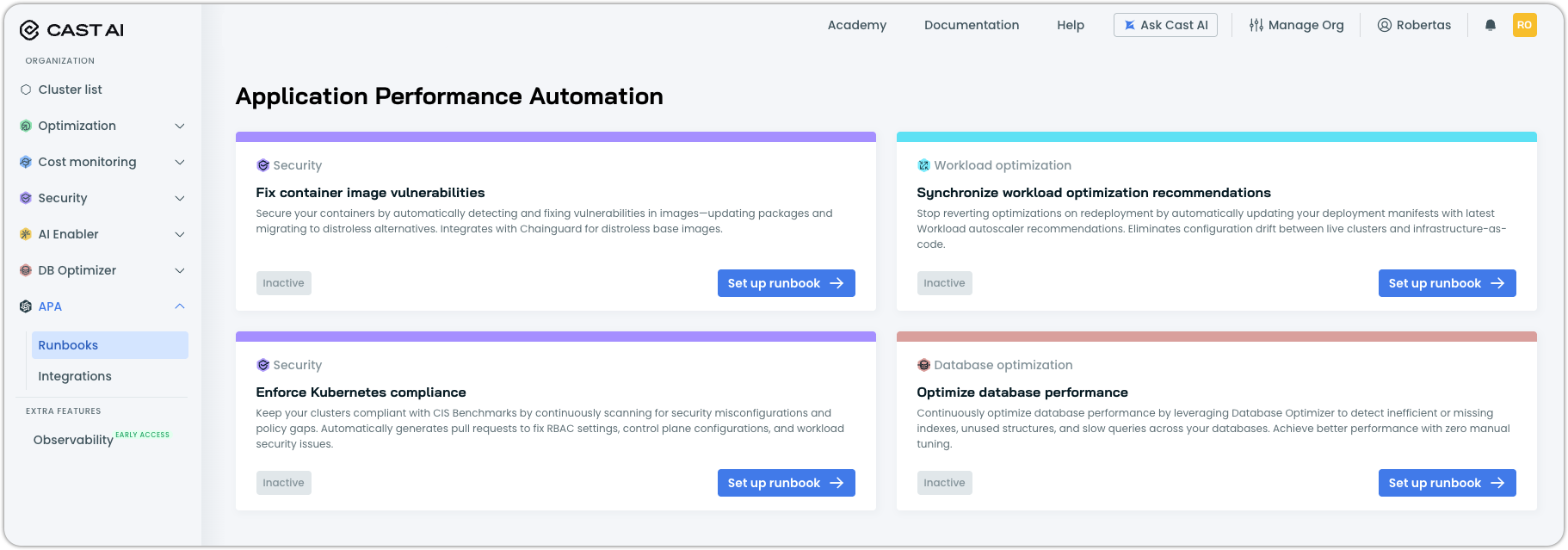
Navigate to APA > Runbooks and locate the Fix container image vulnerabilities card.
-
Click Set up runbook.
-
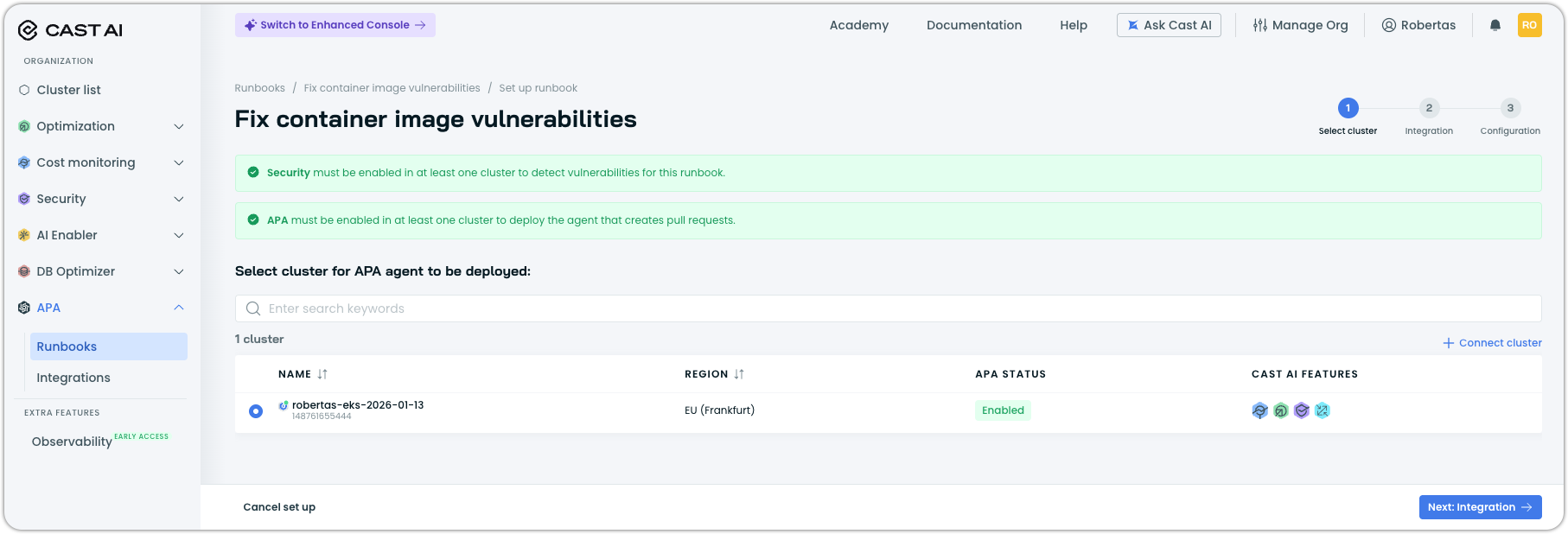
Select the cluster where you want to deploy the APA agent. The cluster must have both Security and APA enabled.
-
Click Next: Integration.
Step 2: Configure integrations
The Integration step connects the runbook to your repositories, AI models, and container registries.
Grant access to repositories
Select the Git credentials that allow APA to read your code and create pull requests. If you haven't configured credentials yet, click Configure Git access to add them.
Select AI models
Choose the model family the agent uses to analyze code and generate fixes. Registered providers appear in the list with their available models.
Connect container image registries
Connect your container registries so the agent can identify base images used in your containers. Click Connect registry to add registries. Supported registries include AWS ECR, GCR, ACR, Docker Hub, and private registries.
Map images to repositories
Map container images to their source Git repositories. This tells the agent where to find Dockerfiles and create PRs.
| Field | Description |
|---|---|
| Image | Select one or more container images. Use exact names or wildcards. |
| Repository | Select the Git repository containing the Dockerfile for these images. |
Click Add to create additional mappings as needed.
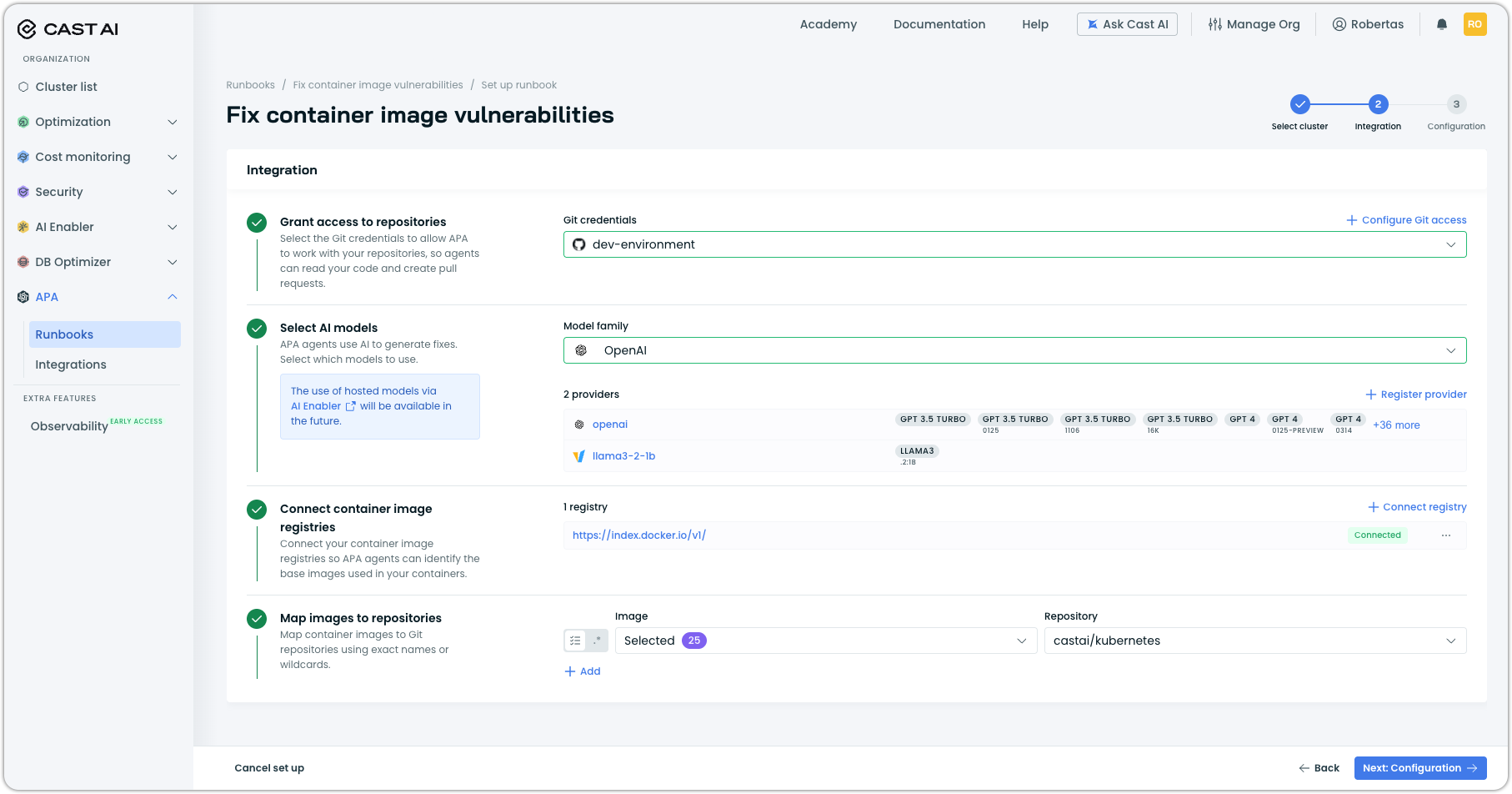
Once all integrations are configured, click Next: Configuration.
Step 3: Configure runbook settings
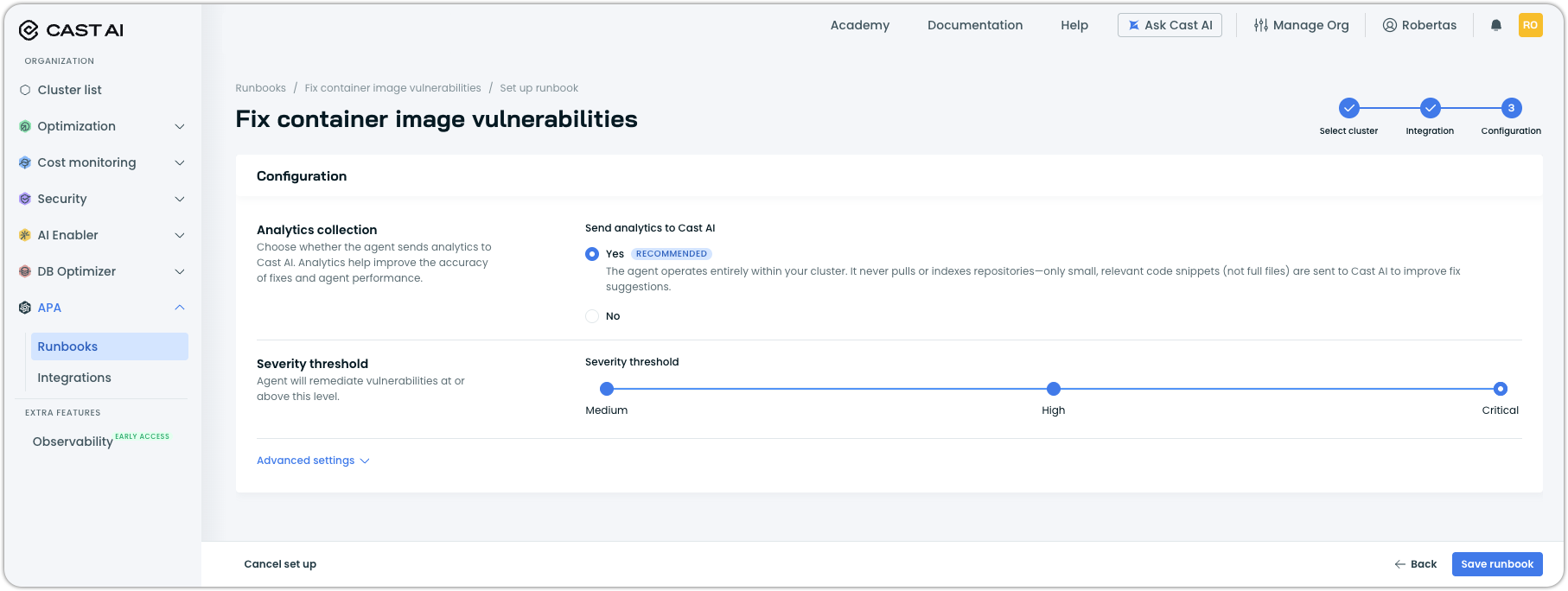
The Configuration step controls how the agent operates.
Analytics collection
Choose whether to send analytics to Cast AI. Analytics help improve fix accuracy and agent performance. The agent operates entirely within your cluster—only small, relevant code snippets (not full files) are sent when enabled.
| Option | Description |
|---|---|
| Yes (Recommended) | Send analytics to improve fix suggestions. |
| No | Disable analytics collection. |
Severity threshold
Set the minimum severity level for vulnerabilities the agent will remediate. The agent fixes vulnerabilities at or above this level.
| Threshold | Vulnerabilities addressed |
|---|---|
| Medium | Medium, High, and Critical |
| High | High and Critical |
| Critical | Critical only |
Advanced settings
Expand Advanced settings to configure additional options:
| Setting | Description |
|---|---|
| Container image prioritization | Choose whether the agent considers base images from all container registries or only private registries when selecting less vulnerable alternatives. |
| Pull request frequency | Minimum interval between PRs. The agent won't create new PRs more frequently than this. Cannot be less than 10 minutes. |
| Automatic manifest updates | When enabled, the agent updates Kubernetes manifests in your repository to reference fixed images after PRs are merged. Disable this if you use GitOps tools (ArgoCD Image Updater, Flux) that handle manifest updates. |
| Helm chart values | (Optional) Customize the APA agent deployment using a Helm values YAML file. Edit only if you intend to change the Helm chart configuration. |
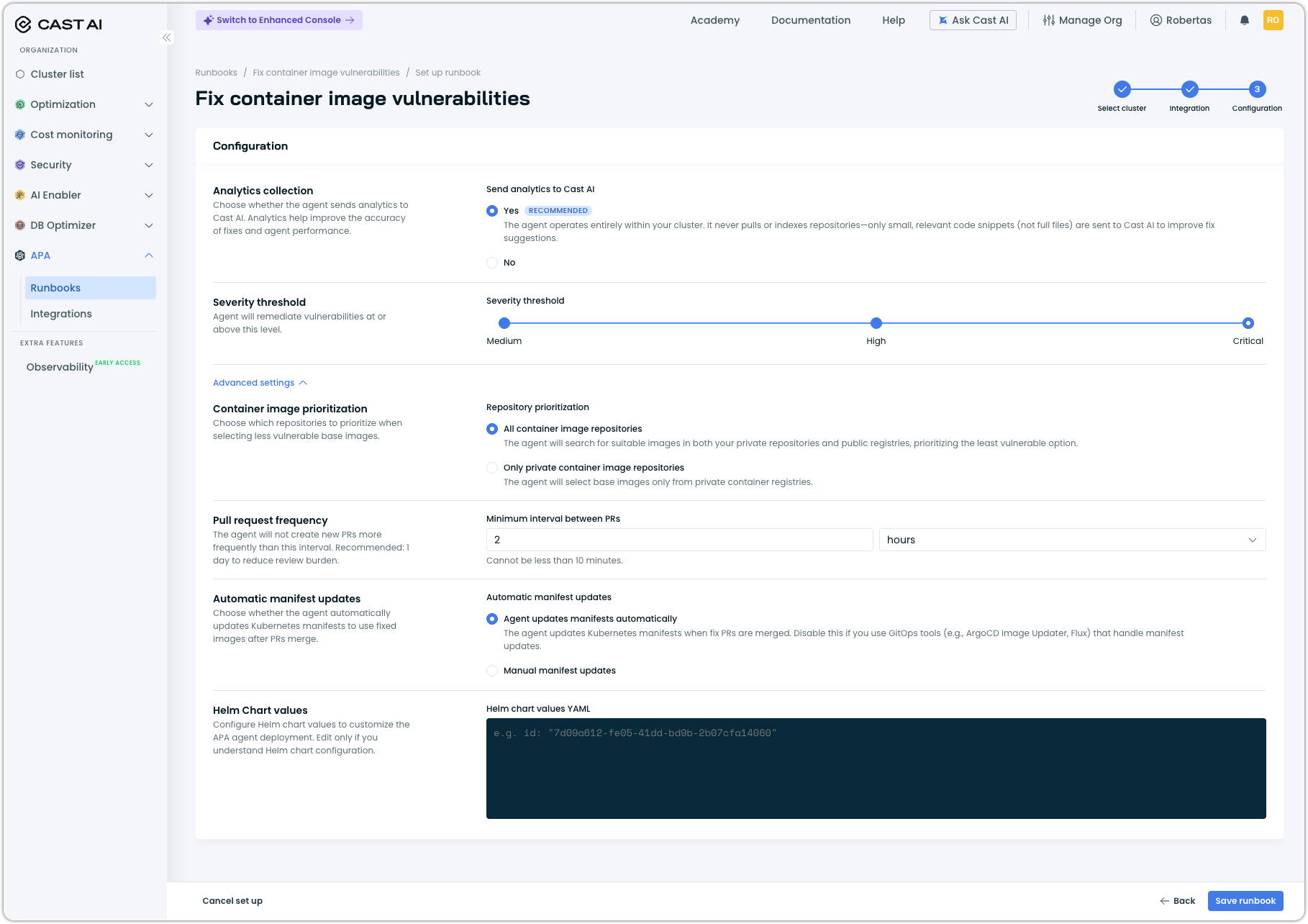
Click Save runbook to finish setup and have the agents begin scanning your repositories.
Monitor the runbook
After setup, you land on the runbook report page, where you can track agent activity and results.
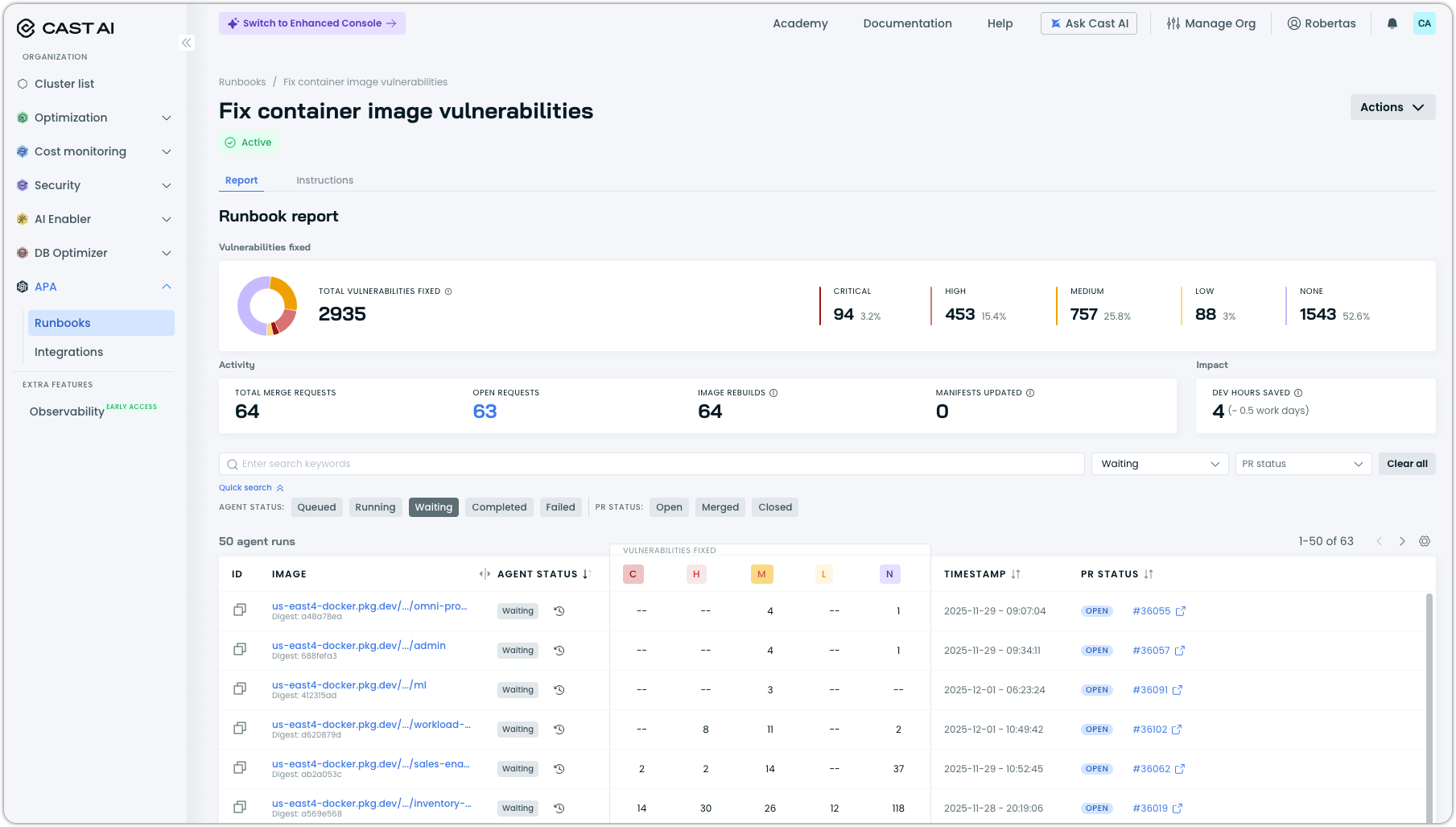
The report shows:
| Metric | Description |
|---|---|
| Total vulnerabilities fixed | Cumulative count of vulnerabilities addressed, broken down by severity (Critical, High, Medium, Low). |
| Pull requests open | Number of PRs awaiting your review. |
| Fixes pending | Fixes the agent is currently working on. |
| Images rebuilt | Images that have been rebuilt with fixes. |
| Workload manifests updated | Manifests updated to reference fixed images. |
| Dev days saved | Estimated developer time saved by automated fixes. |
Manage the runbook
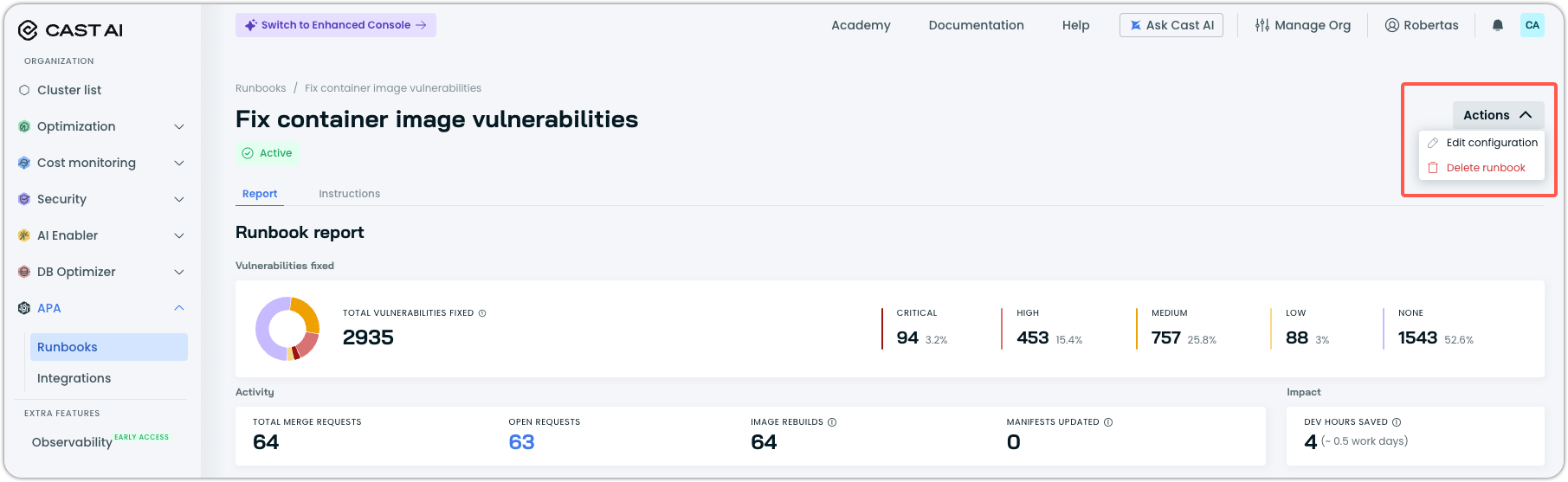
Click Actions in the top right to:
| Action | Description |
|---|---|
| Edit configuration | Modify runbook settings. |
| Delete runbook | Remove the runbook and its configuration. |
FAQ
Do I stay in control of changes?
Yes. APA creates pull requests for both image fixes and manifest updates. Nothing changes in your repositories until you review and approve each PR.
What happens if a fix breaks something?
APA uses your existing CI/CD pipelines to validate changes. If tests fail, the PR remains open for you to review. You can investigate the failure, adjust the fix, or close the PR.
Do I need to change my workflows?
No. Fixes and manifest updates flow through your standard Git process, so you keep your current way of working.
Which registries are supported?
APA works with any OCI-compatible registry, including AWS ECR, GCR, ACR, Docker Hub, and private registries.
Can I control which vulnerabilities are fixed?
Yes. During runbook setup, you can set a severity threshold to limit fixes to critical and high-severity issues only.
Next steps
- Synchronize workload optimization recommendations — Keep your Git manifests aligned with Workload Autoscaler recommendations
- APA Overview — Learn more about Application Performance Automation
Updated last month