

How-to: Migrate from legacy horizontal scaling to HPA
This guide covers migrating from Cast AI's legacy horizontal scaling to the new native Kubernetes HPA implementation. After migration, Cast AI creates and manages a native HorizontalPodAutoscaler (autoscaling/v2) resource for each workload, replacing the previous proprietary scaling mechanism.
Migration preserves your existing minReplicas and maxReplicas settings. Metrics default to CPU at 100% average utilization after migration, because this is closest in functional resemblance to the legacy horizontal scaling behaviour. You should tune these to appropriate values after the migration.
Before you begin
Ensure the following prerequisites are met:
- The following minimum component versions are installed in your cluster:
| Component | Version |
|---|---|
| castai-workload-autoscaler | v0.44.0 or later |
| castai-agent | v0.60.0 or later |
Identify your migration path
Legacy horizontal scaling workloads fall into three categories depending on how they were originally configured. Identify which applies to your workloads and follow the corresponding migration path.
API-managed workloads were configured through the Cast AI REST API or console. These can be migrated automatically through the Cast AI console. See Migrate via the Cast AI console.
Workloads using the unified annotation with legacy horizontal fields use the workloads.cast.ai/configuration annotation but without useNative: true. Their horizontal block uses legacy fields like optimization: on, shortAverage, and duration-based stabilizationWindow.
# You're on Path A if your annotation looks like this:
workloads.cast.ai/configuration: |
  horizontal:
    optimization: on
    minReplicas: 2
    maxReplicas: 10
See Path A: Unified annotation with legacy horizontal fields.
Workloads using deprecated individual annotations use the old v1 annotation format with separate workloads.cast.ai/* annotations such as workloads.cast.ai/horizontal-autoscaling, workloads.cast.ai/min-replicas, etc.
# You're on Path B if your workload has annotations like these:
workloads.cast.ai/horizontal-autoscaling: "on"
workloads.cast.ai/min-replicas: "2"
workloads.cast.ai/max-replicas: "10"
See Path B: Deprecated individual annotations.
The Cast AI console also performs a migration eligibility check for API-managed workloads that classifies your cluster into one of four states:
| Status | Meaning |
|---|---|
Full | All legacy HPA workloads are API-managed. Fully automated migration is possible. |
Partial | Mix of API-managed and annotation-managed workloads. API-managed workloads can be automated; annotation-managed workloads require manual migration. |
Blocked | All legacy HPA workloads are annotation-managed. Automated migration is not possible. |
None | No legacy HPA workloads found. |
Migrate via the Cast AI console
This path applies to workloads originally configured through the Cast AI REST API or console (API-managed workloads).
Check migration eligibility
See if your workloads are eligible for automated migration in the Cast AI console by going to Workload autoscaler > Optimization:
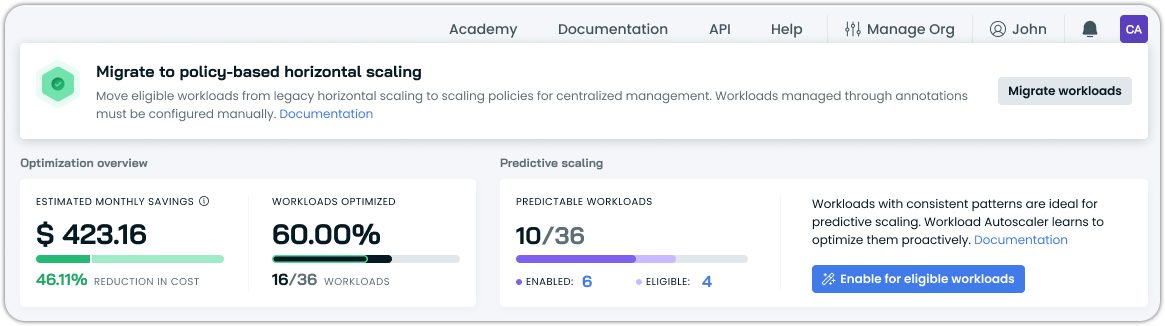
The console will surface a banner with a CTA to initiate migration if at least some of your workloads are eligible.
Start the migration
Click the migration CTA to begin. Migration is asynchronous, as the system processes workloads in the background. The API returns immediately, and you can monitor progress in the console:
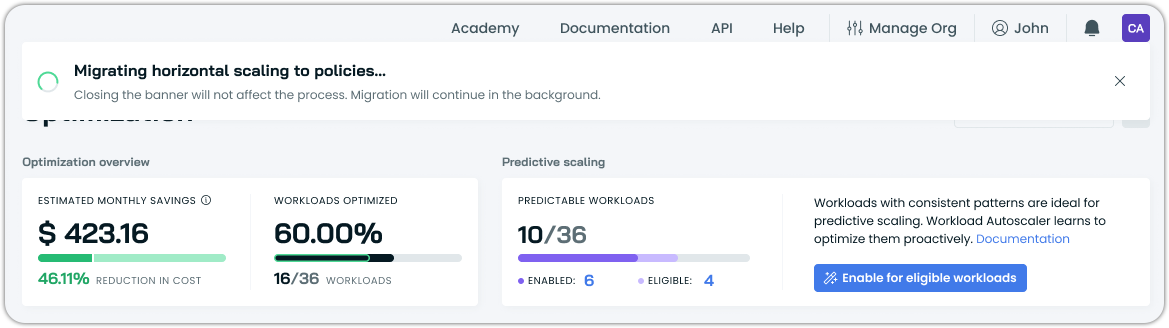
What happens during migration:
For each eligible workload, Cast AI updates the configuration to native HPA objects.
- The existing
minReplicasandmaxReplicasvalues are preserved. - Metrics default to CPU at 100% average utilization.
- A native
HorizontalPodAutoscalerresource is created in the workload's namespace.
ImportantAfter migration, all migrated workloads have workload-level HPA overrides. This means their horizontal autoscaling settings are independent of their scaling policy until you reset the overrides.
Tune metric targets
After migration completes, review and adjust the CPU utilization target on each workload. The default of 100% means the autoscaler only scales when pods are at full CPU utilization, which is typically too aggressive for production workloads.
You can adjust targets individually in each workload's Horizontal autoscaling tab, or, as the recommended approach, configure horizontal autoscaling at the policy level and revert workload overrides to inherit the policy settings. See Horizontal autoscaling in scaling policies.
Verify the automated migration
After migration completes, confirm that native HPA resources were created:
# List HPAs to find migrated workloads
kubectl get hpa --all-namespaces

# Confirm Cast AI HPA ownership on a specific workload
kubectl get hpa <workload-name> -n <namespace> -o yaml | grep -i -A 5 "ownerReferences:"
Migrate via annotations
This section covers manual migration for workloads configured via Kubernetes annotations. There are two starting points, depending on which annotation format your workloads use.
ImportantWhen migrating annotations, all configured settings must be present in the final
workloads.cast.ai/configurationannotation. If the workload also has vertical scaling configuration, it must be included in the same annotation.Mixing deprecated individual annotations with the unified annotation is not supported — when
workloads.cast.ai/configurationis detected, all otherworkloads.cast.ai/*annotations are ignored.
Path A: Unified annotation with legacy horizontal fields
This path applies to workloads that already use the workloads.cast.ai/configuration annotation but with a legacy horizontal block — that is, without useNative: true.
A typical legacy horizontal block looks like this:
annotations:
  workloads.cast.ai/configuration: |
    vertical:
      optimization: on
    horizontal:
      optimization: on
      minReplicas: 2
      maxReplicas: 10
      shortAverage: 3m
      scaleDown:
        stabilizationWindow: 5m
To migrate, replace the horizontal block in-place. The vertical block and any other configuration under the same annotation remain unchanged.
Before:
annotations:
  workloads.cast.ai/configuration: |
    vertical:
      optimization: on
      cpu:
        target: p80
    horizontal:
      optimization: on
      minReplicas: 2
      maxReplicas: 10
      shortAverage: 3m
      scaleDown:
        stabilizationWindow: 5m
After:
annotations:
  workloads.cast.ai/configuration: |
    vertical:
      optimization: on
      cpu:
        target: p80
    horizontal:
      optimization: true
      useNative: true                        # indicates this is HPAv2
      minReplicas: 2
      maxReplicas: 10
      metrics:                               # new block for resource targeting
        - type: resource
          resource:
            name: cpu
            target:
              type: Utilization
              averageUtilization: 80
      behavior:
        scaleDown:
          stabilizationWindowSeconds: 300    # new format for stabilization window in seconds
The key changes within the horizontal block are:
| Legacy field | Action |
|---|---|
optimization: on | Change to optimization: true |
| (absent) | Add useNative: true |
minReplicas / maxReplicas | Keep as-is |
shortAverage | Remove — not applicable in native HPA format |
scaleDown.stabilizationWindow (duration) | Replace with behavior.scaleDown.stabilizationWindowSeconds (integer, in seconds) |
| (absent) | Add metrics array with at least one CPU or memory trigger |
Apply the updated manifest and verify:
kubectl get hpa -n <namespace>
kubectl describe hpa <workload-name> -n <namespace>
Verify the migration
Confirm Cast AI created a native HPA and is managing it:
kubectl get hpa <workload-name> -n <namespace> -o yaml | grep -i -A 5 "ownerReferences:"Path B: Deprecated individual annotations
This path applies to workloads using the old v1 annotation format with separate workloads.cast.ai/* annotations.
A typical v1-annotated workload looks like this:
metadata:
  annotations:
    workloads.cast.ai/vertical-autoscaling: "on"
    workloads.cast.ai/cpu-target: "p80"
    workloads.cast.ai/horizontal-autoscaling: "on"
    workloads.cast.ai/min-replicas: "2"
    workloads.cast.ai/max-replicas: "10"
    workloads.cast.ai/short-average: "5m"
    workloads.cast.ai/horizontal-downscale-stabilization-window: "10m"
Migration requires consolidating all settings — both vertical and horizontal — into the unified workloads.cast.ai/configuration annotation.
1. Remove all legacy annotations
Remove every workloads.cast.ai/* annotation from the workload manifest:
# Remove all of these:
workloads.cast.ai/vertical-autoscaling: "on"
workloads.cast.ai/cpu-target: "p80"
workloads.cast.ai/horizontal-autoscaling: "on"
workloads.cast.ai/min-replicas: "2"
workloads.cast.ai/max-replicas: "10"
workloads.cast.ai/short-average: "5m"
workloads.cast.ai/horizontal-downscale-stabilization-window: "10m"
2. Add the unified configuration annotation
Replace with a single workloads.cast.ai/configuration annotation that includes both your vertical and horizontal settings:
apiVersion: apps/v1
kind: Deployment
metadata:
  name: my-app
  annotations:
    workloads.cast.ai/configuration: |
      vertical:
        optimization: on
        cpu:
          target: p80
      horizontal:
        optimization: true
        useNative: true
        minReplicas: 2
        maxReplicas: 10
        metrics:
          - type: resource
            resource:
              name: cpu
              target:
                type: Utilization
                averageUtilization: 80
        behavior:
          scaleDown:
            stabilizationWindowSeconds: 600
3. Apply and verify
Apply the updated manifest. The castai-workload-autoscaler detects the annotation change and creates a native HorizontalPodAutoscaler resource in the workload's namespace.
kubectl get hpa -n <namespace>
kubectl describe hpa <workload-name> -n <namespace>
Verify the migration
Confirm Cast AI created a native HPA and is managing it:
kubectl get hpa <workload-name> -n <namespace> -o yaml | grep -i -A 5 "ownerReferences:"After migration
Regardless of which migration path you followed, take these post-migration steps.
Tune metric targets — Automated migration defaults to CPU utilization at 100%. Manual migration requires you to explicitly choose a target. Either way, configure your preferred threshold for your workloads after the migration. For memory-sensitive workloads, consider adding a memory utilization trigger alongside the CPU trigger.
Consolidate to policy-level configuration — Migrated workloads have workload-level HPA overrides (automated migration) or annotation-driven settings (manual migration). The recommended approach is to configure horizontal autoscaling on the appropriate scaling policies, then either revert workload-level overrides or remove annotation-based horizontal configuration so workloads inherit from their policy. This reduces per-workload management overhead and ensures consistent behavior. See Horizontal autoscaling in scaling policies.
See also
Updated 5 months ago