

Synchronize Workload Autoscaler recommendations
Keep your Git manifests aligned with Workload Autoscaler recommendations to prevent configuration drift.
Private Preview FeatureThis feature is in private preview and available to select customers. To request access, provide feedback or book a demo, contact your Cast AI Account Manager.
The Synchronize Workload Autoscaler recommendations runbook keeps your deployment manifests in sync with Workload Autoscaler recommendations, preventing configuration drift when you redeploy workloads. You review and merge each PR. Nothing changes in your repositories without your approval.
The problem
Workload Autoscaler continuously adjusts resource requests and limits based on actual usage. But these optimizations exist only in the live cluster state. When you redeploy a workload from Git, the original manifest values overwrite the optimized settings, reverting your resources to outdated, unoptimized values.
This runbook bridges that gap by detecting drift between live recommendations and your Git manifests, then opening PRs to synchronize them.
How it works
The runbook handles the complete synchronization cycle:
- Detect — Continuously monitors for differences between Workload Autoscaler recommendations and your Helm charts or manifests in Git.
- Fix — When differences exceed your configured threshold, creates a pull request with updated CPU and memory resource requests.
- Review — You review and approve the PR. Once merged, your workload manifests in Git reflect the latest Workload Autoscaler recommendations.
- Maintain — With manifests in sync, future redeployments use up-to-date resource recommendations instead of reverting to outdated, unoptimized values.
Set up the runbook
This section walks through configuring the runbook for the first time.
Before you start
Ensure you have:
- A cluster with APA and Workload Autoscaler enabled (see Getting started)
- At least one AI provider registered
- Git credentials configured for your repository
Step 1: Select a cluster
-
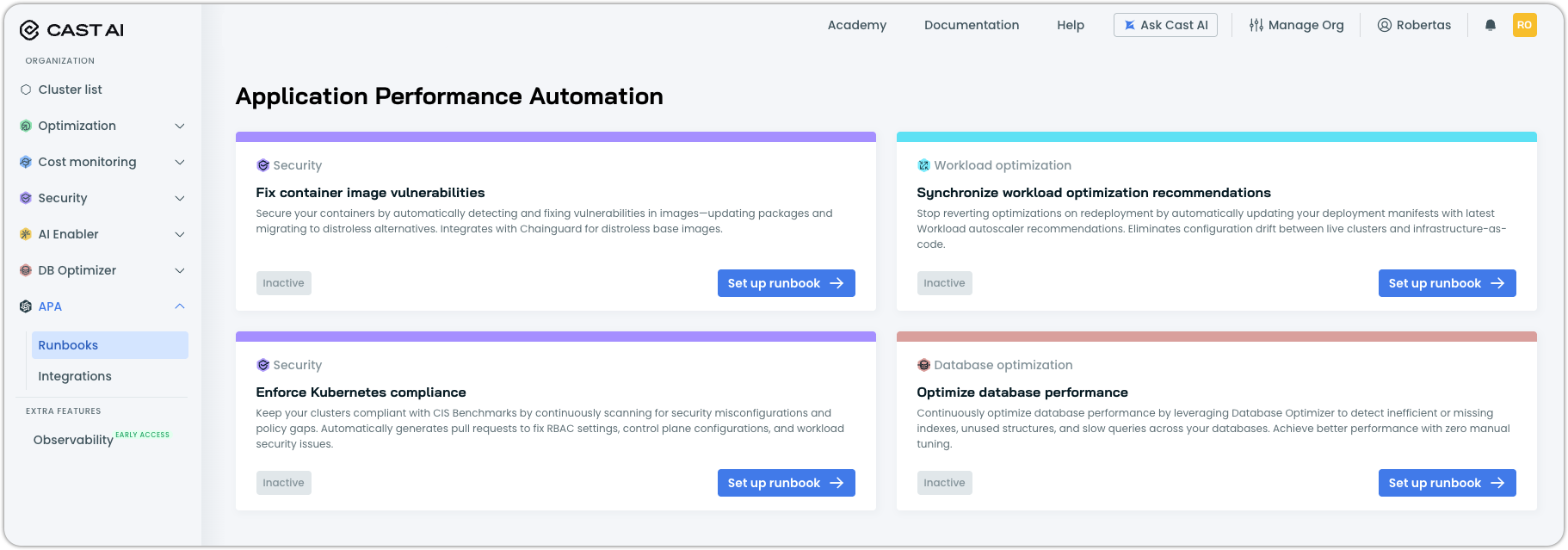
Navigate to APA > Runbooks and locate the Synchronize workload optimization recommendations card.
-
Click Set up runbook.
-
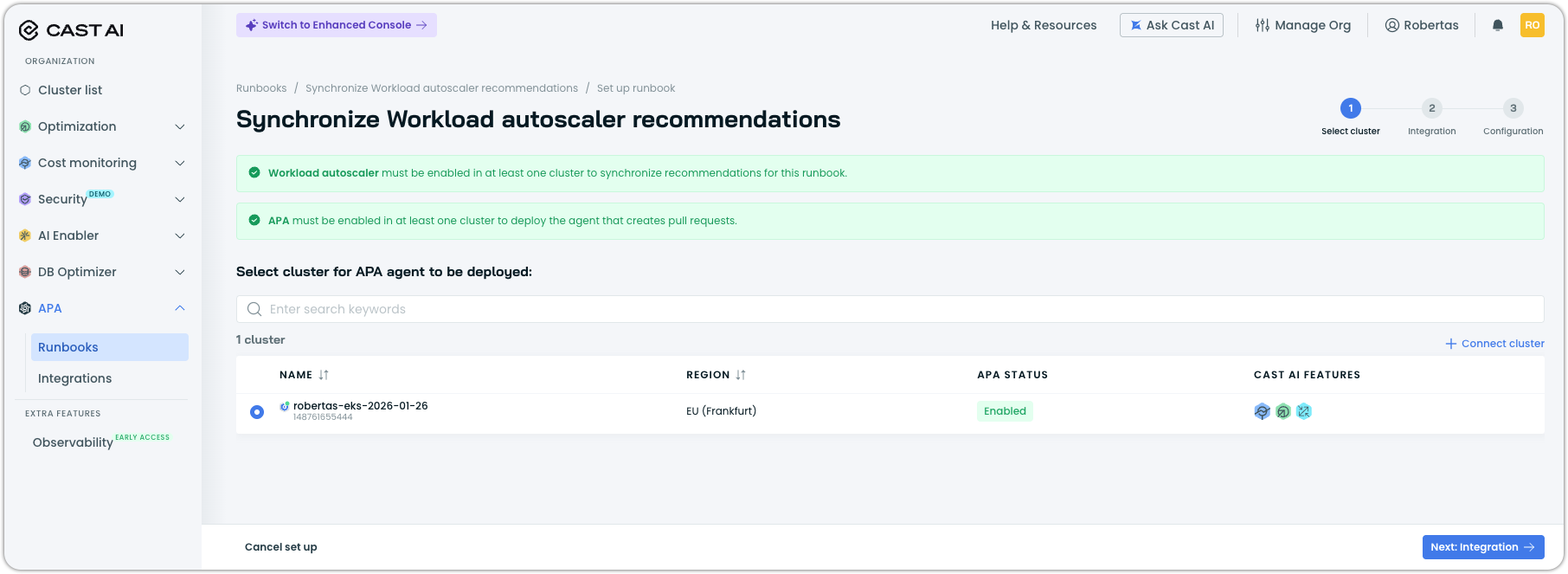
Select the cluster where you want to deploy the APA agent.
The agent runs on this cluster but can sync recommendations for workloads across clusters in your organization. Workload Autoscaler must be enabled on clusters where you want to detect recommendation drift.
-
Click Next: Integration.
Step 2: Configure integrations
The Integration step connects the runbook to your repositories and AI models.
Grant access to repositories
Select the Git credentials that allow APA to read your code and create pull requests. If you haven't configured credentials yet, click Configure Git access to add them.
Select AI models
Choose the model family the agent uses to locate manifests and generate updates. Registered providers appear in the list with their available models.
Map workload clusters to repositories
Map each cluster to the Git repository containing its workload manifests. The agent uses this mapping to know where to create PRs for each cluster's workloads.
| Field | Description |
|---|---|
| Cluster | Select a cluster with Workload Autoscaler enabled. |
| Repository | Select the Git repository containing workload manifests for this cluster. |
NoteEach cluster can be mapped to one repository, and each repository can be mapped to one cluster. This is a temporary limitation. Workload discovery capabilities are in development to offer more flexibility and a smoother user experience.
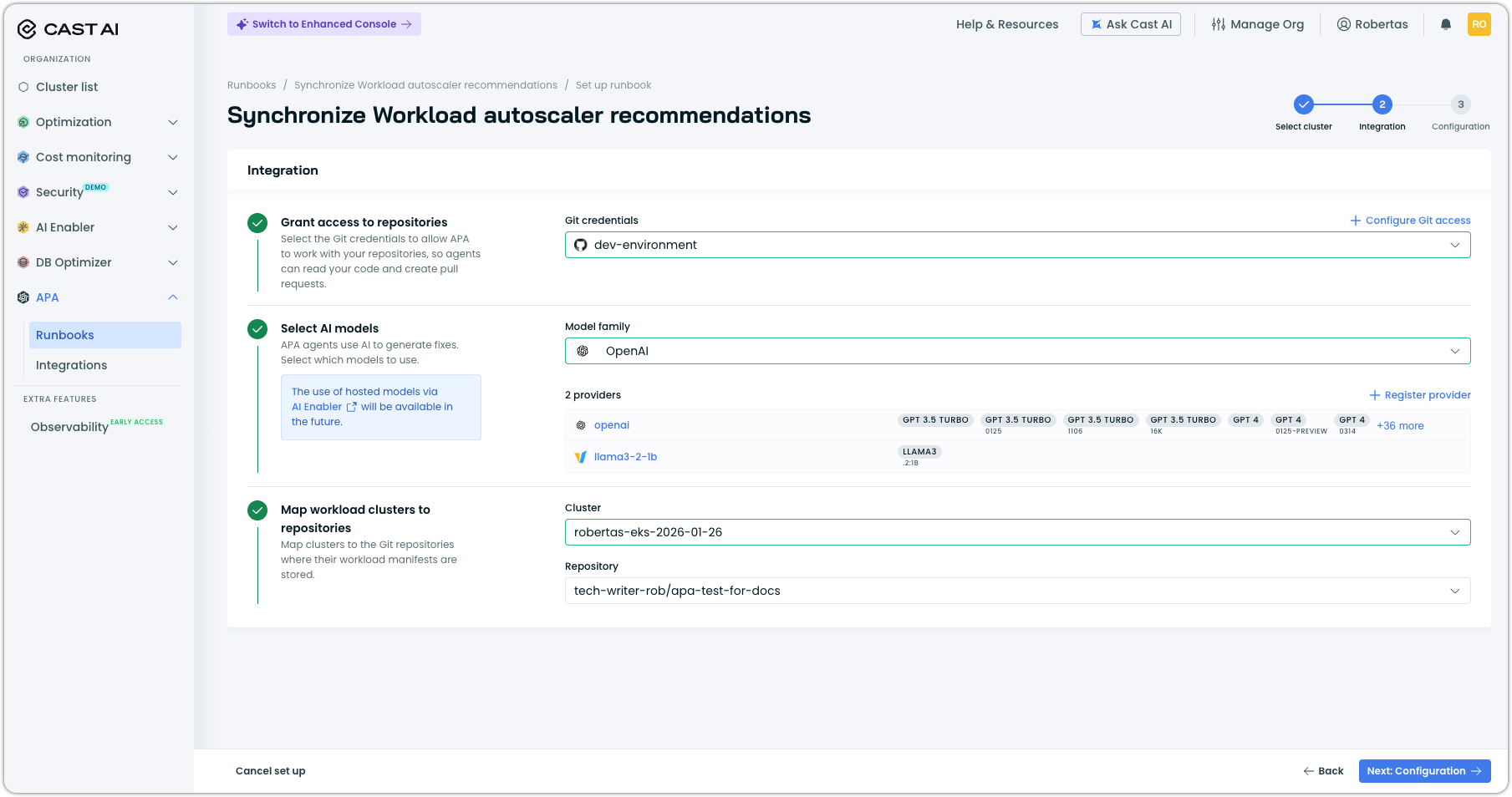
Once all integrations are configured, click Next: Configuration.
Step 3: Configure runbook settings
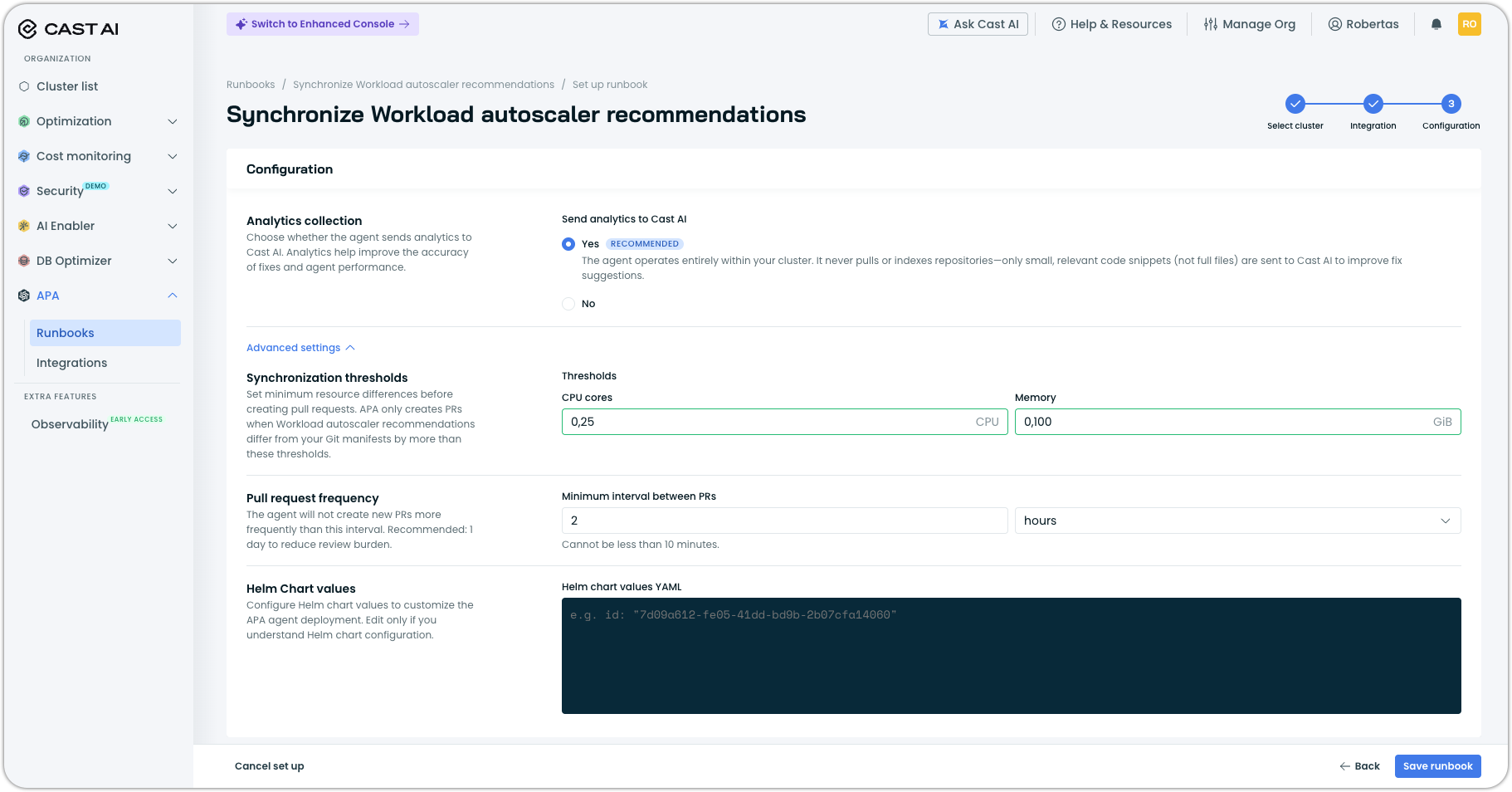
The Configuration step controls how the agent operates.
Analytics collection
Choose whether to send analytics to Cast AI. Analytics help improve fix accuracy and agent performance. The agent operates entirely within your cluster—only small, relevant code snippets (not full files) are sent when enabled.
| Option | Description |
|---|---|
| Yes (Recommended) | Send analytics to improve fix suggestions. |
| No | Disable analytics collection. |
Advanced settings
Expand Advanced settings to configure additional options:
| Setting | Description |
|---|---|
| Synchronization thresholds | Minimum resource difference before creating a PR. APA only creates PRs when Workload Autoscaler recommendations differ from your Git manifests by more than these thresholds. Set values for CPU (cores) and Memory (GiB). |
| Pull request frequency | Minimum interval between PRs. The agent won't create new PRs more frequently than this. Recommended: 1 day to reduce review burden. Cannot be less than 10 minutes. |
| Helm chart values | (Optional) Customize the APA agent deployment with Helm values YAML. See Workload filtering for available options. |
Workload filtering
Use the Helm chart values field to control which workloads the agent syncs. By default, the agent attempts to sync all workloads with Workload Autoscaler recommendations.
# Comma-separated lists
workloadsAllowed: ""           # Workload names to include (empty = all)
workloadsDenied: ""            # Workload names to exclude
workloadKindsAllowed: "deployment,replicaset,statefulset"  # Workload types to include
workloadNamespacesAllowed: "" # Namespaces to include (empty = all)| Value | Description |
|---|---|
| workloadsAllowed | Only sync workloads with these names. Leave empty to allow all. Example: api,admin-api,frontend |
| workloadsDenied | Exclude workloads with these names. Example: metrics-server,coredns |
| workloadKindsAllowed | Only sync these workload types. Default: deployment,replicaset,statefulset |
| workloadNamespacesAllowed | Only sync workloads in these namespaces. Leave empty to allow all. Example: production,staging |
For example, to sync only deployments in the apa-test namespace while excluding system workloads:
workloadsDenied: "metrics-server,coredns"
workloadKindsAllowed: "deployment"
workloadNamespacesAllowed: "apa-test"
Click Save runbook to activate.
Monitor the runbook
After setup, you land on the runbook report page where you can track agent activity and results.
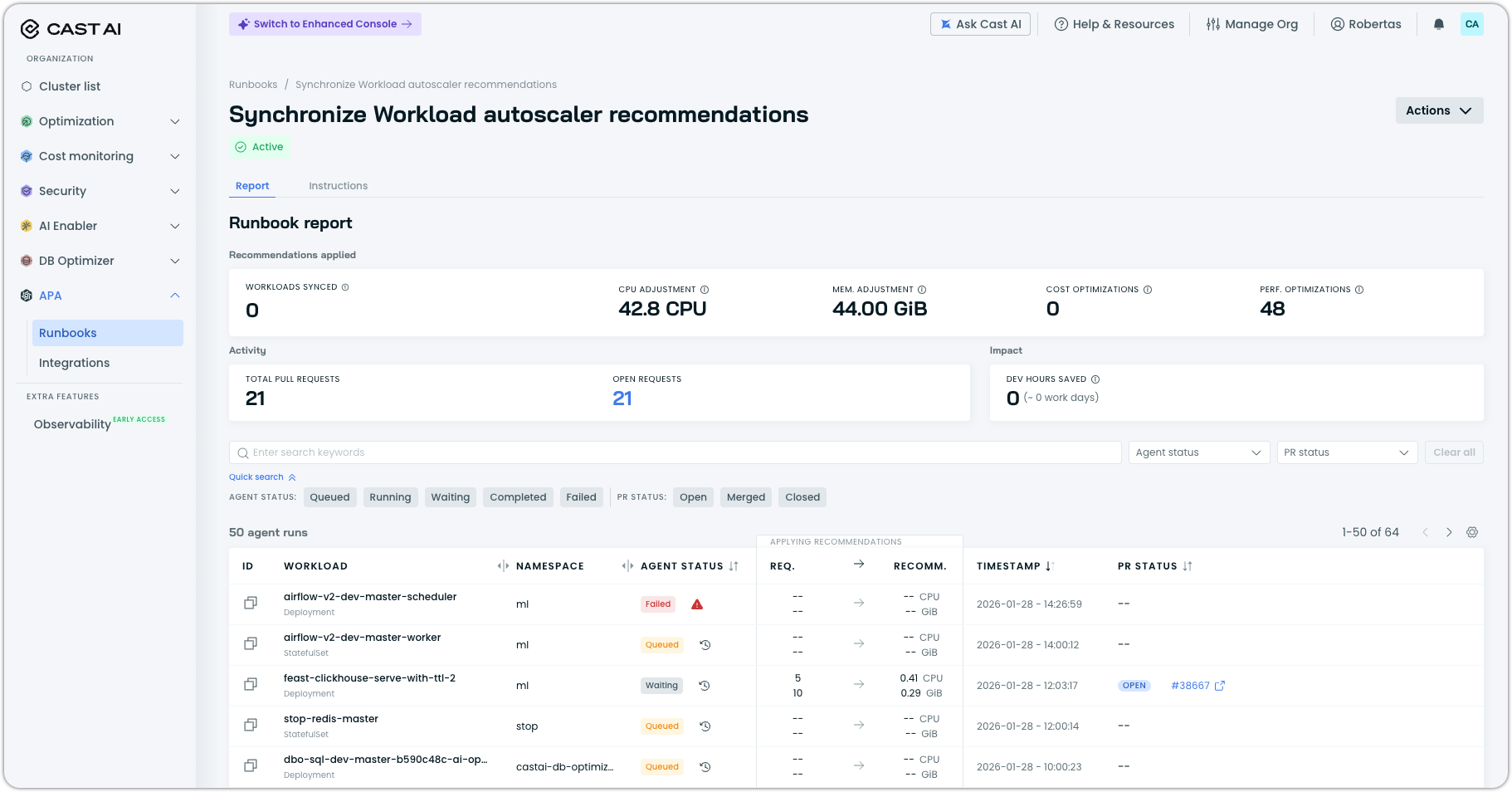
The report shows:
| Metric | Description |
|---|---|
| Workloads synced | Number of workloads with manifests updated to match recommendations. This requires the APA-opened PRs to be merged. |
| CPU adjustment | Total CPU cores adjusted across all synced workloads. |
| Memory adjustment | Total memory (GiB) adjusted across all synced workloads. |
| Cost optimizations | Workloads where resources were reduced (lowering cost). |
| Perf. optimizations | Workloads where resources were increased (improving performance headroom). |
| Total pull requests | Cumulative PRs created by the runbook. |
| Open requests | PRs currently awaiting your review. |
| Dev hours saved | Estimated developer time saved by automated sync. |
Use the filters above the workload list to narrow results by agent status or PR status.
Agent statuses
| Status | Description |
|---|---|
| Queued | Workload is waiting to be processed. |
| Running | Agent is actively generating an update. |
| Waiting | Agent is waiting for an existing PR to be merged or closed before creating a new one. |
| Completed | Update has been generated and PR merged. |
| Failed | Agent could not generate an update. Click the workload row to see the reason. |
NoteThe agent attempts to sync all workloads with Workload Autoscaler recommendations, including system workloads. If a workload's manifest isn't in the mapped repository, the agent run fails with a "Workload manifest not found" message. This is expected behavior for workloads managed outside your repository.
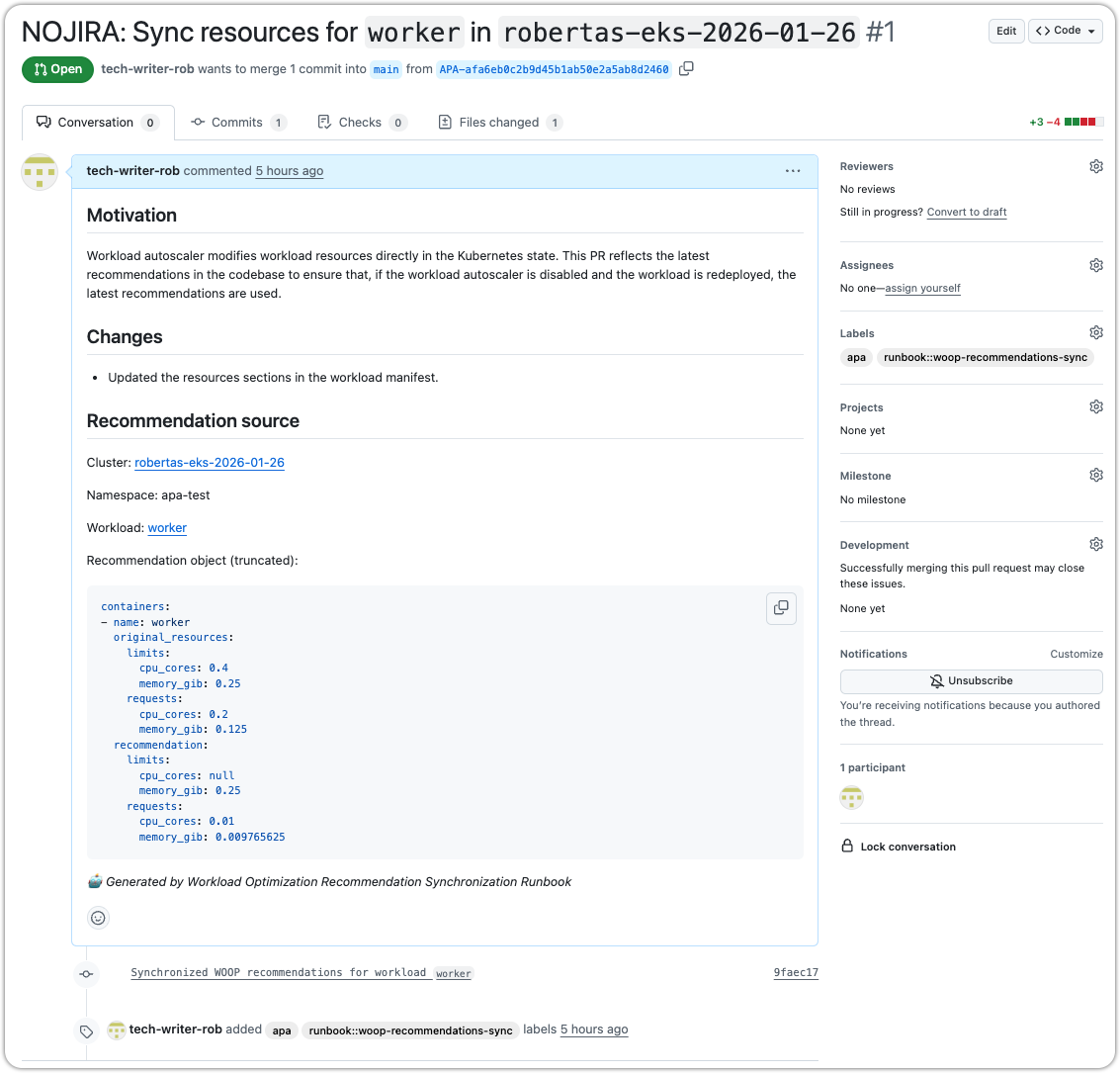
Understanding PRs
When the agent creates a PR, it includes:
- Motivation — Explains why the sync is needed
- Changes — Summary of what's being updated
- Recommendation source — Links to the cluster, namespace, and workload, plus a truncated view of the original and recommended resource values
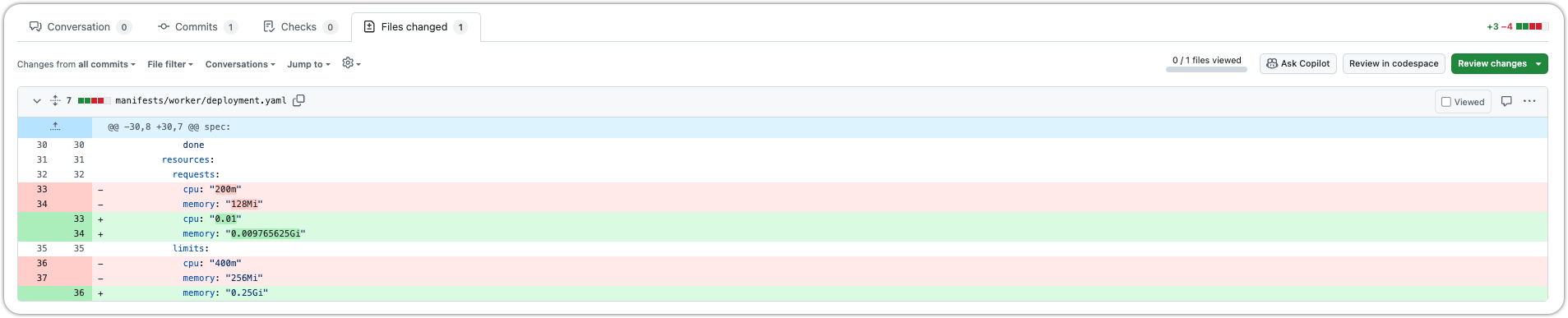
The diff shows the exact resource changes in your manifest:
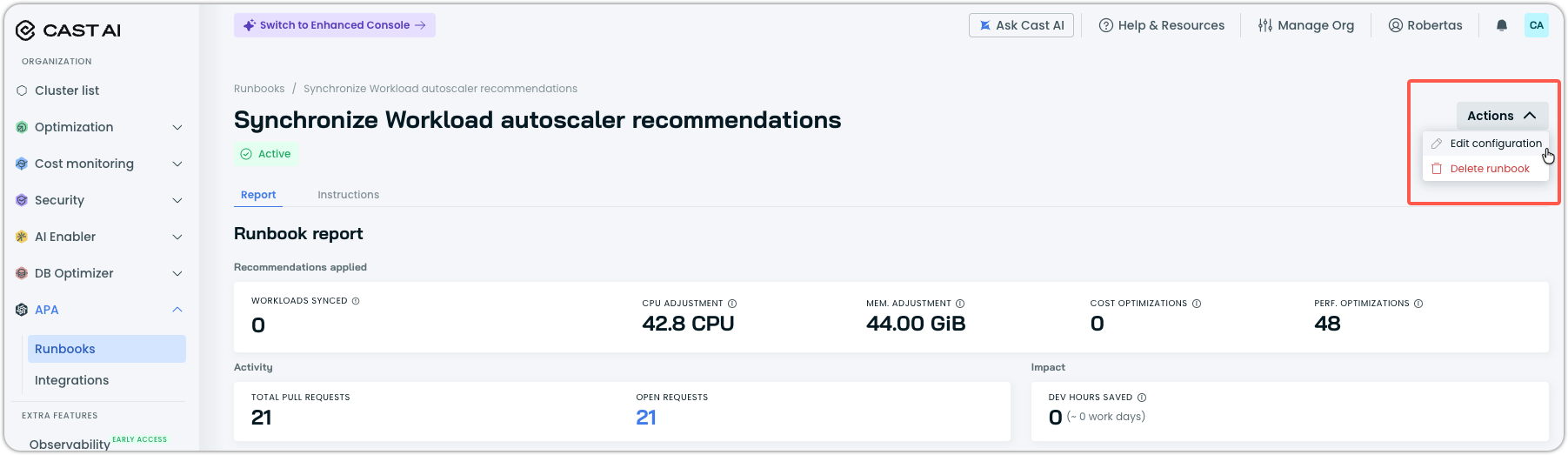
Manage the runbook
Click Actions in the top right to:
| Action | Description |
|---|---|
| Edit configuration | Modify runbook settings. |
| Delete runbook | Remove the runbook and its configuration. |
FAQ
What problem does this solve?
It prevents drift between currently rightsized workloads and your deployment manifests in Git. Without it, redeployments would reset resources to outdated values.
In the future, this runbook will also support Workload Autoscaler's read-only mode, where recommendations are generated but not automatically applied. In this scenario, the runbook will open PRs for unapplied recommendations, allowing you to review and merge changes manually rather than relying on automatic optimization.
How does it work in practice?
The runbook periodically pulls Workload Autoscaler recommendations, compares them against current manifests in your Git repositories, and opens a PR if drift exceeds a defined threshold. Once merged, your manifests always reflect the current recommendations.
Does this replace Workload Autoscaler?
No. Workload Autoscaler still adjusts resources in real time. This runbook ensures your infrastructure-as-code reflects those adjustments so redeployments don't undo them.
Can I control what gets synced?
Yes. You can define thresholds for minimum CPU or memory differences before pull request creation is triggered, and control how often pull requests are created to reduce noise. You can also use workload filtering to include or exclude specific workloads, namespaces, or workload types.
Is this safe for production?
Yes. All updates are delivered as pull requests in your Git repositories. Every change requires your explicit review and approval before merging. You maintain complete control over what gets deployed to production.
Next steps
- Fix container image vulnerabilities — Automatically remediate vulnerabilities in your container images
- APA Overview — Learn more about Application Performance Automation
Updated 3 months ago