

Take a snapshot of your AWS account
Run a one-time, agentless collection of AWS reliability data (EKS control plane, EC2, and ALB metrics, plus EKS, EC2, and EBS describe data) and upload it to Cast AI without installing anything in your clusters.
Take a snapshot of your cloud collects a one-time snapshot of reliability data from your AWS account and uploads it to Cast AI. The script installs nothing in your clusters, creates no IAM resources, and provisions no Cast AI policies or artifacts. It makes only read-only AWS API calls, with credentials already available in your environment.
This differs from Cloud Connect, which is a persistent, organization-level integration that syncs your cloud inventory every 60 minutes. A snapshot is a single run: collect, upload, done.
What the snapshot collects
For every EKS cluster found in your account (and the EC2 instances attached to those clusters), the script collects:
| Data | Source | Notes |
|---|---|---|
| EKS control plane metrics | CloudWatch AWS/EKS namespace | API server request counts and latency, scheduler pending pods, etcd database size, admission webhook duration. Requires EKS on Kubernetes 1.28 or newer. |
| EC2 instance metrics | CloudWatch AWS/EC2 namespace | CPU utilization and status checks for each cluster instance. |
| ALB metrics | CloudWatch AWS/ApplicationELB namespace | Request and error counts, target response time, and host health for load balancers tagged elbv2.k8s.aws/cluster (managed by the AWS Load Balancer Controller). |
| EBS volumes | ec2:DescribeVolumes | Describe data for all volumes, per region. |
| EKS and EC2 describe data | EKS and EC2 describe APIs | Cluster and add-on configuration, including health.issues, plus instance status checks and scheduled events. |
The EKS and EC2 describe data comes from eks:DescribeCluster, eks:DescribeAddon, ec2:DescribeInstances, and ec2:DescribeInstanceStatus.
The script assembles everything into a single document and uploads it to Cast AI in one gzipped request at the end of the run.
Non-fatal skipsIf AWS denies an API call (for example, for a missing IAM permission) or throttles it, the script logs it as skipped and omits it. The run keeps going and uploads whatever it could collect.
Before you run it
Required tools
The script runs on macOS and Linux and needs:
IAM permissions
The IAM identity you run the script with needs the following read-only permissions. This policy statement is complete, and you can paste it directly into the AWS IAM console:
{
    "Version": "2012-10-17",
    "Statement": [
        {
            "Effect": "Allow",
            "Action": [
                "sts:GetCallerIdentity",
                "eks:ListClusters",
                "eks:DescribeCluster",
                "eks:ListAddons",
                "eks:DescribeAddon",
                "ec2:DescribeRegions",
                "ec2:DescribeInstances",
                "ec2:DescribeInstanceStatus",
                "ec2:DescribeVolumes",
                "cloudwatch:GetMetricData",
                "elasticloadbalancing:DescribeLoadBalancers",
                "elasticloadbalancing:DescribeTargetGroups",
                "elasticloadbalancing:DescribeTags"
            ],
            "Resource": "*"
        }
    ]
}
The script calls sts:GetCallerIdentity to resolve which AWS account each set of credentials belongs to, which is what drives how accounts are discovered. AWS requires no explicit permission for this action: any authenticated identity can call it. The list includes the action so that it covers every AWS API call the script makes.
If the identity is an AWS Organizations management account, it additionally needs two permissions for the script to collect its member accounts automatically. organizations:ListAccounts lists the member accounts, and sts:AssumeRole assumes the organization member role in each one:
{
    "Version": "2012-10-17",
    "Statement": [
        {
            "Effect": "Allow",
            "Action": [
                "organizations:ListAccounts",
                "sts:AssumeRole"
            ],
            "Resource": "*"
        }
    ]
}
For tighter scoping, limit sts:AssumeRole to the specific role ARNs instead of "*": for example, arn:aws:iam::<member-account-id>:role/OrganizationAccountAccessRole for each member account.
Take the snapshot
- In the Cast AI console, on the How would you like to connect? screen, select Take a snapshot of your cloud.
- Under Select your cloud service provider, select AWS. GCP and Azure are not available yet.
- Under Run this script, copy the generated command. It already contains your API key, organization ID, and onboarding session ID, so there is nothing to fill in.
- In a terminal where the AWS CLI is configured, paste and run the command. The script collects from every account your credentials can reach (see How accounts are discovered). The command downloads the script from Cast AI and runs it with
bash, so there is no file to save first. - When the script finishes, return to the console and select I ran the script.
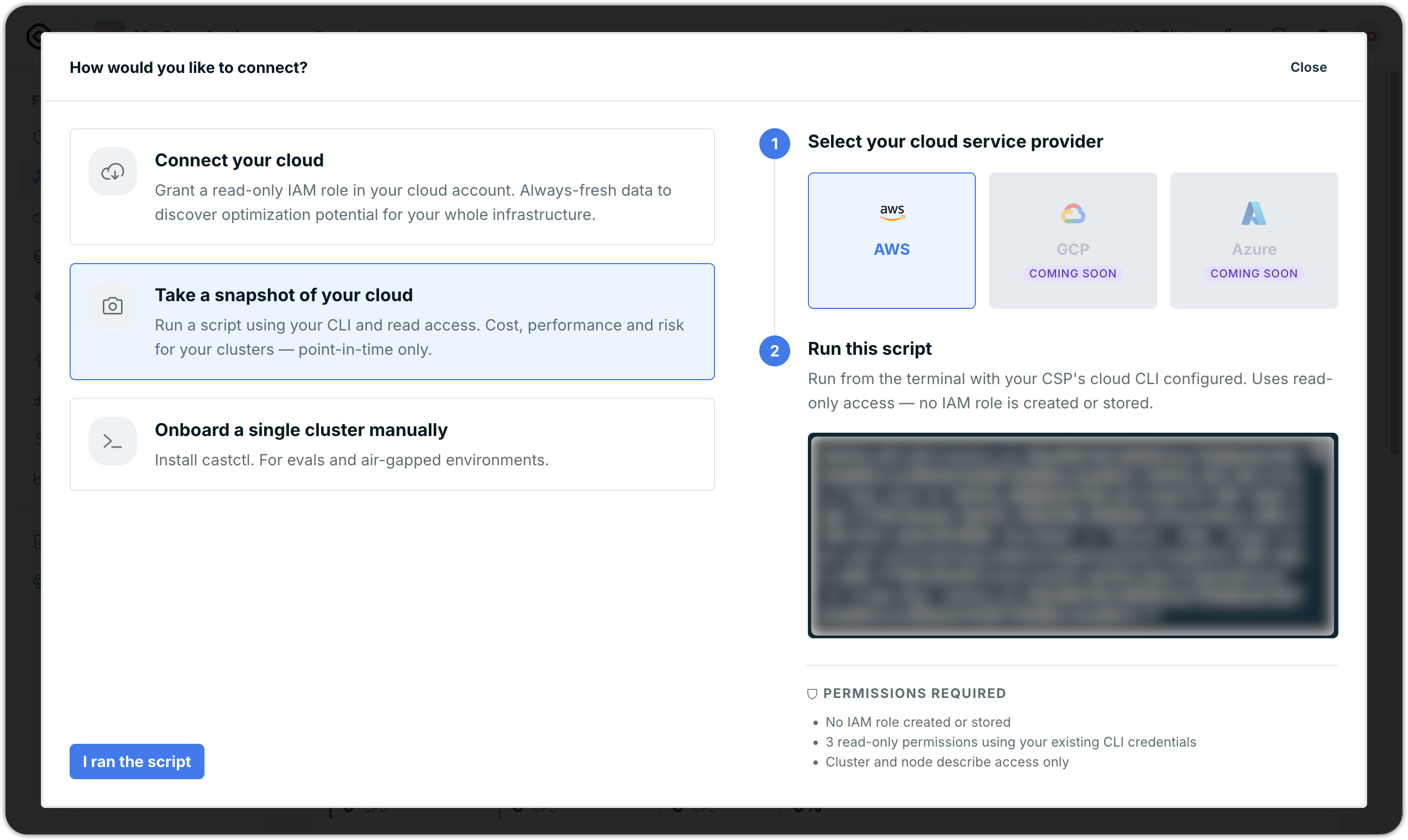
The generated command has the following shape:
CASTAI_API_KEY=<api-key> \
CASTAI_API_URL=https://api.cast.ai \
CASTAI_ORGANIZATION_ID=<org-id> \
CASTAI_TRACKING_SESSION_ID=<session-id> \
/bin/bash -c "$(curl -fsSL 'https://api.cast.ai/inventory/v1beta/organizations/<org-id>/cloud-assets:getReliabilityDataScript' -H 'X-Api-Key: <api-key>')"
To review the script first, fetch the same URL with curl and save the output to a file instead of passing it to bash.
To change the defaults, add any of the optional variables in front of the copied command.
Configuration
You don't need to provide anything yourself: the generated command sets the required CASTAI_API_KEY and CASTAI_ORGANIZATION_ID. The optional environment variables let you customize what the snapshot collects.
To set one, add VARIABLE=value in front of the copied command, separated by spaces:
REGIONS=us-east-1,eu-west-1 COST_LIMIT_USD=5.00 <the copied command>| Variable | Description |
|---|---|
CASTAI_API_URL | Cast AI API base URL. Defaults to https://api.cast.ai. |
REGIONS | Comma-separated AWS region codes to collect, for example us-east-1,eu-west-1. Defaults to all enabled regions (except me-south-1). |
LOOKBACK_MINUTES | Metric lookback window in minutes, for example 1440 for one day. Defaults to 10080 (7 days). |
COST_LIMIT_USD | Maximum estimated CloudWatch cost for the entire run, for example 5.00. Past the limit, the script skips the remaining accounts and still uploads the data collected so far. Defaults to 1.00. |
MATCH_PATTERNS | Comma-separated regexes matched against AWS account IDs, for example ^123456789012$,^234567890123$. The script collects only accounts matching at least one of them. Unset by default (collects all discovered accounts). |
SKIP_PATTERNS | Comma-separated regexes matched against AWS account IDs, for example ^123456789012$. The script skips accounts matching at least one of them. Unset by default (collects all discovered accounts). |
DRY_RUN | Possible values: true and false. When true, the script logs the estimated CloudWatch cost and skips all metric API calls (it still collects describe data). Defaults to false. |
ORG_ROLE_NAME | Name of the existing role the script assumes in each member account of an AWS Organization. Defaults to OrganizationAccountAccessRole. |
CASTAI_TRACKING_SESSION_ID | Associates this script run with your console onboarding session. Set automatically when you copy the command from the console. |
How accounts are discovered
The script provisions nothing. It collects every distinct AWS account reachable from:
- the inherited credentials (
AWS_ACCESS_KEY_IDenvironment variables, an instance/IRSA/ECS task role, or the default profile), and - every named profile from
aws configure list-profiles, including AWS SSO profiles, each with that profile's own credentials.
If the identity turns out to be an organization management account, the script also lists its member accounts and collects each one. To do so, it assumes ORG_ROLE_NAME, an existing, AWS-native role that already trusts the management account. This is the only cross-account assume-role the script performs. Identities that are not management accounts (for example, a single member account) collect their own account directly. The script collects each account once, with whichever identity first reached it.
Cost control
The describe-API calls the script makes are free. The only billable API is CloudWatch GetMetricData, charged at $0.01 per 1,000 metric requests, with each paginated call billed separately (see CloudWatch pricing).
Two mechanisms keep this under control:
COST_LIMIT_USDcaps the estimated cost of the run. Once the projected total would exceed the limit, the script skips the remaining accounts and finishes with what it has. The estimate models the worst case, so real cost is usually lower.DRY_RUN=truelogs the estimated cost without making any metric API calls. Use it to preview the cost of a full run.
Reducing LOOKBACK_MINUTES or narrowing REGIONS also lowers cost, since fewer data points and fewer resources mean fewer billed metric requests.
Related resources
Updated 7 hours ago