

JVM workload optimization
Java workloads manage memory through the JVM heap, which is invisible to standard Kubernetes container memory metrics. The JVM preallocates heap memory at startup, and Kubernetes reports this preallocated memory as "used" even when only a fraction is consumed internally. This creates two problems: over-provisioning when relying on container-level metrics, and an inability to detect internal JVM heap OOM errors (java.lang.OutOfMemoryError) that are invisible to Kubernetes.
The Workload Autoscaler addresses this with two complementary capabilities:
- JVM memory optimization — Uses actual JVM runtime data (heap usage, GC behavior, thread count) to generate memory recommendations instead of relying on container-level working set memory.
- Auto-instrumentation — Automatically injects a JMX metrics agent into Java containers at pod admission time, so no application changes are required to collect JVM metrics.
How it works
Choosing a collection method
The Workload Autoscaler collects JVM metrics three ways. Choose the one that fits your workloads before reading further — the prerequisites and enablement steps below apply to whichever method you pick.
| Method | When to use | Pod changes | Requires |
|---|---|---|---|
| Auto-instrumentation | Default. Your application exposes no metrics of its own. | Injects an init container and a -javaagent flag | Java 9+, inline Java options |
| Endpoint scraping | Your application already exposes Prometheus-format JVM metrics (for example, Spring Boot Actuator) | None — a label and annotations only | prometheus.io/* pod annotations |
| Your own Prometheus | You already run a JMX or JVM metrics pipeline | None | A connected custom metrics data source |
JVM workload detection
The Workload Autoscaler automatically identifies JVM containers using multiple signals from the cluster snapshot:
- Container image — Images matching known JVM runtimes and frameworks (OpenJDK, Kafka, and others)
- Environment variables — Presence of
JAVA_OPTS,JAVA_TOOL_OPTIONS,JDK_JAVA_OPTIONS,JVM_OPTS,_JAVA_OPTIONS, orCATALINA_OPTS - Pod annotations — OpenTelemetry Java instrumentation (
instrumentation.opentelemetry.io/inject-java) and Datadog Java agent annotations - Explicit Cast AI annotation — Adding
workloads.cast.ai/runtime: jvmto a pod's annotations explicitly marks the container as a JVM workload, useful when automatic signals are not present - Custom metrics — JVM heap metrics already flowing into the Workload Autoscaler from an existing Prometheus setup
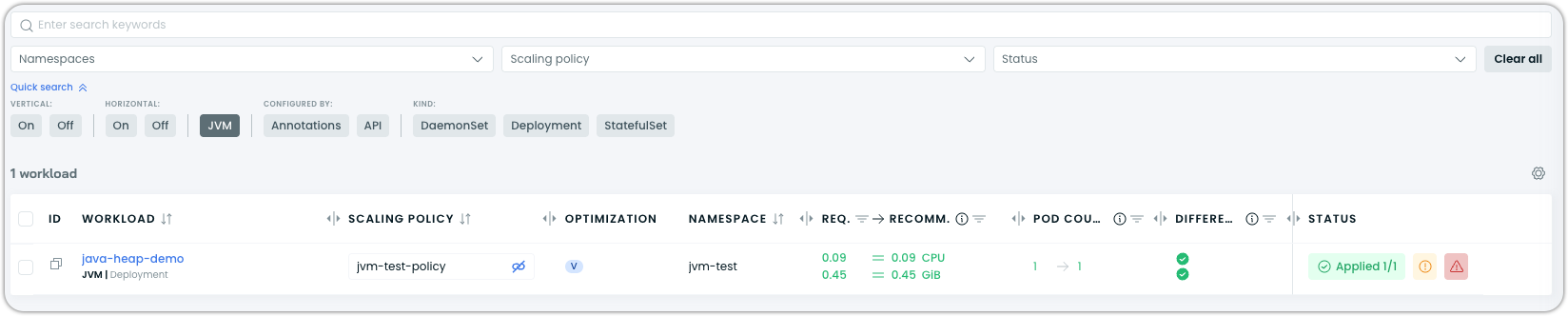
Detection is automatic — no labels or annotations are required on your part. Detected JVM workloads are tagged with a JVM badge in the Cast AI console. To find them, navigate to Workload Autoscaler > Optimization and use the JVM filter chip in the quick search bar.
JVM memory optimization
Standard container-level autoscaling cannot distinguish between heap memory that the JVM has reserved and heap memory that the application is actively using. This leads to two failure modes:
- Container OOM kill — When the total process RSS exceeds the Kubernetes memory limit. Kubernetes emits an
OOMKilledevent, and the Workload Autoscaler handles this automatically by increasing memory. - Internal JVM heap OOM — When the JVM exceeds its own heap limit (
-Xmx,-XX:MaxRAMPercentage). The JVM throwsjava.lang.OutOfMemoryErrorinternally, but Kubernetes sees nothing wrong unless a liveness probe fails. The container may keep running in a degraded state.
When JVM memory optimization is enabled in a scaling policy, the Workload Autoscaler uses actual JVM runtime data — heap usage, non-heap usage, garbage collection behavior, and thread count — to compute memory request recommendations. This lets it detect and prevent internal JVM heap OOM scenarios that are invisible to standard Kubernetes monitoring.
Recommendations include -Xms and -Xmx flags injected into the container's Java options environment variable. The flags are appended to any existing value, preserving your existing JVM configuration. The Workload Autoscaler automatically identifies the right environment variable to use based on what is already present in the container, falling back to JDK_JAVA_OPTIONS if none is detected.
If JVM metrics are not yet available or there is insufficient history, the Workload Autoscaler falls back to the standard memory recommendation flow — the workload continues to receive recommendations, and no disruption occurs.
NoteAfter enabling JVM heap scaling, the Workload Autoscaler needs time to collect enough data points before generating heap-based recommendations. During this warm-up period, the workload detail page may show a message like "JVM recommendation skipped: insufficient JVM metrics." This is normal — the Workload Autoscaler uses standard recommendations in the meantime.
When JVM metrics are available, the workload detail page in the Cast AI console displays additional charts showing heap size and heap recommendation metrics alongside standard memory metrics.
Auto-instrumentation
Auto-instrumentation enables the Workload Autoscaler to collect JVM heap metrics from any Java container without code changes or involvement from the application team. When enabled, the workload-autoscaler webhook injects the following at pod admission time:
- An init container that copies the JMX Prometheus Java agent JAR into a shared
emptyDirvolume - A
-javaagentflag appended to the container's Java options environment variable, pointing the agent at the shared volume - A Prometheus scrape port (port 9404 by default) declared on the container for metrics collection
- A pod label (
workloads.cast.ai/jmx-exporter-injected=true) indicating the agent was successfully injected
Nothing in the application image changes.
Injection behavior:
- New pods and restarts — Injection occurs at admission time. Rolling updates and pod restarts are safe — the webhook skips containers that are already instrumented.
- Running pods — Not affected until they restart. The Workload Autoscaler does not restart pods when auto-instrumentation is toggled. You must restart affected pods manually for the injection to take effect.
- Multiple JVM containers — If a pod contains multiple JVM containers, each gets its own port and Prometheus scrape target.
- Port conflicts — If port 9404 is already in use, the Workload Autoscaler automatically picks the next available port (9405, 9406, and so on).
- Prometheus — If Prometheus is not already present in the cluster, the Workload Autoscaler installs it automatically when auto-instrumentation is enabled.
Scrape existing JVM metrics endpoints
If your Java workloads already expose JVM metrics in Prometheus format — Spring Boot applications with Micrometer expose them at the Actuator /actuator/prometheus endpoint, for example — the Workload Autoscaler can scrape these endpoints directly with the Prometheus instance bundled in castai-workload-autoscaler-exporter:
- No agent is injected and nothing changes in the pod
- No external data source needs to be connected — metrics flow through the automatically created Default Exporter
- JVM heap scaling works the same as with the other collection methods
This method is available in Workload Autoscaler 1.11.0 and later and is enabled by default on new installs. On clusters upgraded from an earlier chart version with --reuse-values or --reset-then-reuse-values, the scrapeJVMMetrics key is absent from your stored values and the scrape job stays disabled — set it explicitly as described in Enable or disable endpoint scraping.
To opt a workload in, add a label to the pod template that tells the Workload Autoscaler to start scraping, and describe the metrics endpoint with the standard Prometheus pod annotations — the same annotations used by the Prometheus community Helm chart:
apiVersion: apps/v1
kind: Deployment
metadata:
  name: my-spring-boot-app
spec:
  selector:
    matchLabels:
      app: my-spring-boot-app
  template:
    metadata:
      labels:
        app: my-spring-boot-app
        # Tells the Workload Autoscaler to start scraping this pod
        workloads.cast.ai/jvm-metrics-scrape: "true"
      annotations:
        # Standard Prometheus annotations describing the metrics endpoint
        prometheus.io/scrape: "true"
        prometheus.io/port: "8080"
        prometheus.io/path: "/actuator/prometheus"
    spec:
      containers:
        - name: app
image: my-spring-boot-app:1.0| Annotation | Required | Description |
|---|---|---|
prometheus.io/scrape | Yes | Must be set to "true" for the pod to be scraped |
prometheus.io/port | Yes | Port the metrics endpoint listens on, for example 8080. Without it the scraped target address is malformed and Prometheus drops the target. |
prometheus.io/path | No | Path of the metrics endpoint. Defaults to /metrics. For Spring Boot Actuator, use /actuator/prometheus. |
prometheus.io/scheme | No | http or https. Defaults to http. |
How scraping behaves:
- Only JVM metrics are collected — metrics with names starting in
jvm_,java_, orjmx_scrape_(Micrometer's JVM metrics, for example); any other metrics exposed by the endpoint are dropped. - Auto-instrumented pods are excluded — pods carrying the
workloads.cast.ai/jmx-exporter-injected=truelabel are skipped, so a workload is never scraped twice. - Scrape interval — each endpoint is scraped every 15 seconds.
NoteThe label and annotations only provide metrics. Heap-based recommendations still require JVM heap scaling to be enabled in the scaling policy assigned to the workload — auto-instrumentation can stay disabled. See Enable JVM optimization.
Because no agent is injected, this method also fits workloads where injection is not an option — for example, Java 8 applications (see Known limitations) or containers whose Java options are loaded from a ConfigMap or Secret.
Verify endpoint scraping
After labeling pods and adding the annotations, verify that JVM metrics are being collected:
-
Confirm the label and annotations are present on the pod:
kubectl get pod <pod-name> -n <namespace> \
  -o jsonpath='{.metadata.labels.workloads\.cast\.ai/jvm-metrics-scrape}'
Expected output:
true -
Confirm the endpoint exposes JVM metrics by forwarding the application port and querying it. Substitute your
prometheus.io/portandprometheus.io/pathvalues for8080and/actuator/prometheus:kubectl port-forward pod/<pod-name> 8080:8080 -n <namespace>curl -s http://localhost:8080/actuator/prometheus | grep "^jvm_" -
Check that the Workload Autoscaler's Prometheus has the target up. Forward the exporter's Prometheus service, then open
http://localhost:9090/targetsin a browser:kubectl port-forward -n castai-agent svc/castai-workload-autoscaler-exporter-prometheus 9090:9090The pod should appear under the
jvm-customer-metricsjob with stateUP. -
In the Cast AI console, navigate to Workload Autoscaler > Custom metrics and use the Metrics explorer to confirm that JVM metrics (heap usage, GC behavior, thread count) are flowing for the workload. Because these metrics flow through the automatically created Default Exporter, no external data source connection is required.
Enable or disable endpoint scraping
The scrape job is controlled cluster-wide by the prometheus.scrapeJVMMetrics Helm value of the castai-workload-autoscaler-exporter chart (default true). Set it explicitly to enable the job on clusters upgraded from an earlier chart version, or set it to false to disable the job.
Configuration-only changesThis command upgrades all components in the umbrella chart, not just Workload Autoscaler. To change configuration without upgrading component versions, pin the chart to your current version by adding
--version <your-current-chart-version>to the command. Runhelm list -n castai-agentto check your current version.
helm upgrade castai castai-helm/castai \
  -n castai-agent \
  --reset-then-reuse-values \
  --set autoscaler.castai-workload-autoscaler-exporter.prometheus.scrapeJVMMetrics=true
On Anywhere clusters, component configuration is passed through the autoscaler-anywhere prefix instead of autoscaler:
helm upgrade castai castai-helm/castai \
  -n castai-agent \
  --reset-then-reuse-values \
  --set autoscaler-anywhere.castai-workload-autoscaler-exporter.prometheus.scrapeJVMMetrics=true
Set the value to false to disable the scrape job cluster-wide.
Prerequisites
Before JVM optimization produces metrics and heap-based recommendations, the following must be in place:
| Component | Minimum version | Description |
|---|---|---|
castai-workload-autoscaler | — | Main component that generates and applies recommendations |
castai-workload-autoscaler-exporter | 0.85.0 | Collects custom metrics from the cluster |
castai-agent | 0.113.0 | Cluster agent that communicates with the Cast AI control plane |
For upgrade instructions, see Workload Autoscaler configuration.
Verify installed component versions
Run the following commands to check that the required components are installed and running:
kubectl get pods -n castai-agent -l app.kubernetes.io/name=castai-workload-autoscalerkubectl get pods -n castai-agent -l app.kubernetes.io/name=castai-workload-autoscaler-exporterkubectl get deploy -n castai-agent castai-agent \
-o jsonpath='{.spec.template.spec.containers[0].image}'All pods should be in Running status.
Additionally:
- A custom metrics data source feeding JVM metrics. If you bring your own Prometheus, connect it in the Cast AI console. With auto-instrumentation or endpoint scraping, the Workload Autoscaler routes metrics through the automatically created Default Exporter instead — no connection step is needed.
- A scaling policy with JVM heap scaling enabled
- At least one JVM metrics source feeding the Workload Autoscaler — auto-instrumentation enabled in the same scaling policy, endpoint scraping (label plus
prometheus.io/*annotations), or your own Prometheus metrics pipeline connected as a data source - If you use auto-instrumentation, affected pods restarted so the JMX agent is injected (not required for endpoint scraping or an external Prometheus pipeline)
WarningEnabling JVM heap scaling with no JVM metrics source — no auto-instrumentation, no endpoint scraping, and no external Prometheus pipeline — results in missing metrics errors for JVM. At least one collection method must be active for the feature to work.
Enable JVM optimization
Enable via the Cast AI console
-
Ensure a Prometheus data source is connected. Navigate to Workload Autoscaler > Custom metrics and verify that a data source is connected (or click Add data source to connect one). See Custom metrics for details.
-
Navigate to Workload Autoscaler > Scaling policies
-
Select an existing policy or create a new one
-
Click Custom metrics in the policy settings sidebar
-
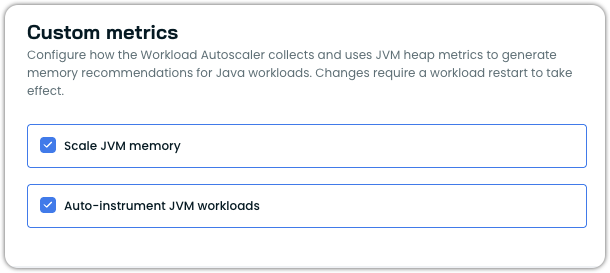
Under JVM heap scaling, enable Scale JVM memory
-
Under Auto-instrumentation, enable Auto-instrument JVM workloads
-
Configure the remaining policy settings and save your policy. See Create a scaling policy for details.
-
Assign JVM workloads to this policy using assignment rules or manual assignment
-
Restart affected pods to trigger injection:
kubectl rollout restart deployment/<name> -n <namespace>Helm configuration
Which upgrade method to useThe Helm commands on this page use the umbrella chart (
castai-helm/castai) by default. If you need to use a different method:
- castctl: To upgrade all Cast AI components at once without managing Helm flags:
This preserves your existing configuration. See the castctl documentation for installation and authentication instructions.castctl castware upgrade- Individual charts: If you installed each component as a separate Helm release (e.g., for ArgoCD or custom GitOps), replace the release name and chart reference with the component-specific ones (e.g.,
castai-workload-autoscalerandcastai-helm/castai-workload-autoscaler) and remove theautoscaler.castai-workload-autoscaler.value prefix.Not sure which method you used? Run
helm list -n castai-agent. A single release namedcastaimeans umbrella chart; separate releases likecastai-workload-autoscalermean individual charts.
Auto-instrumentation is enabled per scaling policy in the Cast AI console. The following Helm value for the castai-workload-autoscaler chart controls cluster-level behavior:
| Parameter | Default | Description |
|---|---|---|
jmxExporter.enabled | true | Master switch for auto-instrumentation. Set to false to disable injection cluster-wide, regardless of scaling policy settings. |
To disable auto-instrumentation at the cluster level:
Configuration-only changesThis command upgrades all components in the umbrella chart, not just Workload Autoscaler. To change configuration without upgrading component versions, pin the chart to your current version by adding
--version <your-current-chart-version>to the command. Runhelm list -n castai-agentto check your current version.
helm upgrade castai castai-helm/castai \
  -n castai-agent \
  --reset-then-reuse-values \
  --set autoscaler.castai-workload-autoscaler.jmxExporter.enabled=false
On Anywhere clusters, component configuration is passed through the autoscaler-anywhere prefix instead of autoscaler:
helm upgrade castai castai-helm/castai \
  -n castai-agent \
  --reset-then-reuse-values \
  --set autoscaler-anywhere.castai-workload-autoscaler.jmxExporter.enabled=false
Enable via annotations
You can enable JVM optimization and auto-instrumentation on individual workloads using the workloads.cast.ai/configuration annotation. This overrides the scaling policy settings for the annotated workload.
workloads.cast.ai/configuration: |
  vertical:
    jvm:
      enabled: true
      autoInstrument: true
To enable JVM optimization for a specific container in a multi-container pod:
workloads.cast.ai/configuration: |
  vertical:
    containers:
      my-container:
        jvm:
          enabled: true
          autoInstrument: true
For the full annotation schema and all available fields, see the annotations reference.
Verify auto-instrumentation
After enabling auto-instrumentation and restarting pods, verify that the injection was successful:
-
Check that the pod has the injection label:
kubectl get pod <pod-name> -n <namespace> -o jsonpath='{.metadata.labels.workloads\.cast\.ai/jmx-exporter-injected}'Expected output:
true -
Confirm that the JMX agent init container was injected:
kubectl get pod <pod-name> -n <namespace> -o jsonpath='{.spec.initContainers[*].name}'The output should include a
jmx-exporter-initcontainer alongside any other init containers in the pod. -
Verify that JVM metrics are being exposed by forwarding the metrics port to your local machine and querying it:
kubectl port-forward pod/<pod-name> 9404:9404 -n <namespace>Then, in a separate terminal:
curl -s http://localhost:9404/metrics | head -20 -
In the Cast AI console, navigate to Workload Autoscaler > Optimization, verify the JVM badge on the workload, and check for heap size and heap recommendation charts on the workload detail page
When not to use auto-instrumentation
Disable auto-instrumentation (jmxExporter.enabled: false) in the following scenarios:
- The application already runs a JMX agent. The Workload Autoscaler does not detect existing JMX agents — it adds a second agent alongside the first, which can cause port conflicts or duplicate metrics. If the application already exposes JMX metrics in Prometheus format, feed them to the Workload Autoscaler through your existing Prometheus setup or use endpoint scraping instead — no separate Prometheus instance required.
JDK_JAVA_OPTIONSorJAVA_TOOL_OPTIONSis loaded from a ConfigMap or Secret. The webhook appends the-javaagentflag to the environment variable value. If the value is sourced from a ConfigMap or Secret reference (envFromorvalueFrom), the webhook cannot modify it. Injection may appear to succeed (the pod label is applied), but the agent will not actually load.- A strict security policy blocks init containers. The injection relies on an init container. If your cluster enforces a Pod Security Policy, OPA/Gatekeeper policy, or Kyverno policy that rejects pods with init containers added by the Workload Autoscaler, the pod will not start.
- You already have Prometheus scraping JVM metrics, or use endpoint scraping. If your monitoring stack already collects JVM heap metrics and they are flowing to the Workload Autoscaler — or you're using endpoint scraping — auto-instrumentation is unnecessary.
Known limitations
Elasticsearch and OpenSearch are not auto-instrumented. Workload Autoscaler detects Elasticsearch and OpenSearch workloads as JVM containers and applies heap scaling, but does not inject the JMX exporter into them. To scale Elasticsearch or OpenSearch memory with Workload Autoscaler, configure your own Prometheus metrics pipeline and connect it as a custom metrics data source.
Java 9+ required. Auto-instrumentation defaults to the JDK_JAVA_OPTIONS environment variable, which is only available in Java 9 and later. Java 8 workloads may show the injection label (workloads.cast.ai/jmx-exporter-injected=true), but the agent will not load and no metrics will be produced because Java 8 does not recognize JDK_JAVA_OPTIONS.
Java 8 uses JAVA_TOOL_OPTIONS instead. The ability to configure the target environment variable per scaling policy is planned. Until then, Java 8 workloads should use an external JMX metrics pipeline instead of auto-instrumentation.
NoteIf you see the injection label on a pod but no metrics are being produced, check the Java version of the workload. Java 8 workloads require manual JMX configuration rather than auto-instrumentation.
Troubleshooting
"Metric is missing" errors for JVM metrics
Symptom: The Cast AI console shows "metric is missing" for metrics like jvm.gc.pause_count, jvm.gc.pause_seconds, jvm.memory.heap.allocated, jvm.memory.heap.committed, jvm.memory.heap.used, jvm.memory.non_heap.used, or jvm.threads.live_threads.
Cause: JVM heap scaling is enabled in the scaling policy, but one or more prerequisites are not met — auto-instrumentation is not enabled, pods have not been restarted, or the custom metrics data source is not configured.
Solution:
- Verify that both Scale JVM memory and Auto-instrument JVM workloads are enabled in the scaling policy assigned to the workload
- Verify that a custom metrics data source is connected and healthy
- Restart affected pods:
kubectl rollout restart deployment/<name> -n <namespace> - Wait 2-3 minutes for metrics to begin flowing
Injection label present but no metrics
Symptom: The pod has the label workloads.cast.ai/jmx-exporter-injected=true, but port 9404 is not listening and no JVM metrics are produced.
Cause 1: Java 8 or earlier. The default environment variable (JDK_JAVA_OPTIONS) is not recognized by Java 8. The agent JAR is copied to the shared volume, but it never loads.
Solution: Upgrade the workload to Java 9 or later. If upgrading is not possible, set up an external JMX metrics pipeline compatible with Java 8 and feed the metrics to the Workload Autoscaler through a Prometheus data source.
Cause 2: Java options environment variable sourced from a ConfigMap or Secret. The webhook could not append the -javaagent flag because the environment variable value is a reference, not an inline string.
Solution: Move the environment variable value inline into the pod spec, or manually add the -javaagent flag to the ConfigMap or Secret value.
Auto-instrumentation blocked by security policy
Symptom: Pods fail admission with errors referencing the init container injected by the Workload Autoscaler.
Cause: Cluster security policies (Pod Security Policy, OPA/Gatekeeper, Kyverno) reject the init container that the Workload Autoscaler adds during admission.
Solution: Add an exception for the Workload Autoscaler JMX agent init container in your security policy configuration, or disable auto-instrumentation and use an external JMX metrics pipeline instead.
Next steps
Updated last month